.svg)


Relationship-Aware Cybersecurity Agents with PuppyGraph and MinIO AIStor
Cybersecurity incidents rarely exist in isolation. An alert may involve a user, a device, a service account, a cloud resource, a network connection, a vulnerability, and a chain of activity that only makes sense when viewed together. As agentic AI changes how security teams investigate and respond, the data architecture behind those workflows needs to evolve too. Agents need a reliable way to move beyond isolated records and reason across the security environment.
PuppyGraph is a high-performance graph query engine that lets you query structured data in MinIO AIStor as a graph. Security data can stay where it already lives, while PuppyGraph provides the graph layer for multi-hop queries, relationship-aware retrieval, and ontology-enforced agent workflows without moving data into a separate graph database.
This tutorial walks you through using PuppyGraph with MinIO AIStor to query and visualize security data as a graph, then use that graph to provide grounded context to an AI agent chatbot.
Why Cybersecurity Needs Graph Analytics
Security investigations often come down to paths. An attacker may enter through one identity, move across a device, assume a role, and eventually reach sensitive data. A misconfiguration may expose a route from an internet-facing asset to an internal service. In each case, the risk comes from how systems are connected, not from any single record in isolation.
Graphs are a natural way to represent that structure. Identities, devices, alerts, permissions, vulnerabilities, and cloud resources become nodes. Logins, network connections, role assumptions, and access events become edges. Instead of forcing every investigation through repeated joins, a graph lets teams query the path itself: which assets are reachable from a compromised identity, which path connects an external IP to a sensitive database, which service accounts can reach vulnerable production resources.
These questions span multiple systems and multiple hops. Graph queries make those paths easier to inspect, filter, and explain.
Zero-ETL Graphs on Existing Security Data in AIStor
Adding graph analytics has traditionally meant moving data first. Security data across logs, alerts, and cloud inventory gets copied into a separate graph database before any analysis can begin. That means more infrastructure, more pipelines, and context that goes stale the moment the source data changes.
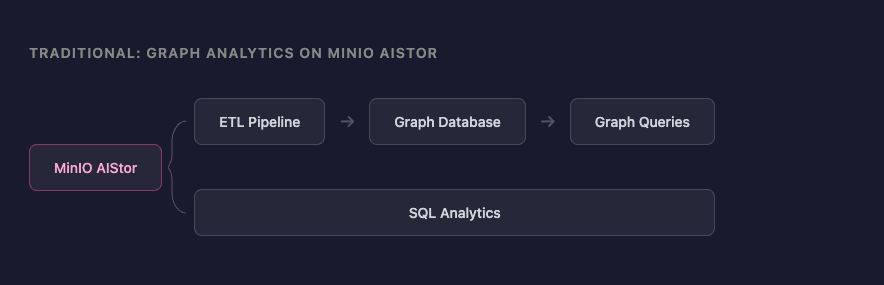
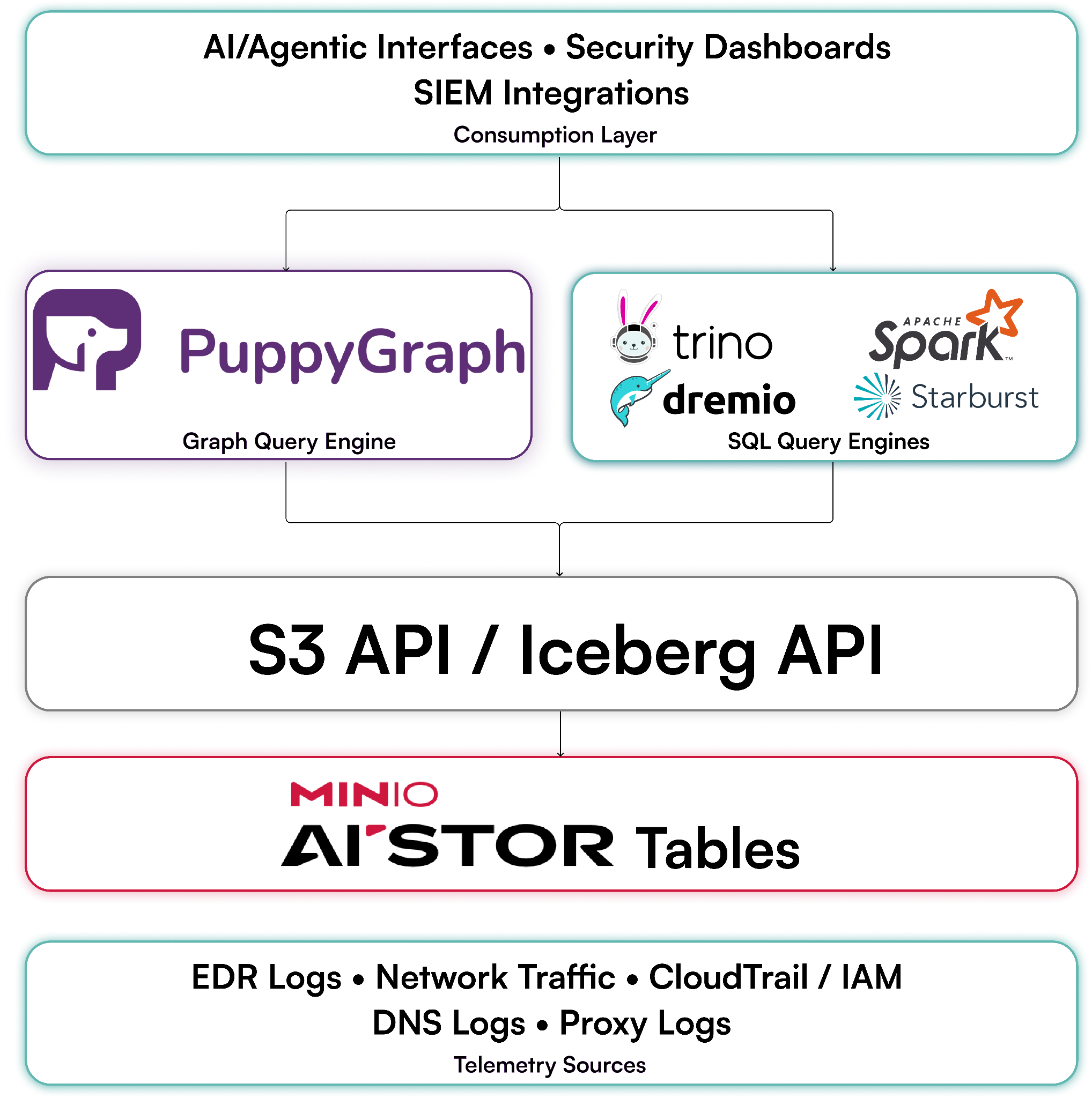
PuppyGraph takes a different approach. Instead of extracting data into a separate graph store, PuppyGraph queries security data directly where it already lives in MinIO AIStor. Teams define a graph schema over their existing Iceberg tables in AIStor, modeling identities, sessions, events, and resources as connected entities without copying a single record. The data stays in AIStor, governed by the same access controls, encryption, and retention policies that already apply.
For security analysts, this means graph queries operate on the freshest data available. Because PuppyGraph reads directly from AIStor rather than a synced replica, attack paths and asset relationships reflect the environment as it changes and threats evolve. There is no replication lag between what the graph shows and what the storage holds.
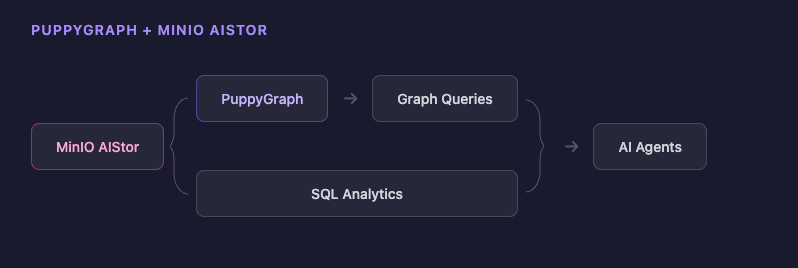
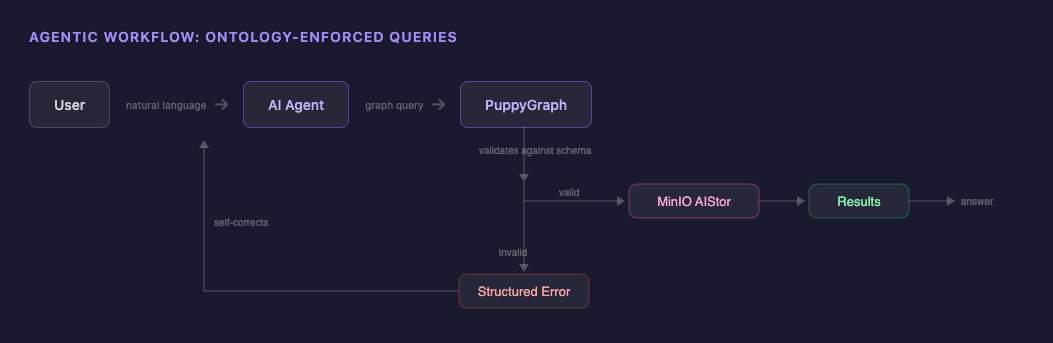
Zero-ETL graphs on AIStor also enable ontology-enforced querying for agentic workflows. The graph schema is applied at query time, defining which entities exist and which relationships are valid. This forces agents to follow the actual model of the environment rather than making free-form assumptions. The result is a graph retrieval layer that fits into existing security architecture: SQL analytics and graph queries running against the same data in the same AIStor deployment, without a separate store to maintain.
Demo: Running Security Graphs on MinIO AIStor
Security teams accumulate telemetry at a rate that outpaces what most SIEM platforms can retain economically. The practical result is shortened retention windows, downsampled log sources, and older data moved into archive tiers that require rehydration before they can be queried. For investigations that span weeks or months, this is a direct limitation on what evidence is reachable at speed.
MinIO AIStor provides the object storage foundation for a security data lake built around that constraint. It uses erasure coding rather than replication, storing telemetry at 2–3× the efficiency of replication. This extends full-fidelity retention within a fixed budget. Reads across the full retention window operate at near line-speed.
AIStor enforces retention at the storage protocol level via Object Lock and WORM, satisfying SEC 17a-4, HIPAA, SOX, PCI-DSS, and DoD requirements. Encryption is supported via SSE-S3 and SSE-KMS. For environments with strict network controls, AIStor runs fully on-premises, operates behind classified network boundaries, is FIPS 140-2 compliant, and carries no external telemetry or phone-home dependencies.
It integrates with Splunk SmartStore and Elastic searchable snapshots via the S3 API without changes to existing SOC workflows. Data stored in AIStor remains in open formats like Apache Iceberg, accessible to the broader analytics stack without additional copies.
AIStor Tables makes the Iceberg layer in this demo possible. It is an Apache Iceberg REST Catalog inside AIStor, served from the endpoint at /_iceberg, so you can create Iceberg tables without running Hive, Glue, Nessie, or any other external catalog service. In this tutorial, a script creates the tables through that endpoint, and PuppyGraph connects to the same endpoint to query them.
PuppyGraph then operates directly on that data. Security investigations are graph-shaped problems: an attacker's path through an environment is encoded in the relationships between log records across sources and time. PuppyGraph queries data stored in AIStor as a graph without a dedicated graph database or ETL pipeline. In the tutorial below, you will use both to query security telemetry, surface lateral movement and access patterns, and ground an AI agent in that evidence.
Prerequisites
To get started with the tutorial, you will need Docker. You can download Docker from here.
Please ensure that docker compose is available. The installation can be verified by running:
docker compose version
Preparing the Data
Download and Extract the Log Files
This demo processes cloud security logs to set up a cloud security graph. The data is from a public dataset of anonymized AWS CloudTrail logs from AWS CloudTrail logs from flaws.cloud.
wget https://summitroute.com/downloads/flaws_cloudtrail_logs.tar
mkdir -p ./json_data
tar -xvf flaws_cloudtrail_logs.tar --strip-components=1 -C ./json_data
gunzip ./json_data/*.json.gz
rm flaws_cloudtrail_logs.tar
Generate Fake Session Data as Parquet
Download the json_to_parquet.py script from here.
Prepare a virtual environment and install the necessary dependencies:
uv venv .venv
source .venv/bin/activate
uv pip install -r requirements.txt
uv run json_to_parquet.py json_data/ parquet_data/
Getting Started
Create a docker-compose.yaml and paste in the following:
services:
  aistor:
    image: ${AISTOR_IMAGE:-quay.io/minio/aistor/minio:latest}
    ports:
      - "127.0.0.1:${AISTOR_PORT:-9000}:9000"
      - "127.0.0.1:${AISTOR_CONSOLE_PORT:-9001}:9001"
    environment:
      MINIO_ROOT_USER: minioadmin
      MINIO_ROOT_PASSWORD: minioadmin
    volumes:
      - aistor-data:/mnt/data
      - type: bind
        source: ${AISTOR_LICENSE_PATH:-./minio.license}
        target: /minio.license
        read_only: true
        bind:
          create_host_path: false
    command: [minio, server, /mnt/data, --console-address, ":9001", --license, /minio.license]
    healthcheck:
      test: [CMD, curl, -fsS, http://localhost:9000/minio/health/live]
      interval: 5s
      timeout: 3s
      retries: 30
  puppygraph:
    image: ${PUPPYGRAPH_IMAGE:-puppygraph/puppygraph:latest}
    ports:
      - "127.0.0.1:${PUPPYGRAPH_PORT:-8081}:8081"
      - "127.0.0.1:${GREMLIN_PORT:-8182}:8182"
      - "127.0.0.1:${BOLT_PORT:-7687}:7687"
    environment:
      PUPPYGRAPH_USERNAME: puppygraph
      PUPPYGRAPH_PASSWORD: puppygraph123
      AI_API_KEY: ${AI_API_KEY:-}
    depends_on:
      aistor:
        condition: service_healthy
volumes:
  aistor-data:
To start up the services, run the command:
docker compose up -d
If successful, you should get a message that looks like this:
[+] up 5/5
 ✔ Network aistornet                    Created          0.0s
 ✔ Volume aistor-puppygraph_aistor-data Created          0.0s
 ✔ Container aistor                     Healthy          5.8s
 ✔ Container spark-iceberg              Started          5.9s
 ✔ Container puppy
Before we can load any data, we need to bootstrap AIStor:
docker compose exec aistor mc alias set local http://localhost:9000 minioadmin minioadmin
docker compose exec aistor mc admin accesskey create local/ --access-key admin --secret-key password --name puppygraph
docker compose exec aistor mc table warehouse create local mywarehouse
Populate Data
Download populate_tables.py from here.
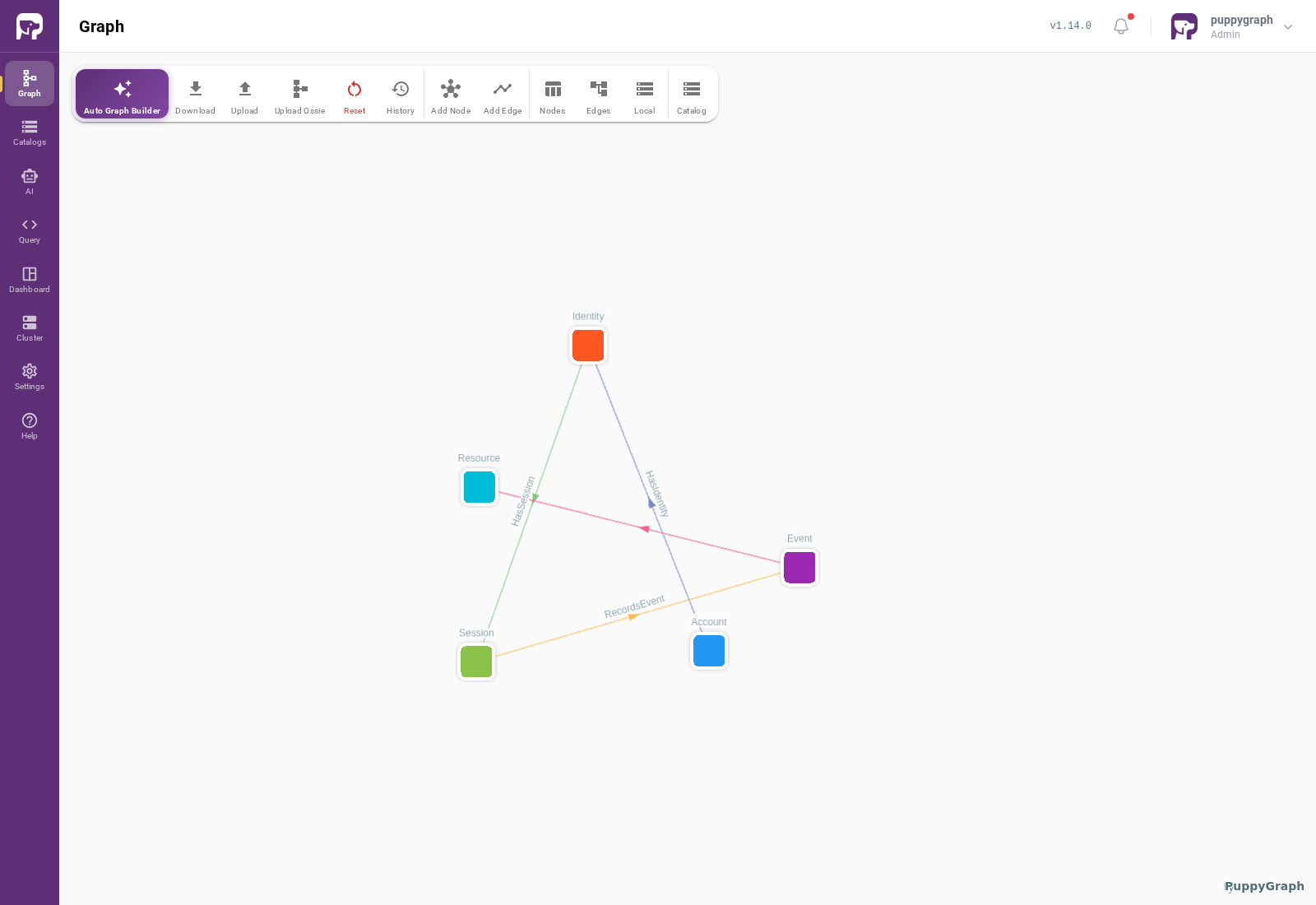
The script creates and inserts data into six tables: Account, Identity, Session, Event, Resource, and EventResource.
Run the following command to populate the tables:
uv run populate_tables.py
Connect PuppyGraph to AIStor
Log into PuppyGraph at http://127.0.0.1:8081/ PuppyGraph with the credentials puppygraph:puppygraph123.
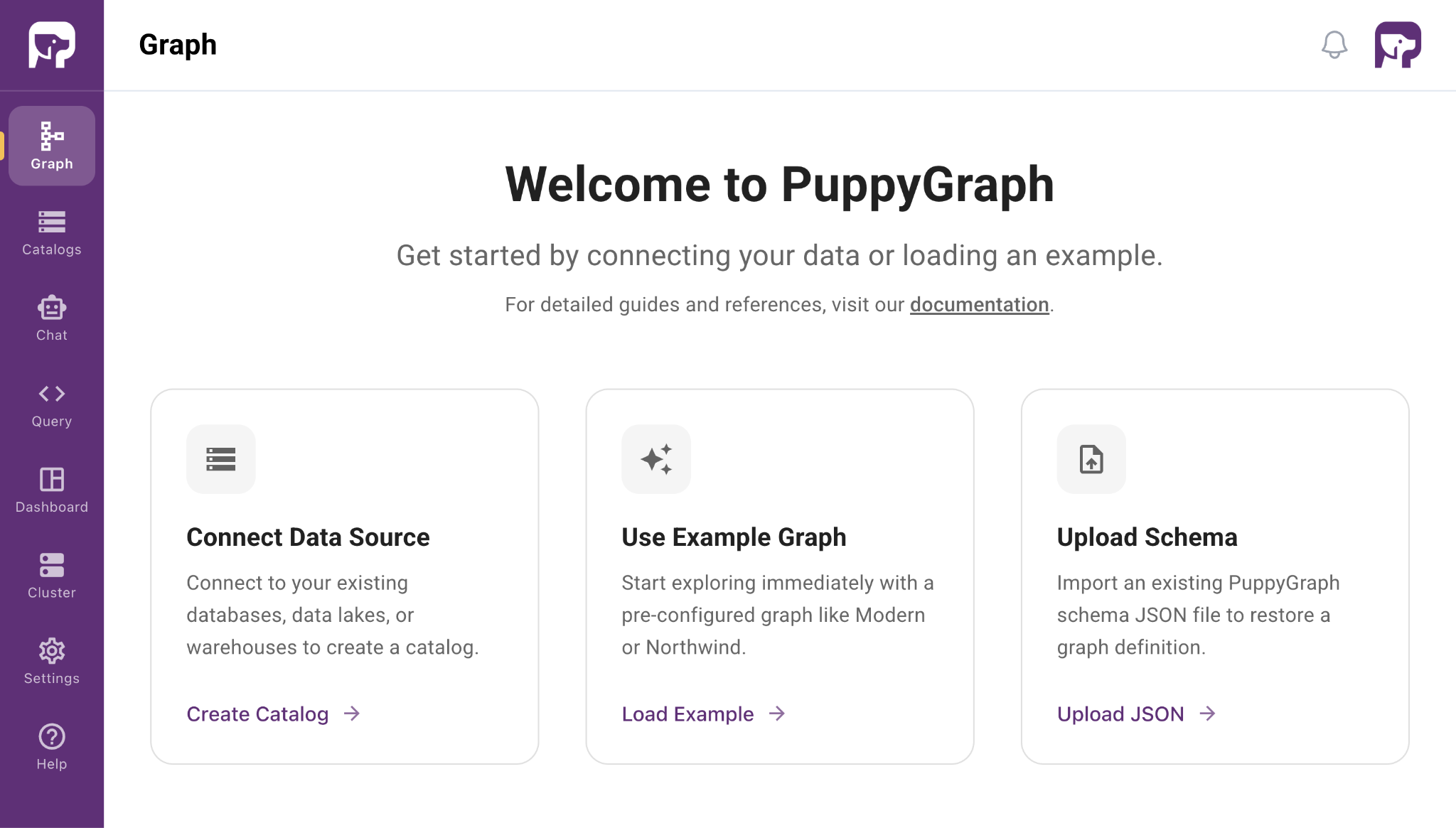
The PuppyGraph connection to AIStor consists of two parts: the catalog and the storage.
Catalog Details
Catalog type: Apache Iceberg
Catalog name: aistor_test
Metastore type: Iceberg REST
Access key: admin
Secret key: password
Endpoint URL: http://aistor:9000/_iceberg
Warehouse: mywarehouse
Authentication Type: AWS SigV4
SigV4 signing name: s3tables
SigV4 signing region: us-east-1
Storage Details
Storage type: S3 Compatible
Endpoint: http://aistor:9000
Access key: admin
Secret key: password
Enable path style access: Check
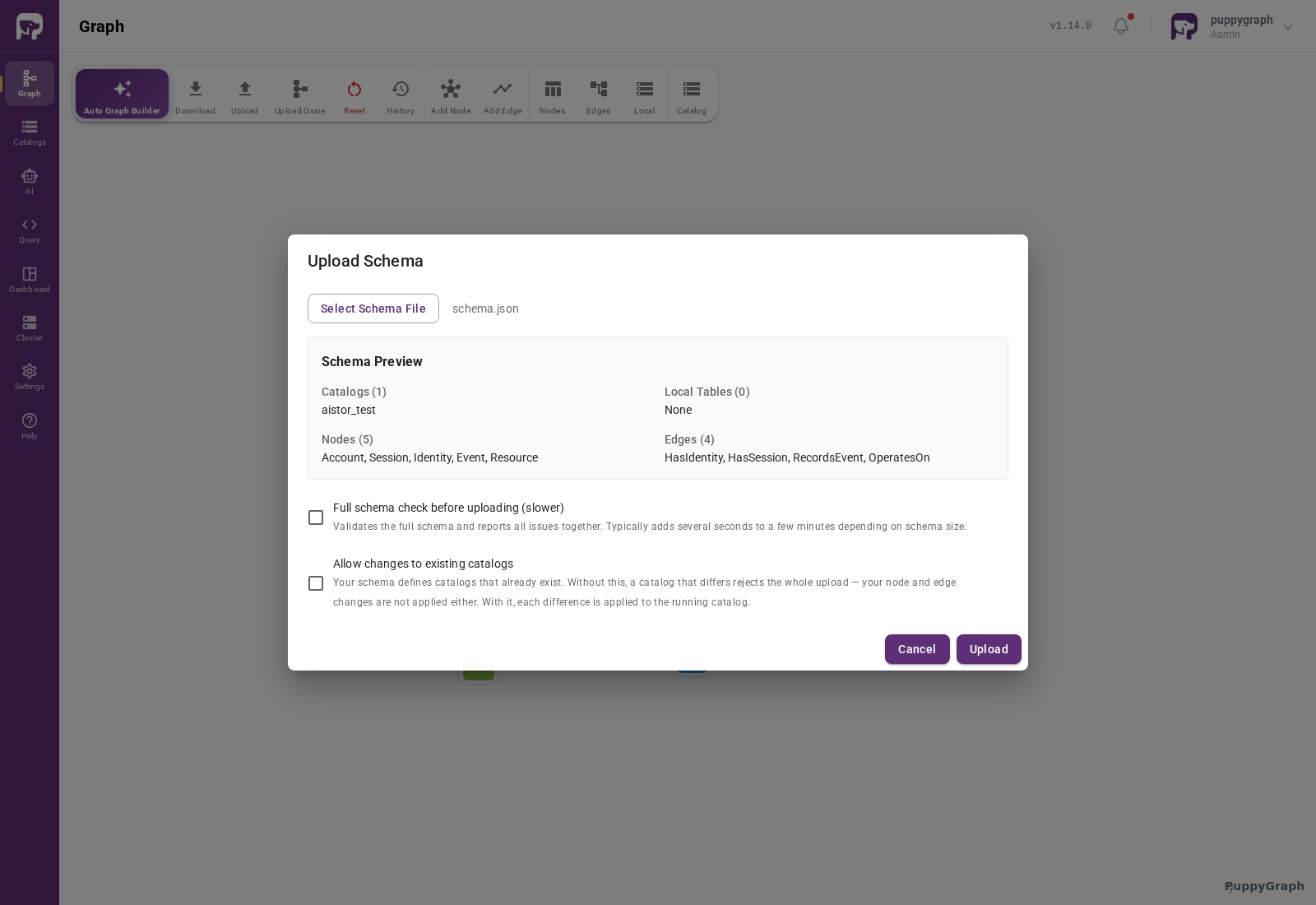
Download the full schema file here.
The schema.json includes the necessary connectivity details, along with the desired mapping of tables to nodes and edges.
Click Upload Schema to load the file to PuppyGraph:
Craft Queries
You can use the dashboard to track the nodes and edges you've created and use the Chat interface to query your data in natural language. This reduces the learning curve for teams less familiar with graph query languages.
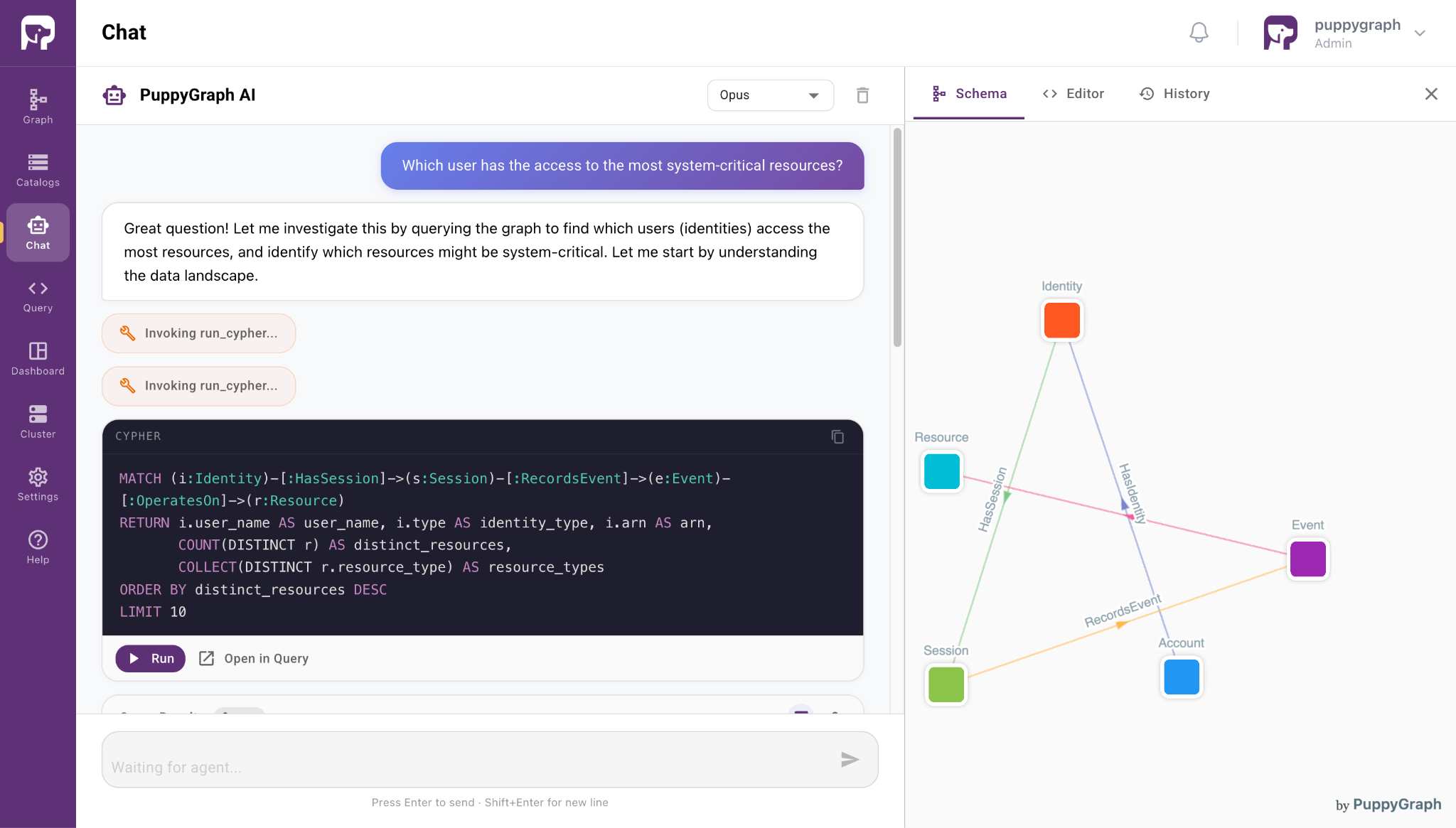
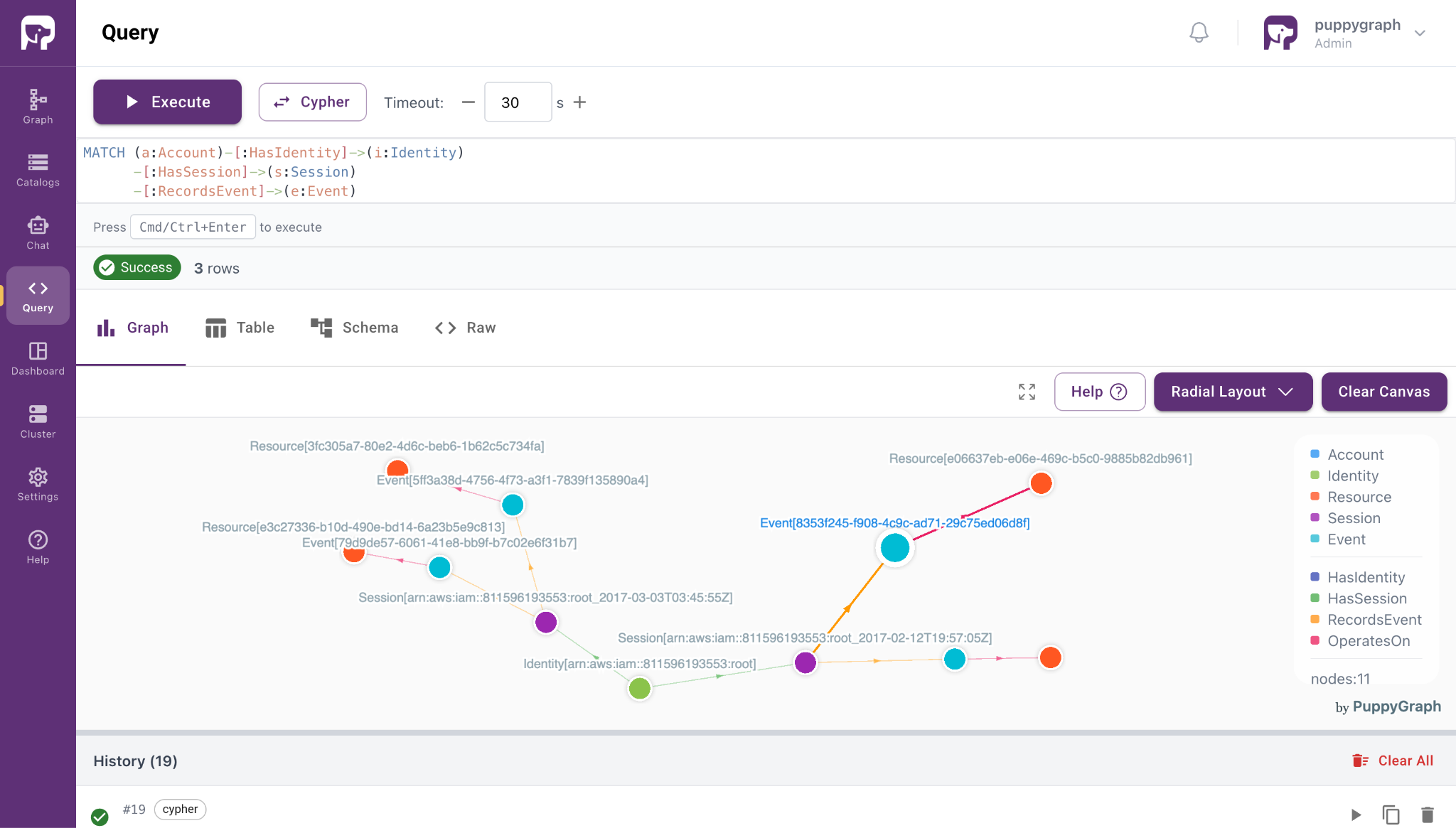
The Query panel provides finer-grained control over the queries issued, with support for both openCypher and Gremlin. Below are a few example queries that can be run:
- Which user has the largest attack surface, and what does it look like?
MATCH (a:Account)-[:HasIdentity]->(i:Identity)
      -[:HasSession]->(s:Session)
      -[:RecordsEvent]->(e:Event)
      -[:OperatesOn]->(r:Resource)
WITH i, count(DISTINCT r) AS resource_count
ORDER BY resource_count DESC
LIMIT 1
MATCH path = (i)-[:HasSession]->(s:Session)
             -[:RecordsEvent]->(e:Event)
             -[:OperatesOn]->(r:Resource)
RETURN path
LIMIT 100
- If a given resource is compromised, who is the blast radius?
MATCH path = (a:Account)-[:HasIdentity]->(i:Identity)
             -[:HasSession]->(s:Session)
             -[:RecordsEvent]->(e:Event)
             -[:OperatesOn]->(r:Resource {resource_id: 'f8af52af-c87e-4f30-97a2-548c7d52028c'})
RETURN path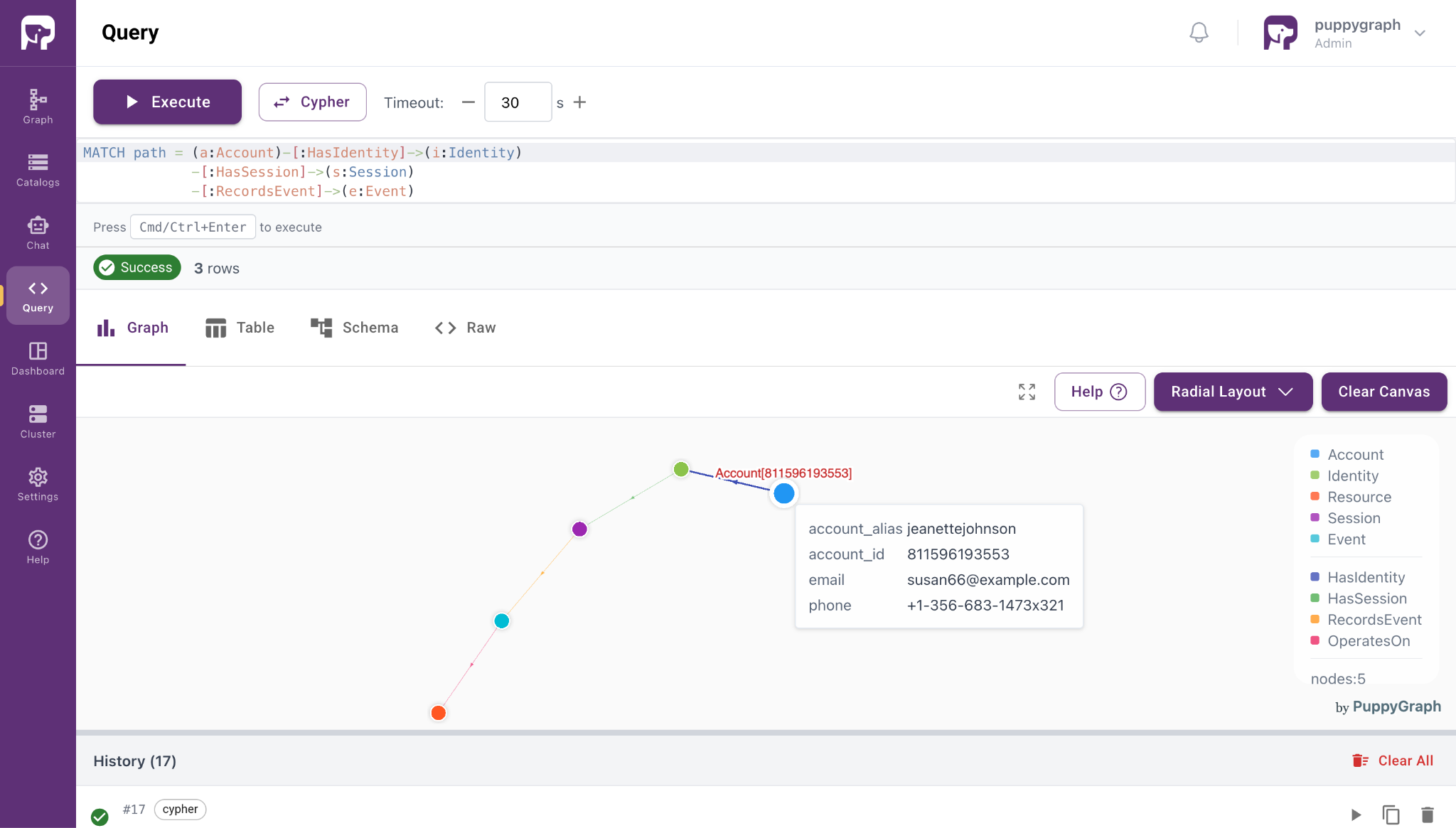
Shutdown Docker
When you’re done exploring your data, you can remove everything created by Docker by running the following command:
docker compose down --volumes
Relationships Define Risk
Security environments contain complex and interconnected data. Identities, devices, alerts, vulnerabilities, permissions, and cloud resources often span multiple systems and only make sense when viewed together. Making those relationships available for investigation and AI-driven analysis is a core responsibility of modern security architecture. By combining MinIO AIStor and PuppyGraph, teams can expose and traverse these connections without adding operational complexity or introducing a separate graph database.
.svg)