.svg)



We wanted to share our thoughts on running MinIO on a SAN/NAS appliance. First off, you CAN run MinIO on a SAN/NAS appliance. While it is possible, it is not a good idea and we strongly discourage our customers from taking this approach. Don’t let your friendly, neighborhood SAN/NAS appliance vendor talk you into it without first reading the below. It explains why this is a bad idea and what the implications are.
MinIO runs on pretty much anything. Having said that, we have made some recommendations and you can find them here. If you have any questions about any other box, drop us a note, ask on the Slack channel or through the Ask an Expert chat function on the pricing page.
Here are the reasons you should not run MinIO on a SAN/NAS appliance.
- Replacement, not complement. Object storage is a replacement for SAN/NAS, not a complement. POSIX doesn’t scale in the cloud-native world in which we live. It is legacy technology that is in decline. Because of the market share that SAN/NAS once held, they would very much like to treat object storage as an API layer. It is not. Object storage is the primary storage of the cloud. The cloud is built on object storage - not SAN/NAS.
- Duplicated durability. MiniO is a full featured object store and its erasure code implementation is highly optimized for global scale. Each and every object is erasure-coded independently with its own highway hash based bitrot hashes. When you run MinIO on a SAN/NAS appliance you are effectively duplicating that effort - with predictable implications on performance. Because you are doing something twice it is slower, besides SAN/NAS appliances are not running optimized erasure coding making the performance difference even more pronounced.
- Performance bottleneck. Already referenced in the duplicated durability section - performance will be degraded when MinIO is run on SAN/NAS appliances. As a general rule, MinIO will max out the HW on virtually any platform - maxing the network with NVMe and the drives with HDD (although a smaller network will be the bottleneck with HDD too). MinIO has, and continues to, devote considerable resources to SIMD optimizations for AVX-512, NEON and VSX extensions. No other vendor has made this investment and it shows in the benchmarks.
Even though they are designed to be networked, SAN/NAS architecture are too chatty for distributed architecture. As a result, the high IOPS claims are limited to scale up architectures - with the challenges that comes with that. There are only so many drives and CPUs that fit into a single system.
Furthermore, modern database and AI/ML applications are throughput intensive and not IOPS intensive because they pull the data into local memory where they can perform mutations and transformations at high speeds. Throughput is far easier and more economical to scale than IOPS, thus the shift.
As we can see in the picture below, there is an additional layer of storage networking for the drives. This results in performance loss, increased complexity and additional cost.

- Concurrency. SAN/NAS devices can’t allow a large number of applications to read files, modify them and write them back to storage at massive scale across a network. In contrast, MinIO breaks the problem up and executes tasks in parallel in a distributed architecture to provide higher throughput.
Every modern database and data processing workload is architected for distributed data processing. Hadoop started this trend of massively parallel distributed data processing for scale. The reason was that scale-up storage architectures quickly ran into bottlenecks.
Direct attached storage with 100GbE NICs running software defined storage are fairly cheap compared to SAN/NAS appliances. It is not uncommon to see tens to hundreds of nodes processing petabytes of data in the direct attached storage model.
To put this into context, with 32 nodes with 100GbE NICs and 16x NVMe SSDs, you can achieve 3,200 Gbps network bandwidth and 1,536 GBps (16 SSDs x 3GBps x 32 nodes drive bandwidth. This is not economically viable with SAN/NAS approaches and why we recommend running MinIO independently. - Dedicated Storage. If you are sharing the underlying SAN/NAS infrastructure with other applications in addition to MinIO, you may want to reserve throughput for MinIO with QoS settings - although there are several limitations that preclude even this from being a good solution. MinIO is I/O bound and any fluctuation in the underlying storage media will manifest itself in the application’s performance.
- Snapshots are Obsolete and Limited. Because MinIO’s object level versioning and immutability provides continuous data protection - it effectively renders SAN/NAS snapshots obsolete. All you need is a dumb block store without the bells and whistles.
The reason why SAN/NAS snapshotting is inferior is, it does not support multi-volume consistent snapshotting, it does not protect any data loss between the snapshotting windows and it does not scale to large petabyte volumes.
Running MinIO alongside these inferior data protection schemes isn’t adding redundancy - it is decreasing the effectiveness of the platform and increasing the cost by unnecessarily taking up space on the drives for the obsolete snapshotting approach.
MinIO has the resilience component covered, use that functionality and let the snapshots go.
Having noted all the reasons not to run MinIO on your SAN/NAS - there are some additional details worth discussion that might prove to be exceptions to the general advice. Each of the following scenarios looks at MinIO running in three different configurations: single server/single drive, single server/multiple drives and multiple servers/multiple drives.
Let’s start with the ideal scenario - which we recommend as the reference point:
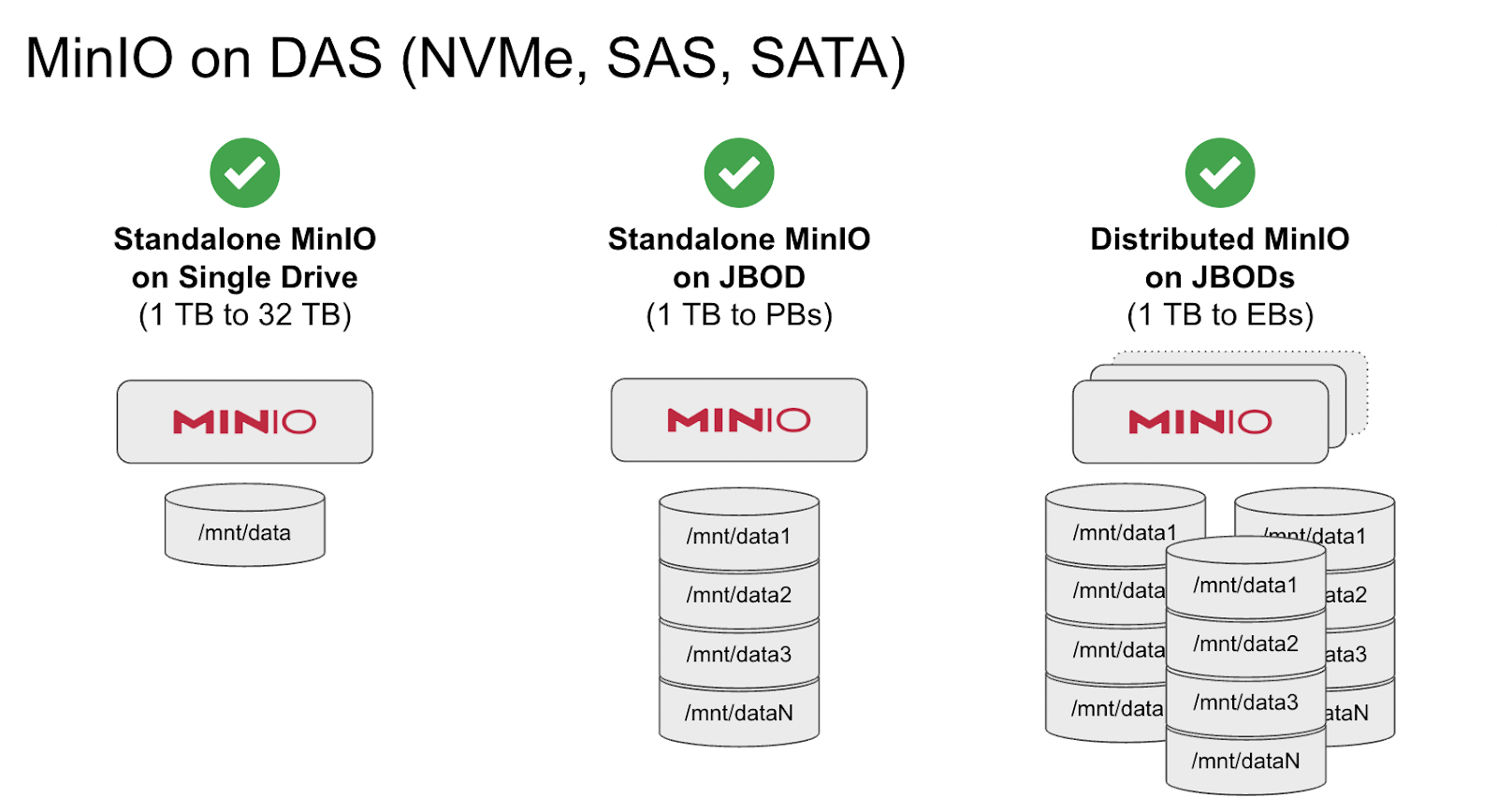
Here MinIO is running as direct attached storage on commodity hardware to provide performance, economics and simplicity at scale.
Next we look at running MinIO on SAN:
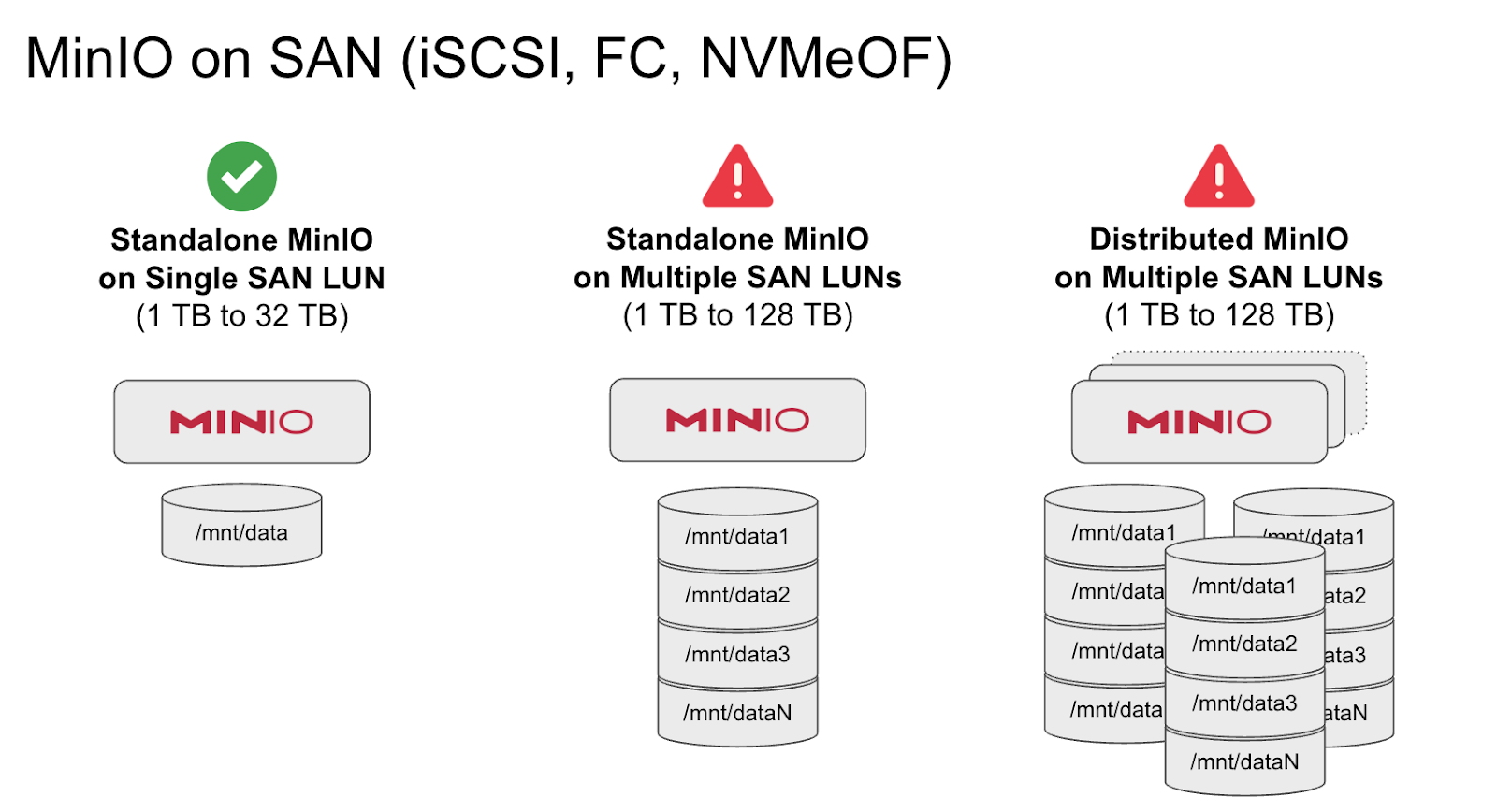
Many web and mobile applications deal with small amounts of data, typically from hundreds of GBs to a few TBs. As a general rule, they are not performance hungry. In such a scenario, if you have already made an investment in the SAN infrastructure, it is acceptable to run MinIO on a single container or VM attached to a SAN LUN. In the event of failure, VMs and containers automatically move to the next available server and the data volume can be protected by the SAN infrastructure provided you have architected it as such.
However, as the application scales from a single LUN to multiple LUNs or multiple VMs/containers, challenges emerge. All of the limitations explained above apply here. LUNs do not scale well beyond 16TB each. Serving MinIO across multiple LUNs in a standalone or distributed mode will work, but not efficiently. As long as you are aware of the limitations regarding performance and complexity, then this is a viable, if sub-optimal approach.
Finally, we look at running MinIO on NAS:
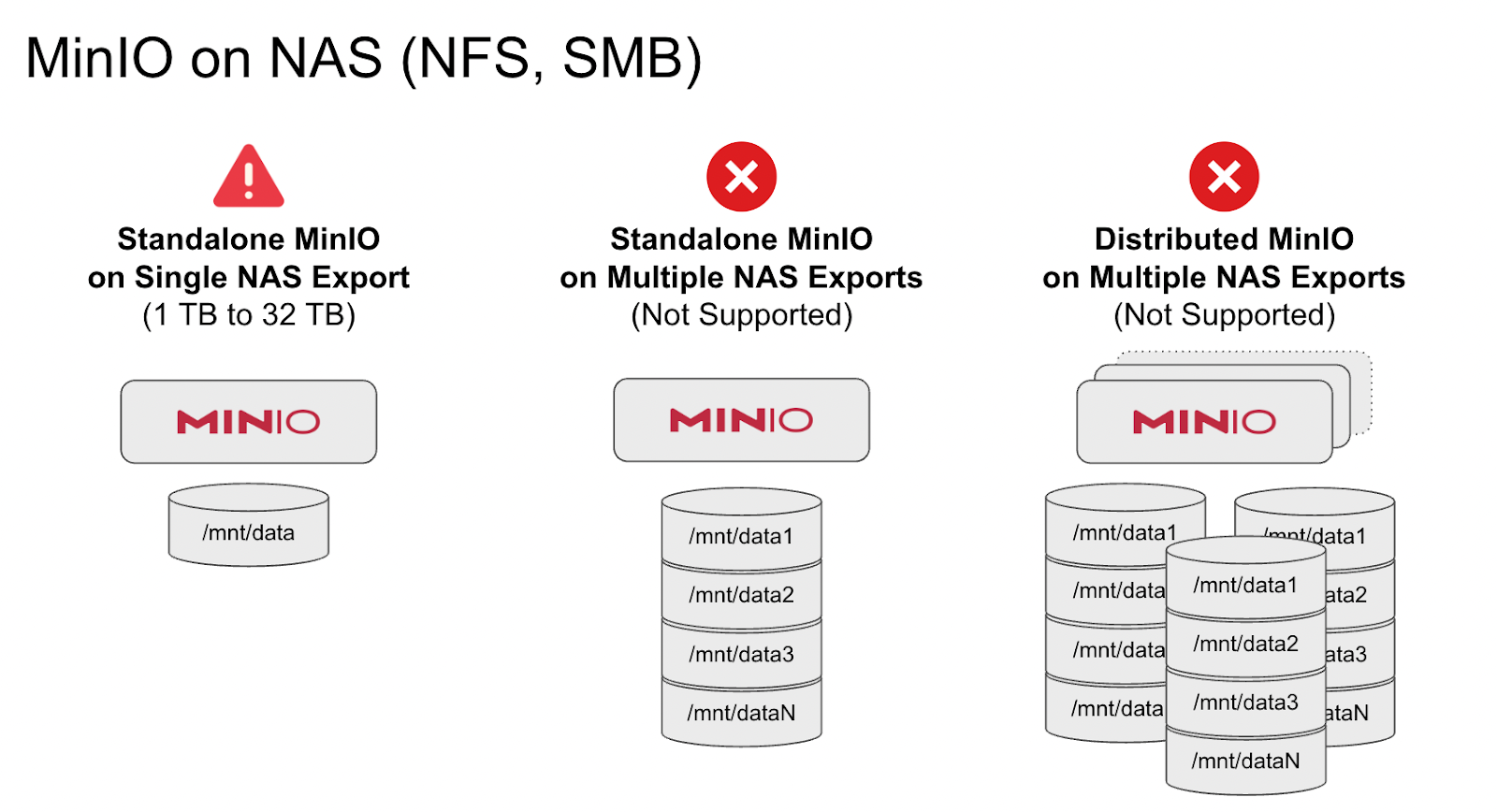
Unlike SAN and DAS which are block storage, NAS is a network filesystem. It is much closer to object storage in its capabilities than SAN. Because of the overlap, It severely cripples the object storage when serving as the underlying storage media. An object store sitting on top of NAS simply cannot overcome the legacy POSIX limitations. For this reason, you simply cannot run MinIO on top of NAS other than in the single server/single drive (NAS export) scenario.
Even in this scenario, you should limit it to simple file serving workloads and not tax the object store with concurrent read-modify-write-overwrite type workloads. NAS consistency and concurrency guarantees are weak. Some vendors fake file locking primitives and it can result in data loss. Make sure to thoroughly test your setup for all kinds of I/O before you put this setup in production.
Conclusion
MinIO is famously minimalist, with a deep focus on simplicity and automation. Contrary to what comes to mind when people hear the term minimalism, it means just the right amount. Add something and it becomes cluttered or bloated, take something away and it becomes lacking.
Running MinIO on a SAN/NAS is the equivalent of adding something that doesn’t need to be there. Yes you can do it, but you end up compromised on multiple levels, with multiple systems conducting redundant operations.
The right answer is to run MinIO on dedicated HW with a commercial license and to work directly with our engineers to continuously improve your deployment and thus your organization's data acuity.
Data driven companies outperform non-data driven companies, and you simply can’t be a data driven company when access to data is slow and inefficient..
.svg)