.svg)



Compressing data has traditionally meant a trade-off. Keeping it small has meant giving up direct access to it: to find anything inside a compressed file, you first decompress the whole thing. That has long been the standard way to search compressed data, and most of it is still searched that way today. On object storage, where you pay for every byte you read, the trade-off has a price. Searching a terabyte of compressed logs for one error means reading the terabyte.
MinLZ removes that trade-off. It is a modern, lossless compression format, built for data you keep compressed and still need to search. A MinLZ stream can carry a small per-block search index that lets mz search find a byte sequence while skipping every block that probably cannot contain it. Those blocks are never decompressed, and with a sidecar index, never read from disk at all. Your data stays compressed and stays searchable.
The result: you keep your data compressed and searchable.
One number to set the scene: finding a specific string in a 10 GB CockroachDB log (compressed to 578 MB) takes 0.14 s with mz search, reading about 133 MB. Decompressing that log and piping it to grep — the usual way to search compressed data — takes ~5 s and reads the whole file. zstd -dc | grep takes ~5 s, lz4 -dc | grep ~10 s. Scanning the raw 10 GB with rg takes ~8 s.
The search index is stored as skippable chunks: older MinLZ readers ignore them and the compressed payload is byte-for-byte unchanged, so adding search is always backward-compatible.
Search indexes can be built while compressing or after the fact as sidecar streams, allowing them to be used separately from the compressed data.
MinLZ is a lossless compression algorithm developed by MinIO, that's aimed to be used for modern data formats.
It is designed to always be fast enough for realtime compression and decompression at IO speeds, while offering a good compression ratio. Key features include parallel processing, random access reading, and stream integrity.
The format has full, open specification and is the primary compression format used in AIStor.
Why this matters now
The data that accumulates in the AI era is largely this kind: application and training logs, request traces, agent run histories, telemetry. It lands in object storage, compresses well, and is read rarely, usually only when something breaks or an auditor asks. The expensive question is almost always the same: is this string anywhere in these terabytes, and where. MinLZ answers it by reading the index and a handful of candidate blocks instead of the whole archive. On object storage, that is the difference between reading megabytes and reading terabytes, and you pay for the difference on every query.
How it works (in 30 seconds)
Every block gets a tiny bloom-filter table: the byte-windows in the block are hashed and their bits set. To search, mz search hashes the same-length windows of your pattern and checks each block's table:
- any window bit missing → the pattern is definitely not in that block → skip it (no decode);
- all bits present → the block might match → decode and scan it.
Longer/rarer patterns produce more independent window checks, so blocks that don't contain them are rejected with near-certainty. Tables can live inline in the .mz, or in a sidecar .mzs file you build afterwards — handy for data you can't or don't want to re-compress.
This is why it matches with compression. Compressible data is very likely to produce search indexes that are also useful, meaning there is a reasonable reduction in the search table compared to the raw data.
For full details: SEARCH.md (usage & tuning) and SPEC_SEARCH.md (wire format).
When to use it — and when not
We will use the command-line tool mz search to demonstrate, but everything is available via the Go API.
This is a specialized tool. It is dramatic when it fits and pointless when it doesn't, so read this part first.
Reach for mz search when:
- You search for literal byte strings — IDs, error codes, request paths, hostnames, JSON keys, hashes. (Not regex. See below.)
- The pattern is reasonably selective — it appears in a minority of blocks. Rare → huge win.
- The data is large, archived, or remote and you'd rather not materialize the whole thing.
- You search the same corpus repeatedly — build the index once, query many times.
- You are I/O-bound: on object storage or a cold cache, skipped blocks issue zero reads.
- You need to confirm a string is absent ("is this error anywhere in 10 GB?") — the fastest case of all.
Don't bother when:
- You need regex, case-insensitive, or fuzzy matching. mz search is literal bytes only.
- The pattern is very common or shorter than the index's match length — little or nothing gets skipped, and you pay a small table-check tax on top of a full decode.
- It's a one-shot scan of small data that's already in RAM and you have ripgrep — rg is superb there and hard to beat.
Rule of thumb: the speed-up scales with how much the query lets MinLZ skip. Rare string → 100× faster. String in every record → no faster at all.
Quick start
You need an index. Either add one while compressing:
mz c -search file.log # writes file.log.mz — still a normal, decodable .mz…or add one to an existing .mz after the fact (this decodes each block and builds fresh tables; the original data is untouched):
mz sidecar build file.log.mz # writes file.log.mz.mzs alongside itThen search. The sidecar is auto-detected:
mz search "connection refused" file.log.mz        # prints  <offset>:<line>
mz search -c "connection refused" file.log.mz      # count matching lines
mz search -q "connection refused" file.log.mz      # exit code only (0=found, 1=not)
mz search -v -c "connection refused" file.log.mz    # + timing and skip stats
Line output is streamOffset:line, e.g.:
1976076142:{"tag":"cockroach.dev","channel":"DEV","severity":"ERROR",...}-v shows you exactly what happened — here, "find all warnings" in the 10 GB log:
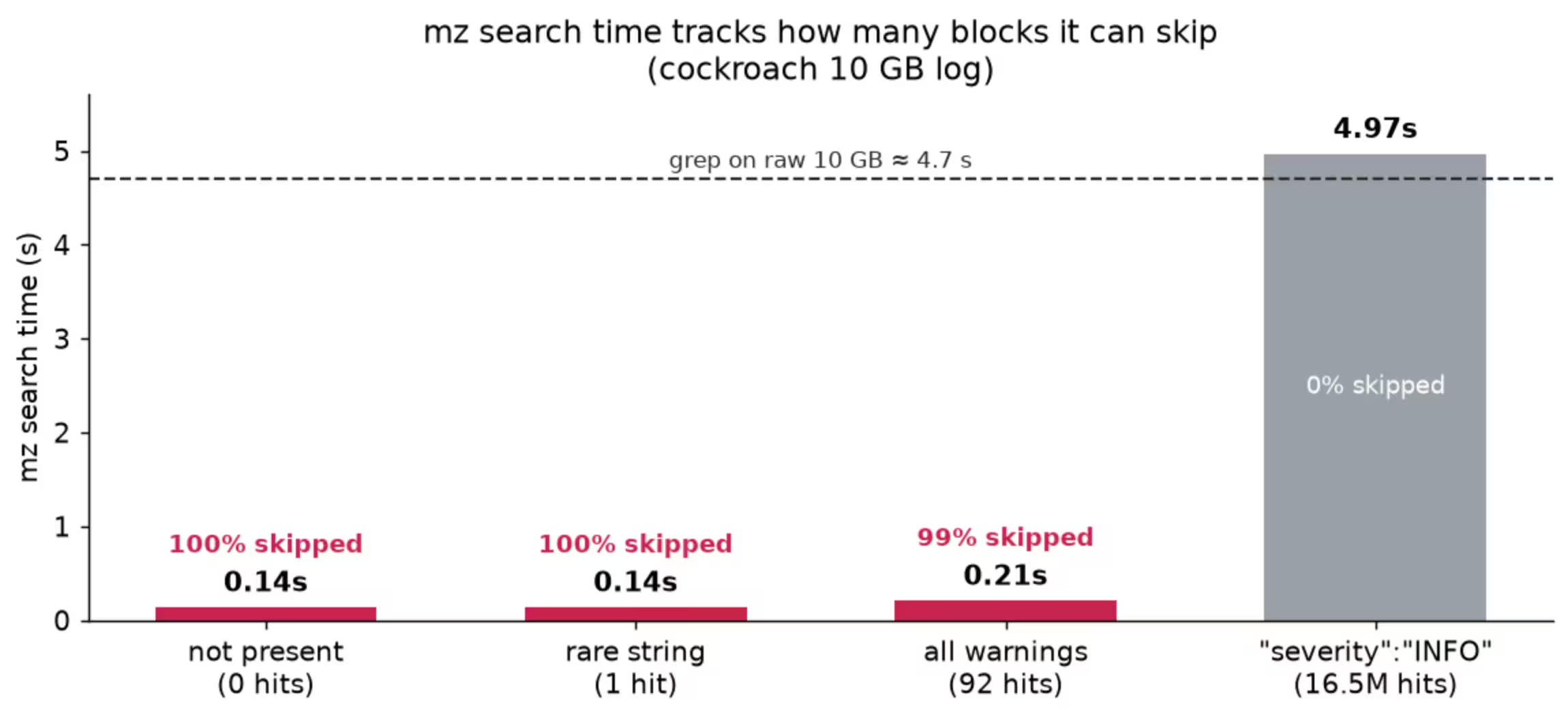
λ mz search -v -c '"severity":"WARNING"' cockroach.node1.log.mz
cockroach.node1.log.mz: using sidecar cockroach.node1.log.mz.mzs
cockroach.node1.log.mz: search info: matchLen=6 baseTableSize=23 (8388608 entries) no-prefix
92
cockroach.node1.log.mz took 231ms 45483.2 MB/s
Blocks total: 1253, skipped: 1238 (98.8%), deferred: 1245 (99.4%, 1238 skipped)
Blocks searched: 15 (1.2%), false positive: 7 (46.7%)
Table total: 139345225 bytes, avg 111209 bytes/table, 1.33% of 10506623721 uncompressed
It looked at 15 of 1253 blocks and answered in a quarter of a second.
While the table cost of 1.33% is acceptable for most cases, it is possible to reduce the size a lot by specializing the search index to a specific result.
If you know you'll always search a particular field, you can tell MinLZ to index only the bytes that follow it. For example:
λ mz sidecar build -search.prefix='"severity":"' cockroach.node1.log.mz
Building sidecar: cockroach.node1.log.mz -> cockroach.node1.log.mz.mzs
Sidecar size: 50846 bytes

λ mz search -v -c '"severity":"WARNING"' cockroach.node1.log.mz
cockroach.node1.log.mz: using sidecar cockroach.node1.log.mz.mzs
cockroach.node1.log.mz: search info: matchLen=6 baseTableSize=23 (8388608 entries) long-prefix="\"severity\":\""
92
cockroach.node1.log.mz took 39ms 269400.6 MB/s
Blocks total: 1253, skipped: 1245 (99.4%), deferred: 0 (0.0%, 0 skipped)
Blocks searched: 8 (0.6%), false positive: 0 (0.0%)
Table total: 38859 bytes, avg 31 bytes/table, 0.00% of 10506623721 uncompressed
Even when considering the sidecar headers, the index is less than 0.0005% of the data.
Benchmarks
Setup: AMD Ryzen 9 9950X (16C/32T), 61.6 GB RAM, Windows 11, mz [dev]. Warm page cache, best of 3 runs, literal (-F) patterns. grep's output is sent to a file so it performs a full count scan (piping grep -c to /dev/null lets GNU grep quit at the first match — a common benchmarking trap). Every file below is in cmd/mz/; the commands are copy-pasteable.
Flagship: 10 GB of CockroachDB logs
cockroach.node1.log is 10.5 GB of JSON log lines. It exists here in four forms: raw, MinLZ (.mz, 578 MB), Zstandard (.zst, 508 MB) and LZ4 (.lz4, 954 MB). Building the MinLZ search sidecar took 8.5 s and produced a 178 MB file (1.69% of the raw size).
(zstd/lz4 are decode-bound, so their time is the same regardless of the query or how many hits there are.)
.png)
For selective queries mz search is ~30–60× faster than any approach that has to read the whole stream — because it doesn't. It processes the 10 GB dataset at an effective 40–55 GB/s by decompressing almost none of it. As the pattern gets more common the advantage shrinks, and for a field present in every record ("severity":"INFO", 16.5 M hits, nothing to skip) it lands right where plain decompress-and-grep does — no better, no worse:
Confirming a string is absent
This is the case mz search was born for. To prove a string isn't in a file, every other tool must read the entire file. mz search checks each block's table, finds the pattern can't be there, and skips it — so a "not found" over 10 GB comes back in 0.14 s instead of 5–10 s. If you're scripting alert checks or grepping archives for an incident marker that's usually not present, this is the difference between an instant answer and a coffee break.
Less I/O — the real lever for cold and remote data
The warm-cache times above actually understate the benefit, because they charge nothing for reading the file. In the real world — cold cache, network storage, S3 — bytes read is what you pay for. Here mz search reads the 178 MB index plus only the handful of candidate blocks; with a sidecar, skipped blocks issue no reads at all:
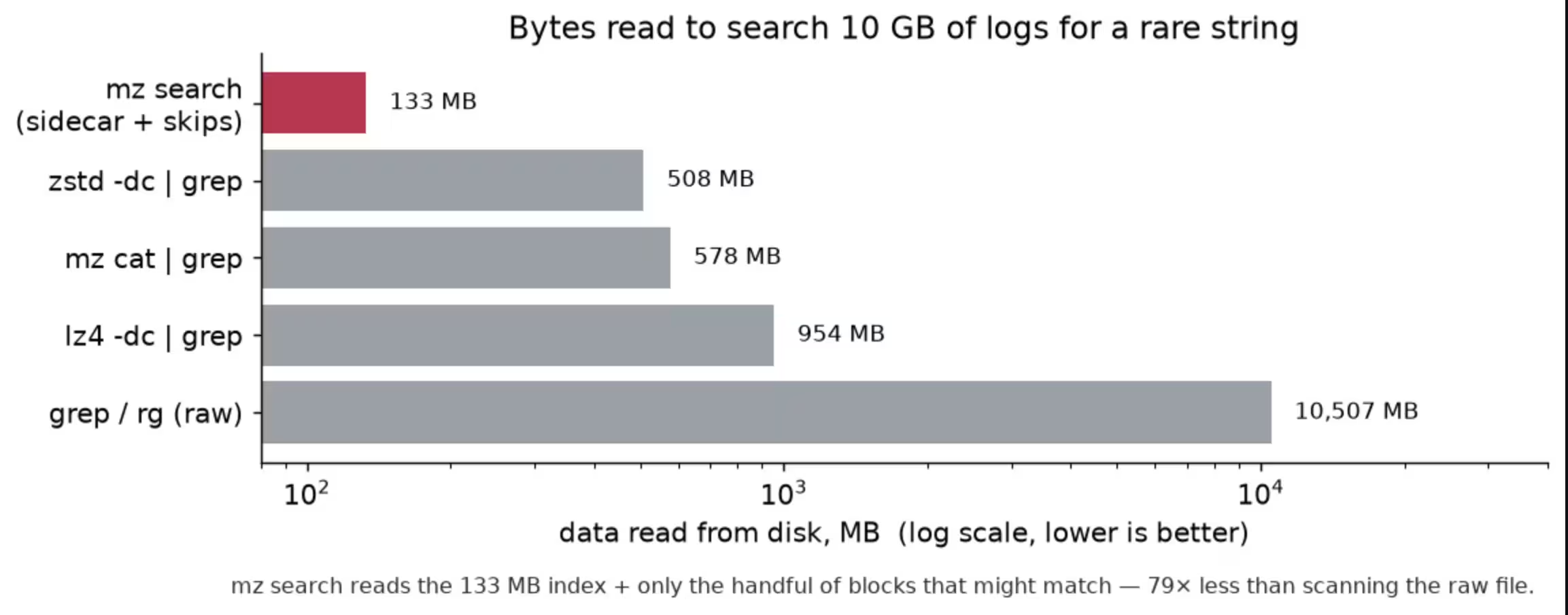
178 MB vs. 10.5 GB — 59× less data touched. On object storage that ratio is your latency and your bill.
The honest limit: common patterns and easy-to-scan data
Switch to nyc-taxi-data-10M.csv (3.3 GB of plain-ASCII CSV, .mz 758 MB, 174 MB sidecar) and the picture flips:
A full-precision coordinate looks selective, but its 8-byte windows (40.7922, .792251, …) are shared across millions of other coordinates, so only 17% of blocks can be skipped — and mz search ends up slower than just decompressing and grepping. ripgrep on the raw file wins outright here: plain ASCII hits its SIMD fast path (~3.5 GB/s). (Notice rg was ~8 s on the UTF-8-heavy cockroach log but ~1 s here — ripgrep's speed is very data-dependent, whereas grep is steadier.)
If your pattern isn't selective, or your data is small/ASCII/already in RAM, reach for ripgrep. mz search is for finding needles in big compressed haystacks.
What the index costs
Search tables are extra bytes. How many depends on the data and configuration:
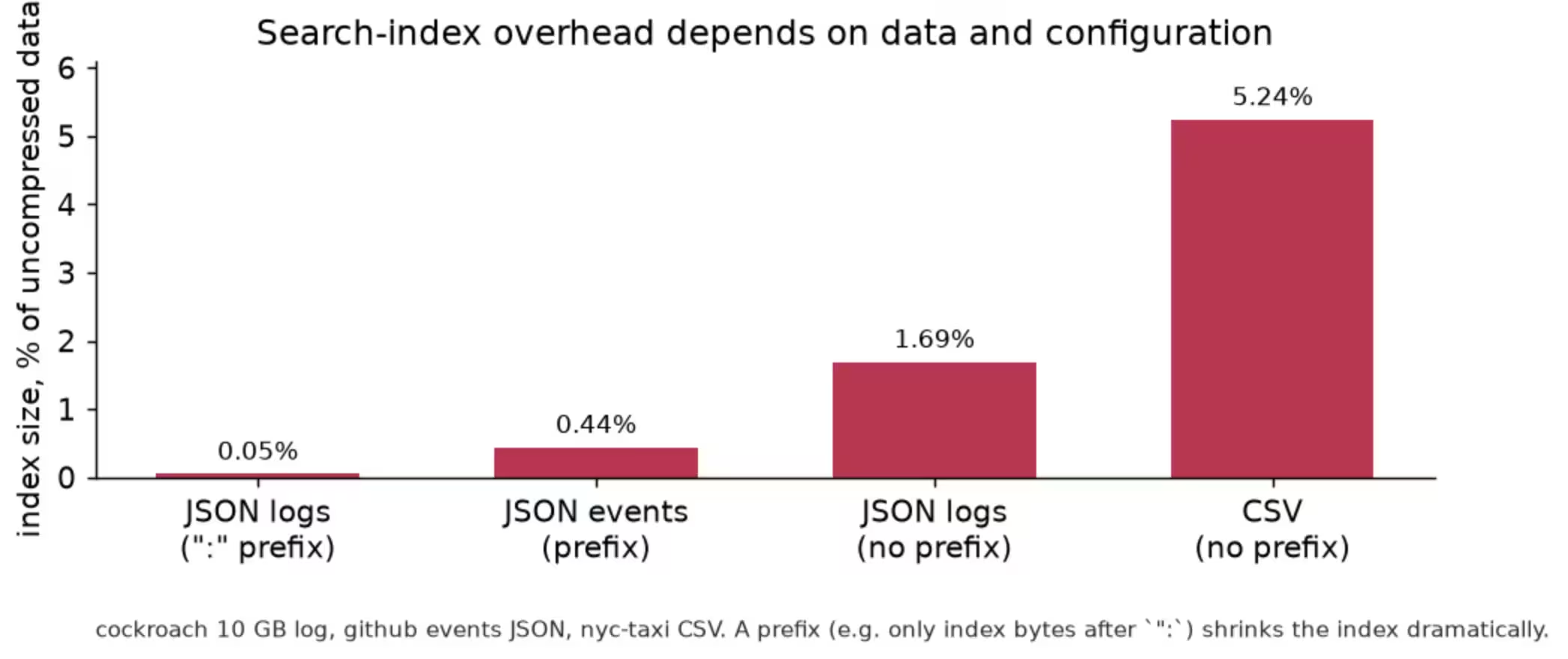
The default (no prefix) is a low single-digit percentage. Telling MinLZ where values live — e.g. "only index bytes after ":" in JSON — makes the tables far sparser and shrinks the index to a fraction of a percent, at the cost of only being usable for queries that contain the prefix. See SEARCH.md for tuning.
Selective (longer prefix) indexes
The no-prefix index above records windows at every byte position, so its size scales with the data. If you know you'll always search a particular field, a long prefix tells MinLZ to index only the bytes that follow it — collapsing the index to a fraction of the size.
CockroachDB log lines all carry "timestamp":"<epoch.nanos>". We can index only what comes after "timestamp":", and add -search.extras=8 so each occurrence records 9 overlapping 8-byte windows of the value (a little bloom filter over the timestamp itself, matchLen + extras ≤ 16):
mz sidecar build -search.lens=8 -search.prefix='"timestamp":"' -search.extras=8 \
    -o cockroach.node1.log.mz.ts.mzs cockroach.node1.log.mz
That's 8× smaller — and searching for a specific timestamp is, if anything, faster, because there's less index to walk:
That's 8× smaller — and searching for a specific timestamp is, if anything, faster, because there's less index to walk:
mz search -sidecar cockroach.node1.log.mz.ts.mzs \ '"timestamp":"1679865848.891225528"' cockroach.node1.log.mz# 1 match, 99.9% of blocks skipped, 94 ms (~110 GB/s effective) — count matches grep exactlyThe catch is the one every prefix index has, and it's worth stating plainly: this index only helps queries that contain "timestamp":" followed by at least matchLen + extras (here 16) more bytes — a timestamp down to roughly microsecond precision. Searching it for an error string, or for a coarse "timestamp":"1679 fragment, simply falls back to a full decode. So build one prefix index per field you actually query (a single sidecar can carry several configs at once), or a no-prefix index when queries are arbitrary. See SEARCH.md for byte-, mask- and long-prefix modes.
Limitations & gotchas
- Literal bytes only. No regex, no case-insensitivity, no wildcards. (Input is raw bytes, so it works on any data, not just text.)
- Skipping tracks selectivity at the match length. Common patterns, or patterns whose match-length windows are ubiquitous (digits, hex), skip little to nothing.
- Patterns must be at least matchLen bytes (default 6) to use the index, otherwise the searcher falls back to a full decode.
- A prefix-tuned index only accelerates queries that contain the prefix. Others fall back to full decode. Build a no-prefix index if queries are arbitrary.
- Without a prefix, near-random / incompressible blocks fill the table past its population limit, so they get no table and are always scanned. A prefix avoids this — only the positions after the prefix are indexed, keeping the table sparse (and useful) even on high-entropy data.
- You need an index. Searching a plain .mz with no tables is just decompress-and-scan.
- mz search -c counts matching lines like grep/rg. Two display caveats: a matching line that continues past a block boundary is printed truncated at that boundary (its match offset is still exact), and -n prints a match ordinal, not a source line number.
Where MinLZ fits
MinLZ is not a side project. It is a production proven format that is being used daily for terabytes of data in AIStor installations. The specification for both the compression and search is open, complete and published, so nothing here depends on a proprietary format or a single vendor's runtime.
On its own, MinLZ ships as the mz CLI and a Go library, so you can adopt the search capability wherever your compressed data lives today and bring it to AIStor when you are ready.
The payoff is the same in both places: your data stays small, stays searchable, and on cold or remote storage, answers a query by reading the index and a few blocks instead of the whole archive.
Try it
Search ships in the mz CLI (mz search, mz sidecar) and in the Go library (WriterSearchTable, BlockSearcher, BuildSidecar, NewSidecarSearcher).
- Repository: https://github.com/minio/minlz
- Usage & tuning: SEARCH.md
- Wire format: SPEC_SEARCH.md
Reproduce the flagship benchmark:
wget https://files.klauspost.com/compress/cockroach.node1.log.zst
zstd -d cockroach.node1.log.zst
mz c -3 -search -search.sidecar -search.len=8 cockroach.node1.log   # compress & build the 132 MB index
mz search -v -c "ALL SECURITY CONTROLS" cockroach.node1.log.mz      # 0.14 s, 99.9% skipped
# compare:
zstd -dc cockroach.node1.log.zst | grep -c "ALL SECURITY CONTROLS".svg)