An AI agent like OpenClaw sends its whole session to the model with every request, so most of what you pay for is tokens the model has already read. Frontier APIs charge ten to twenty times more for those tokens once their cache expires. We ran OpenClaw in an OpenShell sandbox against two NVIDIA DGX Spark systems with MinIO MemKV, a context cache with no timeout, and measured what the tokens cost.
Why agents wait
Before a model writes an answer, it reads the whole prompt. This step is called prefill, and it produces a KV cache: a block of data for every token it read. If the next request starts with the same tokens, the server reuses that cache instead of reading them again.
Agents depend on this. OpenClaw sends its whole session with every request: its instructions, its tools, every file it read and every answer it gave. After an hour of work that is often over 100,000 tokens. The KV cache lives in GPU memory, so it is lost when the server restarts, or when other sessions push it out. Then the model has to read the whole session again, which takes about a minute for a 120,000-token session on our two DGX Spark systems.
MinIO MemKV keeps a copy of the KV cache on each DGX Spark's own drive. When the GPU no longer has a block, vLLM loads it from MemKV instead of computing it again.
A context cache without a timeout
Frontier APIs cache the start of your prompt too, and bill cached tokens at a tenth or a twentieth of the normal price. But that cache expires after minutes of inactivity, and is lost whenever the prompt's start changes. Then the whole session is billed again at the full price. MemKV keeps the cache on the NVIDIA DGX Spark systems' drives: 2 TiB across the two machines, about 190 million tokens of DeepSeek-V4-Flash context, kept across restarts, breaks and other agents' work until MemKV needs the space and drops the least recently used. So on the DGX Spark systems a returning session costs about what a cache hit does, for as long as it stays in MemKV, not for a few minutes.
Cost per token
The unit we price is a million prompt tokens, the tokens the model reads. A typical task in the restart test below, OpenClaw answering one question about the Apache Iceberg source code in a long session it resumed after a server restart, used about 850,000 prompt tokens across all its requests and wrote about 8,000. Only about 17,000 of them had to be computed; the rest could be served from a cache, because OpenClaw sends its session again with every request. So a task costs about 0.85 times the price of a million prompt tokens.
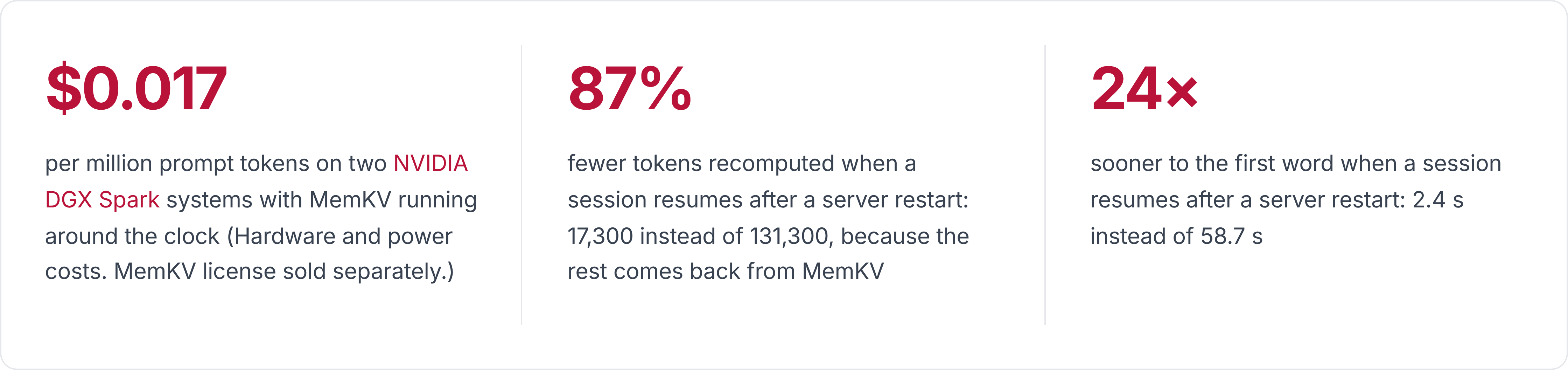
On the DGX Spark systems. Two DGX Spark systems cost $9,398 at NVIDIA's list price of $4,699 each. Spread over three years, that is $0.36 an hour. Power adds at most $0.08 an hour, taking each DGX Spark's 240 W power supply as the ceiling and electricity at $0.17 per kWh. In the 40-agent test below, the two DGX Spark systems served 26.5 million prompt tokens an hour with MemKV and 21.8 million without, so a million prompt tokens cost $0.017 with MemKV and $0.020 without when they are busy around the clock. Busy 8 hours a day, each hour of work carries three hours of hardware cost: $0.044 and $0.053.
On an API. We priced the same tokens at each provider's published rates, counting the repeated tokens as cache reads, which is the cheapest case. If the provider's cache has expired, for example after a break, the whole prompt is billed at the full input price. Both include the tokens written, and cache writes at each provider's cache-write price. The table compares prices for the same tokens, not the quality of the models.
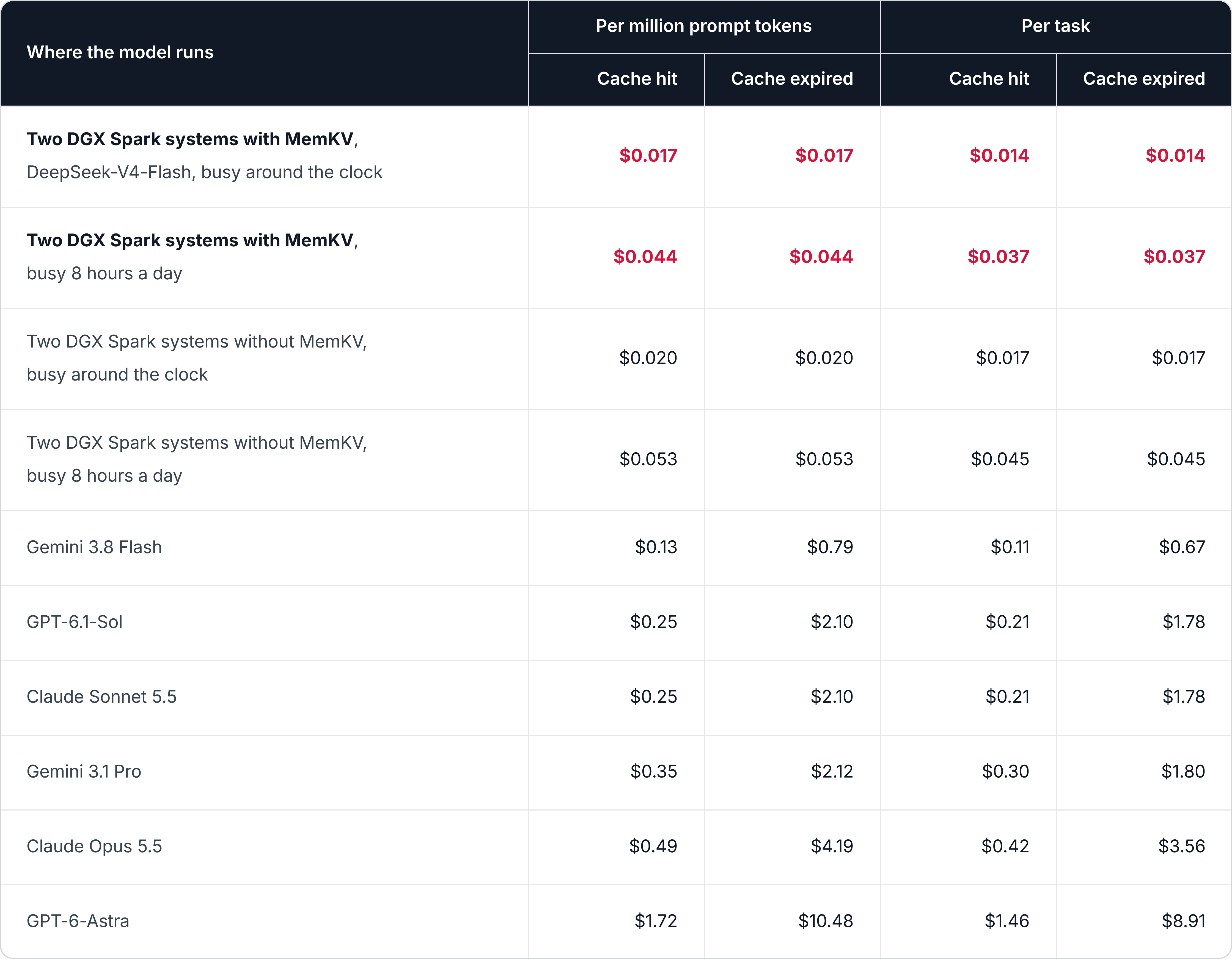
At the price of a Claude Opus 5.5 task, the two DGX Spark systems pay for themselves after about 23,000 tasks, or about 19 billion prompt tokens: about 730 hours of four agents at work, a month around the clock or about four months of 8-hour working days. Against Claude Sonnet 5.5 it takes about 46,000 tasks, or about 1,460 hours. These counts set the hardware price against the API price minus the electricity per task.
- How the models compare. On coding, DeepSeek-V4-Flash is in the same class as the frontier models: on Vals AI's SWE-bench Verified leaderboard (September 2026) it scores 88.8%, against 79.6% for Claude Sonnet 5, 80.0% for Gemini 3.8 Flash and 78.8% for Gemini 3.1 Pro. Newer models such as Claude Sonnet 5.5 are not on that leaderboard yet, and on broader benchmark averages Claude Sonnet 5.5 still comes out ahead. Check quality on your own work.
- The DGX Spark cost assumes they are kept busy, as four OpenClaw agents kept them in the 40-session test. With less work, the hardware cost is spread over fewer tokens.
- The MemKV license is not included, because MinIO prices it on request. Add it to the hardware cost when you work out your own break-even.
Prices are from each provider's published pricing, checked on 7 October 2026: NVIDIA, Anthropic, OpenAI and Google. API prices assume prompts under 200,000 tokens and standard tiers. They leave out Google's hourly cache storage fee, and Gemini 3.8 Flash's prices are an offer that ends on 31 December 2026. Benchmark scores are from Vals AI and LLM Stats. The whole calculation is harness/cost.py in the example repository, which reads the measurements in it.
Why not keep the cache in RAM?
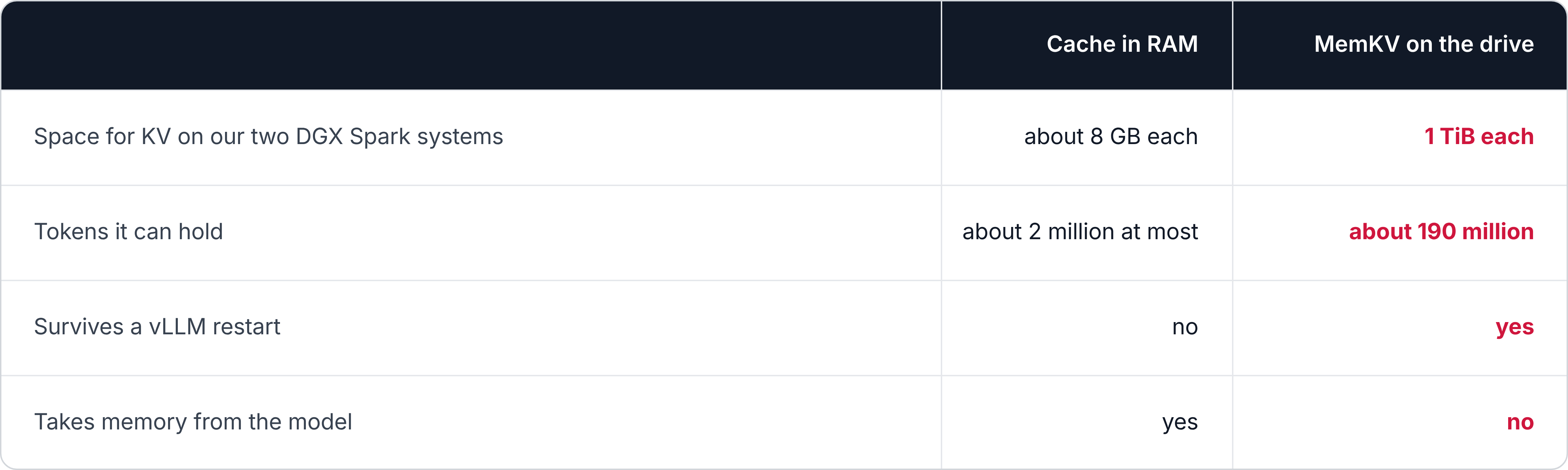
vLLM can also copy KV to the computer's main memory. On most servers that is a good option, but not on a DGX Spark. The DGX Spark's CPU and GPU share the same 128 GB. With the model loaded and vLLM's GPU cache set up, our DGX Spark systems had 7.5 and 8.3 GB of memory available while serving. A cache in RAM would compete with the model for that memory and, even using all of it, would hold about 2 million tokens: about 16 OpenClaw sessions the size of the one below. It would also be lost every time vLLM restarts.
MemKV keeps the cache on the drive instead, which on a DGX Spark is large and otherwise mostly empty. Two 1 TiB files hold about 190 million tokens of DeepSeek-V4-Flash context, and they survive restarts.
The setup
- Two DGX Spark systems, connected by one cable between their built-in NVIDIA ConnectX-7 NIC ports.
- DeepSeek-V4-Flash, served by vLLM and split across both DGX Spark systems.
- One MemKV server per DGX Spark, storing KV in a 1 TiB file on the drive the DGX Spark ships with.
- OpenClaw, running on a separate computer inside an OpenShell sandbox, talking to vLLM over the network.
Step 1: Set up MemKV
Get a trial license. To try MemKV on your DGX Spark, email sales@min.io and ask for a MemKV trial license. Save the file you receive as memkv.license. *The license is priced separately from the $0.017 per million prompt tokens figure above.
Install the server on each DGX Spark from the package at dl.minio.io/aistor/memkv. Every message between MemKV clients and servers is signed, so generate one shared key and use it everywhere:
openssl rand -hex 32Write the server config. This is the file we used on each DGX Spark, /etc/memkv/config.yaml. storage.mode: file keeps KV in an ordinary file on the existing drive, so no drive has to be set aside. rdma.devices lists the two rails of the DGX Spark's network port. storage.block_size: 1 MiB fits about four times as many tokens in the file as MemKV's 4 MiB default, which makes it the better size for a DGX Spark.
network:
  address: 0.0.0.0:9900
  auth_key: <the shared key>
memory:
  block_size: 2 MiB
  max_size: 2 GiB
rdma:
  devices: [rocep1s0f0, roceP2p1s0f0]
  num_worker_threads: 8
storage:
  mode: file
  block_size: 1 MiB
  drives:
    - media: /var/lib/memkv/drive0.dat
      max_size: 1 TiB
  eviction:
    enabled: true
Start it, as a systemd service so it survives reboots:
memkv start --config /etc/memkv/config.yaml --license /etc/memkv/memkv.licenseMemKV creates the file at its full size on first start. With eviction on, it drops the least recently used KV when the file is 70% full, so it runs unattended. To change the size later, move the old file away first: MemKV reopens an existing file at the size it was created with.
Check it is running in MemKV's web console, on port 9901 of each DGX Spark.
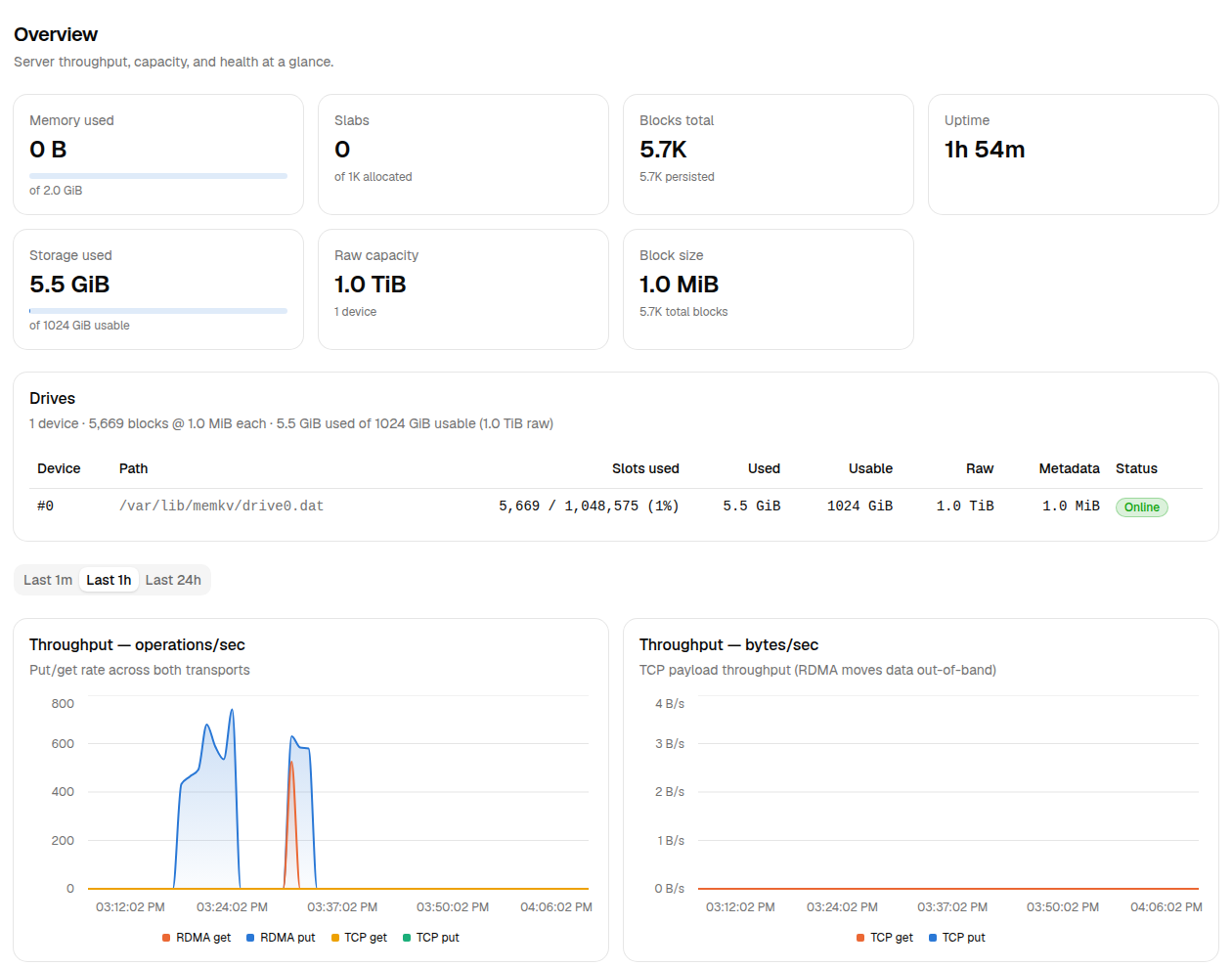
The MemKV console on DGX Spark 1 during a restart test. 5,669 KV blocks of 1 MiB are stored, 1% of the file. The chart shows the two phases: RDMA writes (blue) while OpenClaw built its session, then RDMA reads (orange) as the resumed session came back from MemKV after the restart, alongside writes of the new answer's KV. All KV moves by RDMA, so the TCP byte chart on the right stays at zero.
Step 2: Point vLLM at MemKV
Write the client config that vLLM's MemKV plugin reads. It lists both MemKV servers by their addresses on the cable between the DGX Spark systems:
servers: [192.168.100.1:9900, 192.168.100.2:9900]
rdma_devices: [rocep1s0f0, roceP2p1s0f0]
transport: rdma
auth_key: <the shared key>
license: /etc/memkv/memkv.license
Install the plugin in vLLM's environment. It registers itself with vLLM, so vLLM is not patched.
pip install memkv-vllmStart vLLM with three additions: the client config, a fixed hash seed so a restarted server names KV blocks the same way, and the --kv-transfer-config that turns MemKV on.
PYTHONHASHSEED=0 MEMKV_CONFIG=/etc/memkv/client.yaml \
VLLM_PREFIX_CACHE_RETENTION_INTERVAL=4096 \
vllm serve deepseek-ai/DeepSeek-V4-Flash-0731 \
  --served-model-name dsv4flash \
  --tensor-parallel-size 2 \
  --enable-cumem-allocator \
  --kv-transfer-config '{
    "kv_connector": "OffloadingConnector",
    "kv_role": "kv_both",
    "kv_connector_extra_config": {
      "spec_name": "MemKVOffloadingSpec",
      "spec_module_path": "memkv_vllm.spec",
      "memkv_scratch_medium": "host"
    }
  }'
We started vLLM with the community spark-vllm-docker recipe for DeepSeek-V4-Flash, which adds the flags for running one model across two DGX Spark systems. The MemKV part is only what is shown above. --enable-cumem-allocator is needed because that recipe turns on PyTorch's expandable memory segments. VLLM_PREFIX_CACHE_RETENTION_INTERVAL=4096, as the DeepSeek-V4-Flash build for the NVIDIA GB10 Grace Blackwell Superchip recommends, keeps cached prefixes at 4,096-token steps.
Check it works. At startup vLLM logs MemKV key prefix … from 2 worker ranks. After a restart, the vllm:external_prefix_cache_hits_total metric rises as sessions resume.
How it works
The MemKV plugin runs inside vLLM. It asks the MemKV servers for blocks over an ordinary TCP connection. The servers then send the blocks back with RDMA (remote direct memory access): the network card writes them straight into vLLM's memory, without using either CPU. This works the same for the MemKV server on the same DGX Spark and the one on the other DGX Spark.
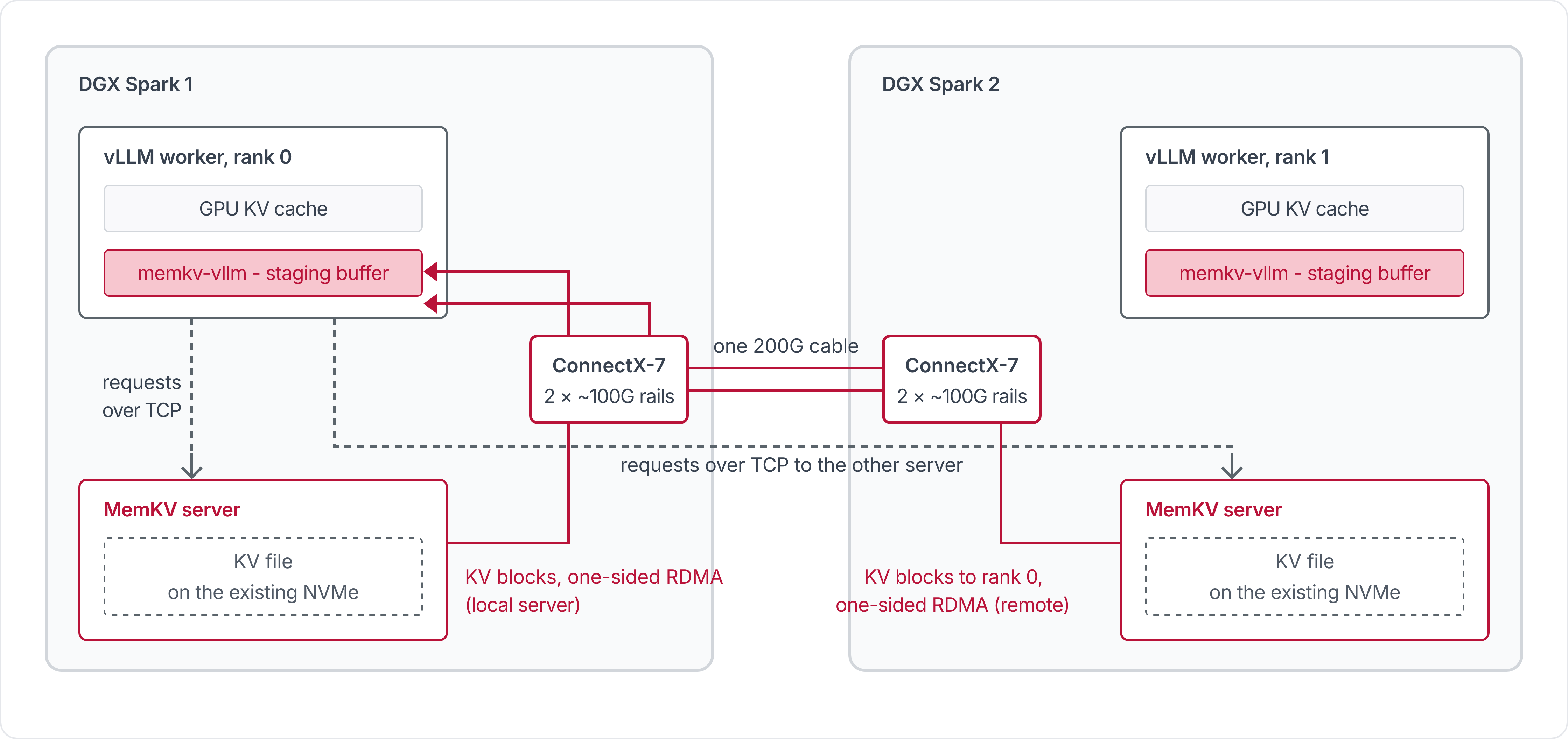
On the DGX Spark, the CPU and GPU share one memory, so the buffer the network card writes into is already where the GPU can read it.
vLLM is one of several engines MemKV works with. The same MemKV servers can also serve SGLang (through its HiCache storage), LMCache, NVIDIA Dynamo and llama.cpp, so the KV store does not tie you to one inference engine.
Step 3: Run OpenClaw in an OpenShell sandbox
OpenClaw is an open-source agent that reads files, runs tools and keeps long sessions. Agents like this can run commands, so we ran it inside OpenShell, an open-source secure runtime for agents. OpenShell denies all network traffic and filesystem writes by default and lets through only what a policy allows.
Install OpenShell on the computer that runs the agent. It needs Docker.
curl -LsSf https://raw.githubusercontent.com/NVIDIA/OpenShell/main/install.sh | shDescribe the vLLM endpoint as a provider. The provider names the one host and port the agent may reach and the one program allowed to reach it. OpenShell keeps the API key outside the sandbox: the agent sees a placeholder, and OpenShell's proxy swaps in the real key on the way out.
# DeepSeek-V4-Flash served by vLLM on the two DGX Spark systems. Only OpenClaw's Node
# runtime may reach it, and only this host and port.
id: spark-vllm
display_name: DGX Spark vLLM
description: OpenAI-compatible vLLM endpoint on the DGX Spark cluster
category: inference
inference_capable: true
credentials:
  - name: api_key
    description: vLLM API key
    env_vars: [VLLM_API_KEY]
    required: true
    auth_style: bearer
    header_name: authorization
discovery:
  credentials: [api_key]
endpoints:
  - host: 10.0.0.152
    port: 8000
    protocol: rest
    access: read-write
    enforcement: enforce
binaries: [/opt/node24/bin/node]
openshell profile import -f spark-vllm.yaml
openshell provider create --name spark-vllm --type spark-vllm --credential VLLM_API_KEYBuild the sandbox image. We started from the OpenShell base image and added Node.js 24 and OpenClaw, plus a copy of the Apache Iceberg source code for OpenClaw to study, owned by root so the agent can read it but not change it.
Write the sandbox policy. Everything outside the agent's home directory and /tmp is read-only, and no network traffic is allowed beyond the provider.
# Agent sandbox for the DGX Spark tests: read the Iceberg source, write only
# the agent's own home and /tmp, reach nothing but the vLLM provider.
version: 1

filesystem_policy:
  include_workdir: true
  read_only:
    - /usr
    - /lib
    - /proc
    - /dev/urandom
    - /etc
    - /var/log
    - /opt
    - /data
  read_write:
    - /sandbox
    - /tmp
    - /dev/null

landlock:
  compatibility: best_effort

process:
  run_as_user: sandbox
  run_as_group: sandbox

network_policies: {}
Create the sandbox and point OpenClaw at vLLM. TMPDIR points OpenClaw's database at a writable directory.
openshell sandbox create --name openclaw --from spark-agents:openclaw-iceberg \
  --policy agent-policy.yaml --provider spark-vllm \
  --env TMPDIR=/tmp --env SQLITE_TMPDIR=/tmp --detach

openshell sandbox exec -n openclaw -- bash -c '
  openclaw onboard --non-interactive --accept-risk --mode local \
    --auth-choice vllm --custom-base-url http://10.0.0.152:8000/v1 \
    --custom-api-key "$VLLM_API_KEY" --custom-model-id dsv4flash
  openclaw config set models.providers.vllm.timeoutSeconds 300
  openclaw config set "models.providers.vllm.models[0].contextWindow" 1000000'
OpenClaw assumes a 128,000-token context by default. Our vLLM serves 1 million, and setting it stops OpenClaw from compacting long sessions early.
Ask a question. Each call runs one agent turn in a named session, so a later call with the same --session-id continues the conversation.
openshell sandbox exec -n openclaw -- \
  openclaw agent --local --session-id iceberg --json \
  --message "Read /data/iceberg/format/spec.md and explain how a table is laid out."
We checked the sandbox from the inside: writes to /data/iceberg and /usr were refused, curl could not reach vLLM because only OpenClaw's Node.js runtime is allowed, and every attempt to reach the internet was blocked and logged.
How we measured
A script ran everything with no one at the keyboard, including stopping and starting vLLM. For each of three repetitions it:
- started vLLM with MemKV under a new MemKV namespace, so nothing from earlier runs could be reused, and had OpenClaw answer four questions about Iceberg in one session: the specification, how commits work, snapshot expiration, and how readers find delete files;
- saved OpenClaw's session state from the sandbox;
- restarted vLLM with MemKV, restored the state, and asked a follow-up question in the same session;
- started vLLM without MemKV, restored the same state, and asked the follow-up again.
Times come from vLLM's own counters, read every half second; bytes come from the MemKV servers' counters and the network cards' hardware counters. The scripts and the raw data are in the example repository.
Results: resuming after a restart
The follow-up was: explain how row-level deletes work, which format versions support each kind, when a reader applies them, and what compaction does with them. Its first request carried OpenClaw's whole session, 70,000 to 139,000 tokens depending on how much OpenClaw had read on day one, identical in both setups. Median of three repetitions, range in brackets:
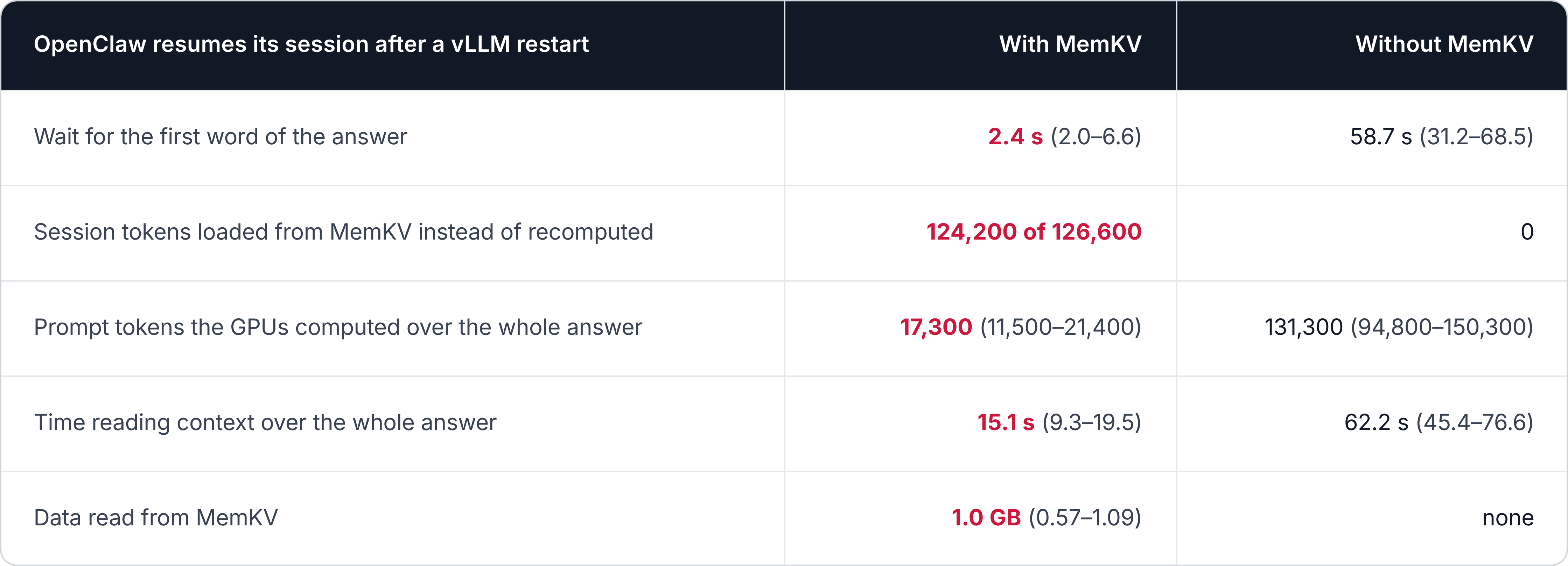
MemKV was faster in all three pairs. Over the whole answer the GPUs still compute some tokens with MemKV: the new question, the files OpenClaw read while answering, and its own replies, which each later request carries.
What the network saw
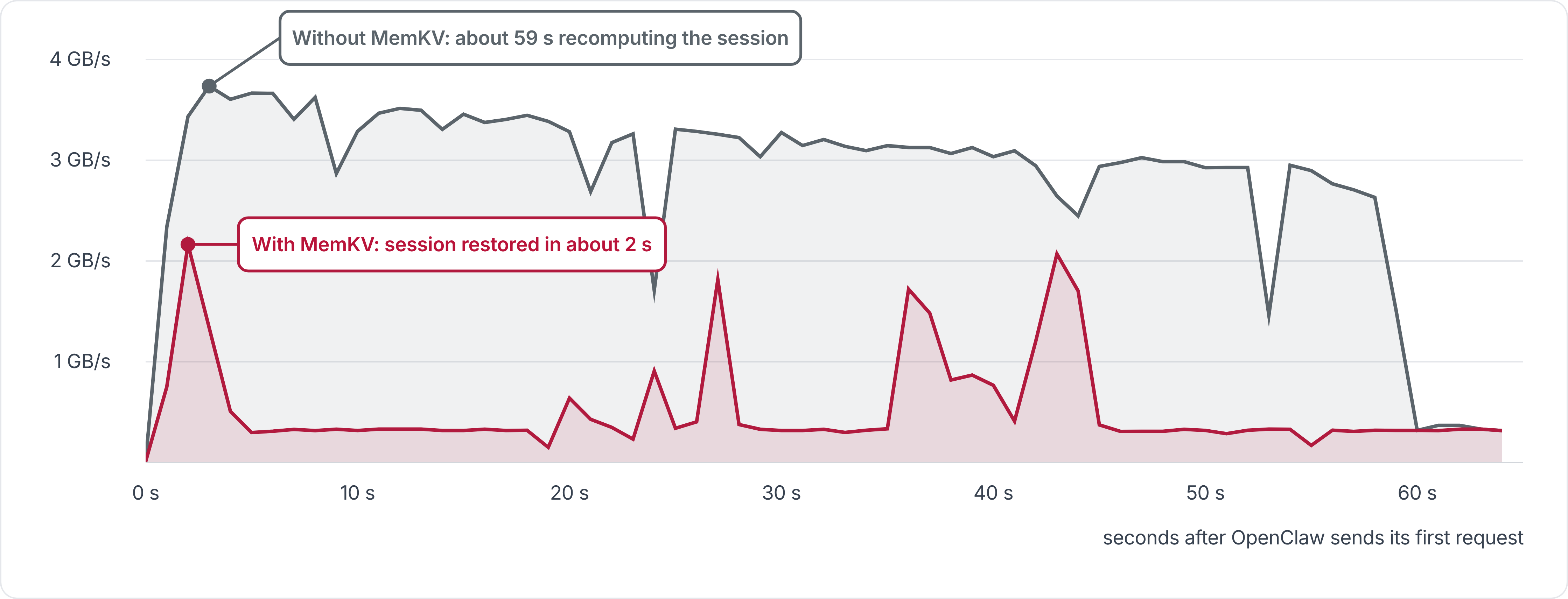
RDMA bytes received per second, summed over both rails of both DGX Spark systems, from the network cards' hardware counters, sampled once a second. One of the three repetitions. In all three, the restore with MemKV took 1 to 2 seconds, and recomputing without it took 32 to 68 seconds. With MemKV, the later spikes are the GPUs computing new material, such as files OpenClaw reads while it answers. The steady traffic is the two GPUs exchanging results while OpenClaw writes.
- With MemKV, the session's KV came back in 1 to 2 seconds in every repetition: 0.6 to 1.1 GB read from the MemKV servers.
- Without MemKV, the two GPUs spent about a minute recomputing the same session (half that for the smallest one), and exchanged 100 to 202 GB over the same cable while doing it.
- The cable is far from full. The network cards report a 200 Gb/s link, about 25 GB/s. The restore peaked at about 2 GB/s, and recomputing without MemKV at about 4 GB/s, which leaves room for several restores at once. We did not test more than four agents.
What OpenClaw worked out
OpenClaw answered from the Iceberg specification and the Java code it had read on day one, citing lines. Part of its answer:
The sequence rule is enforced by PositionDeletes.filter(seq): files are sorted ascending by data sequence number and findStartIndex returns only files with a sequence number at or above the data file's. That's the "data seq ≤ delete seq" rule in binary-search form.
MemKV does not change the model or its settings, only where the session's KV comes from. We did not grade the answers from the two setups against each other.
Results: forty agents on one server
We then ran 40 OpenClaw sessions, four active at a time, each studying its own Iceberg topic: partitioning, snapshot expiration, deletion vectors, views, the REST catalog and 35 more. Each session first read the specification and the code for its topic. Together, the sessions held about 3.6 million tokens, nearly twice the 1.9 million tokens vLLM's GPU cache can keep, so by the time a session came back, the others had pushed it out of the GPU.
From the same saved state, every session then asked two more real questions, once with MemKV and once without. These were live agent turns: OpenClaw read more files, called its tools, and wrote full answers.
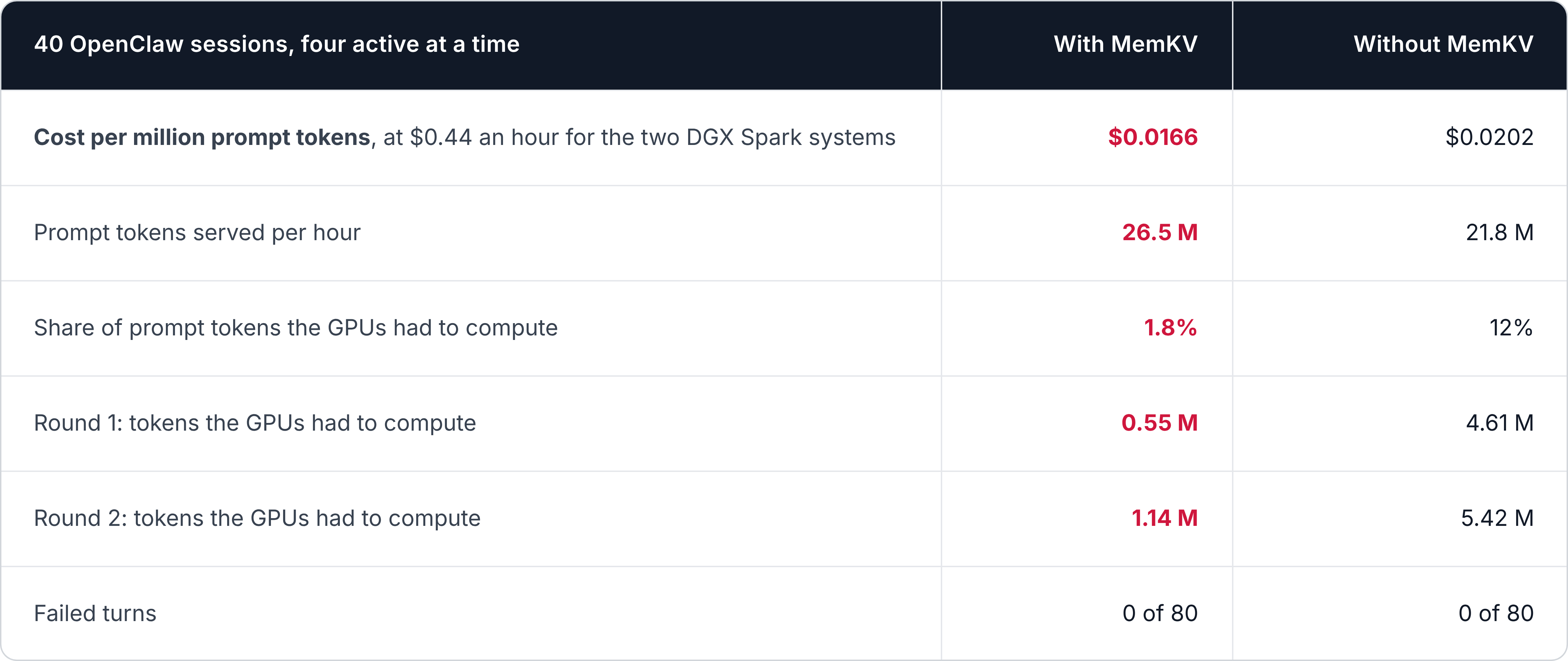
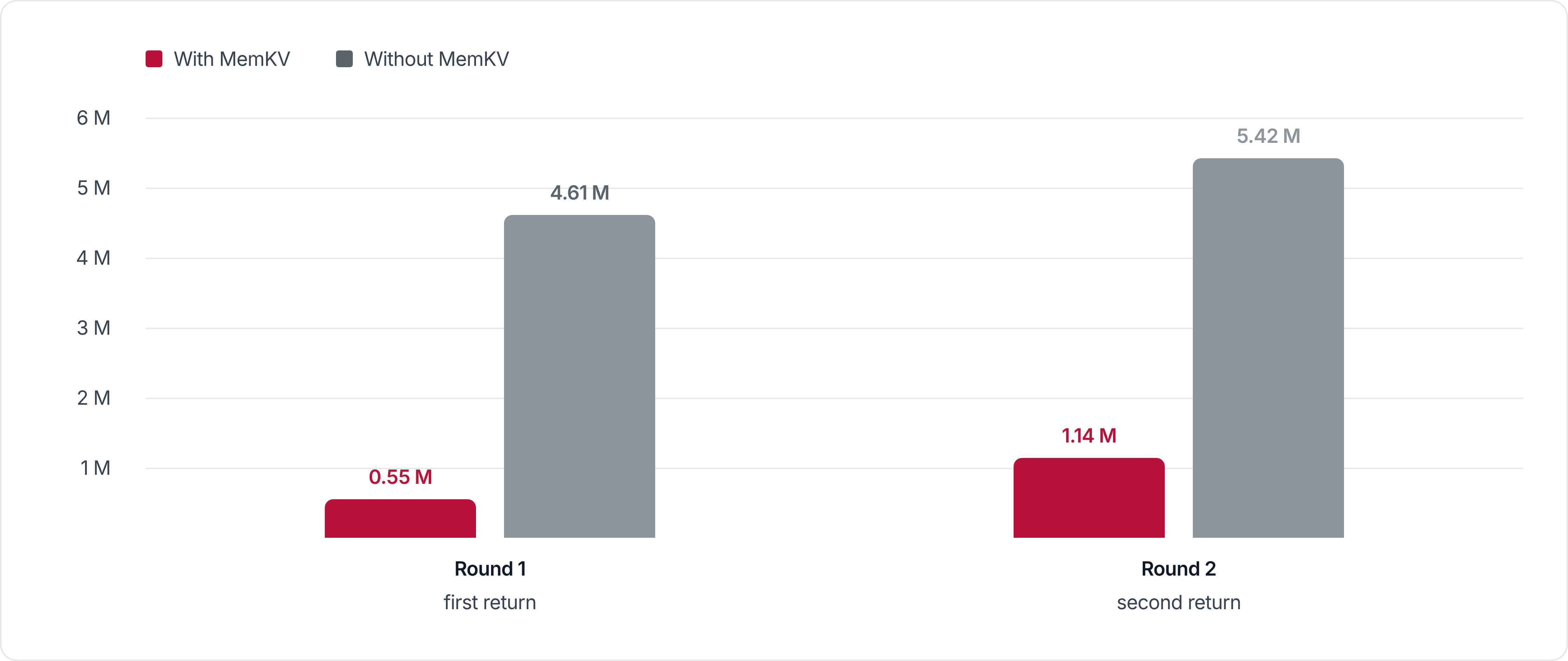
With MemKV, the GPUs computed 1.8% of the prompt tokens instead of 12%: five to eight times less recomputing per round. That GPU time went into serving more tokens, so each million prompt tokens cost 18% less. This is one run of each setup, one after the other, and the two served different amounts of prompt tokens (94 million with MemKV, 84 million without), so treat the 18% as one measurement rather than an average. The gain is smaller than in the restart test because each OpenClaw turn makes many requests while it reads and calls tools, and after the first one the session is warm in the GPU anyway. MemKV saves the recomputing at the start of each turn, when the session comes back.
What this means day to day
The rule of thumb from these tests: every time a 120,000-token OpenClaw session comes back after its cache was lost, MemKV saves about a minute of waiting before the agent starts answering (about 59 seconds without it, 2.4 with it).
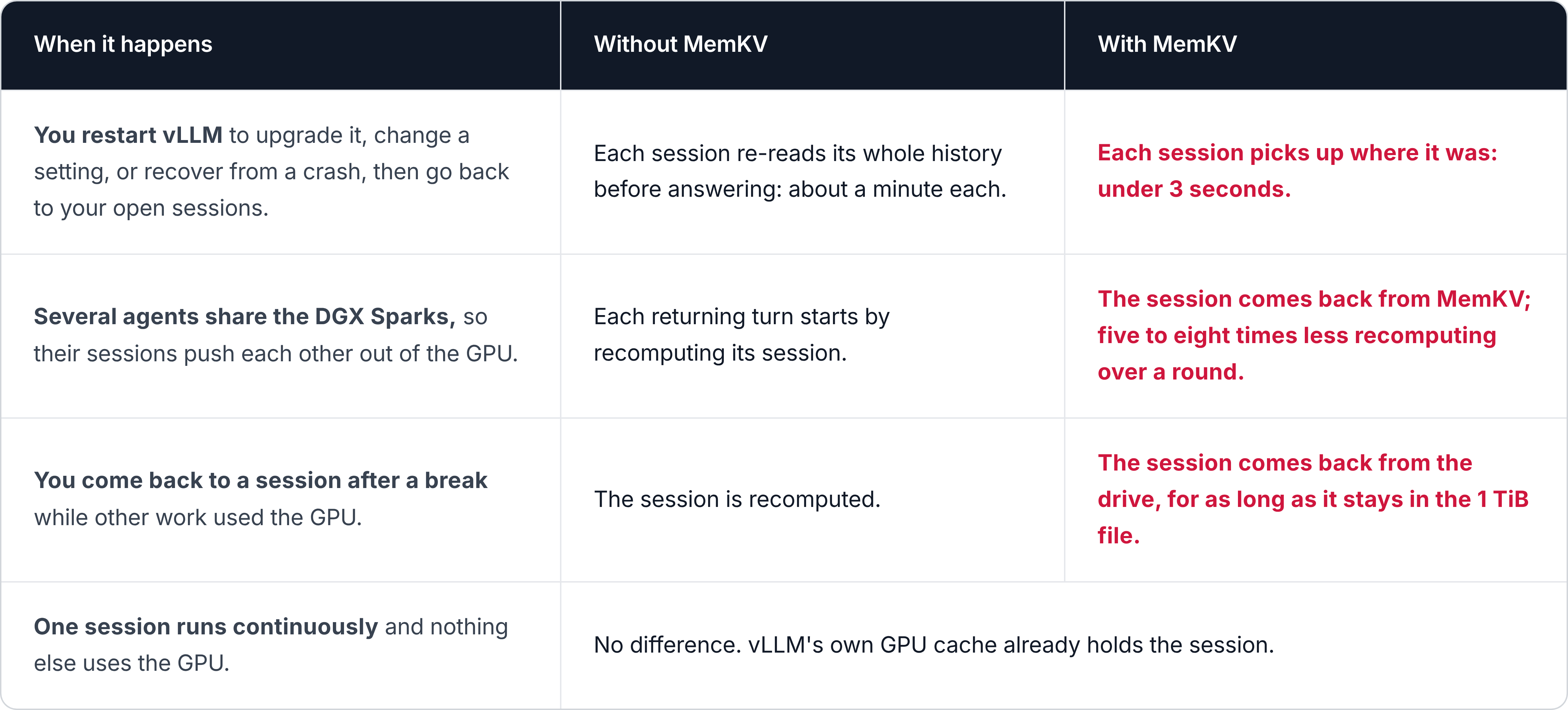
MemKV has a small cost: the first time a session is computed, MemKV also stores it. And it does not change how fast the model writes, so an agent that mostly writes gains less than one that mostly reads.
How much compute MemKV saves
- On a resume after a restart: 17,300 tokens computed instead of 131,300, 87% fewer, and 15 seconds of reading context instead of 62, 76% less.
- Across 40 agents sharing the DGX Spark systems: five to eight times fewer tokens recomputed per round.
- Energy: recomputing a 103,000-token session kept the two GPUs at 62 and 64 W for 53 seconds, about 1.8 Wh of GPU energy; idle, each draws about 12 W. Restoring a session from MemKV took 1 to 2 seconds.
What we ran
Every script, config file, raw measurement and screenshot from these tests is in github.com/minio/dgx-spark-agents, so you can repeat them on your own DGX Spark systems. Its EVIDENCE.md lists the file and the command behind every number in this post.
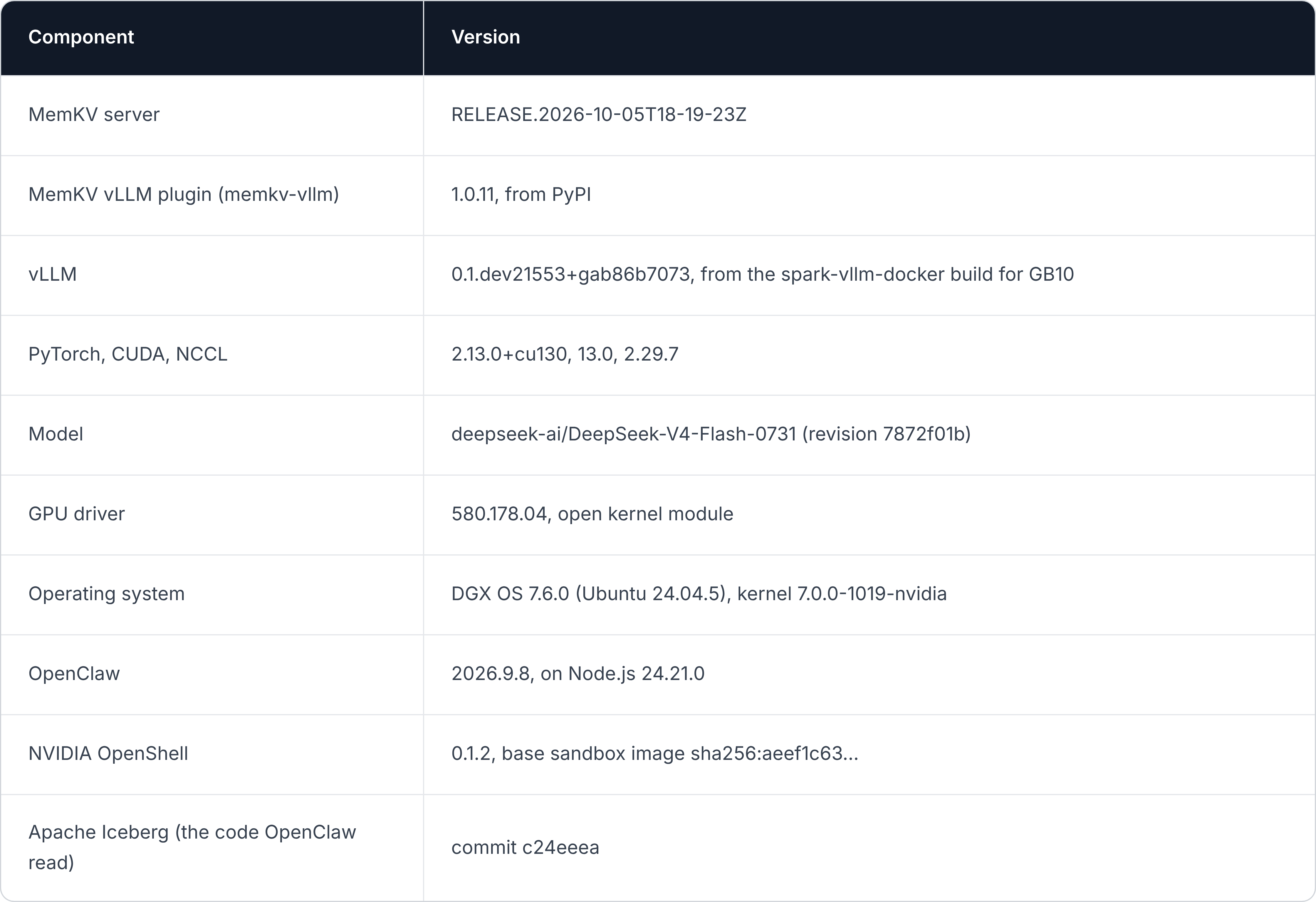
Good to know
- These are small samples. The restart test is three pairs, always run with MemKV first. The 40-session test is one run of each setup. Treat the numbers as what we measured, not as averages.
- The 40-session test used 4 MiB storage blocks. It ran before we moved MemKV to 1 MiB. The block size sets how many tokens fit on the drive.
- MemKV saves reading, not writing. It cuts the prompt tokens the GPUs recompute; it does not change how fast the model writes.
- Across two DGX Spark systems, MemKV needs RDMA, which the DGX Spark's built-in network card provides.
- DeepSeek-V4-Flash works out of the box. Its KV cache is regular attention blocks that vLLM can store and restore as they are. Every result here uses it.
- The $0.017 per million prompt tokens covers hardware and power pricing. The MemKV license is priced separately. Email sales@min.io for a trial.