.svg)


Every Apache Iceberg lakehouse needs a catalog, and in most deployments that catalog is a separate service. Hive Metastore, AWS Glue, or Nessie sits outside the object store, adding another service boundary, another credential set, and another integration to keep consistent with the storage layer beneath it.
MinIO AIStor Tables takes a different approach: the Apache Iceberg REST Catalog runs embedded inside the object store itself, served from the AIStor S3 endpoint at /_iceberg. There is no external catalog service to install or operate for the native catalog. Table metadata and table data share one platform and one endpoint, and both the catalog API and the object API authenticate with SigV4 credentials that can be governed through AIStor access policies.
AIStor Tables supports the full Apache Iceberg V3 REST Catalog API, including deletion vectors, row lineage, and the Variant type for semi-structured data. It also supports Iceberg Views as a catalog capability. Query engines such as Spark, Trino, and Dremio connect to that single endpoint using standard SigV4 signing. This post explains why that embedded design changes the lakehouse architecture.
What Is Object Storage in an Apache Iceberg Data Lakehouse?
Object storage is a storage architecture that manages data as discrete objects behind an HTTP API, rather than as blocks or files in a hierarchy. In a lakehouse, it is the durable foundation everything else sits on.
Apache Iceberg is a table format, not a storage system. It defines how a collection of data files, commonly Parquet, behaves like a database table: which files belong to the table, what the schema is, and which snapshot represents the current state.
The catalog is the third role. It is the authoritative index that tells query engines where each table's current metadata lives. Without a catalog, an engine cannot find the table; without the table format, files are just files; without object storage, there is nothing durable underneath.
Think of it like a library: object storage is the building and shelves, Iceberg is the cataloging system that groups pages into books, and the catalog is the front desk that tells every visitor exactly where to look.
Here is how the four layers map onto an AIStor-based lakehouse:
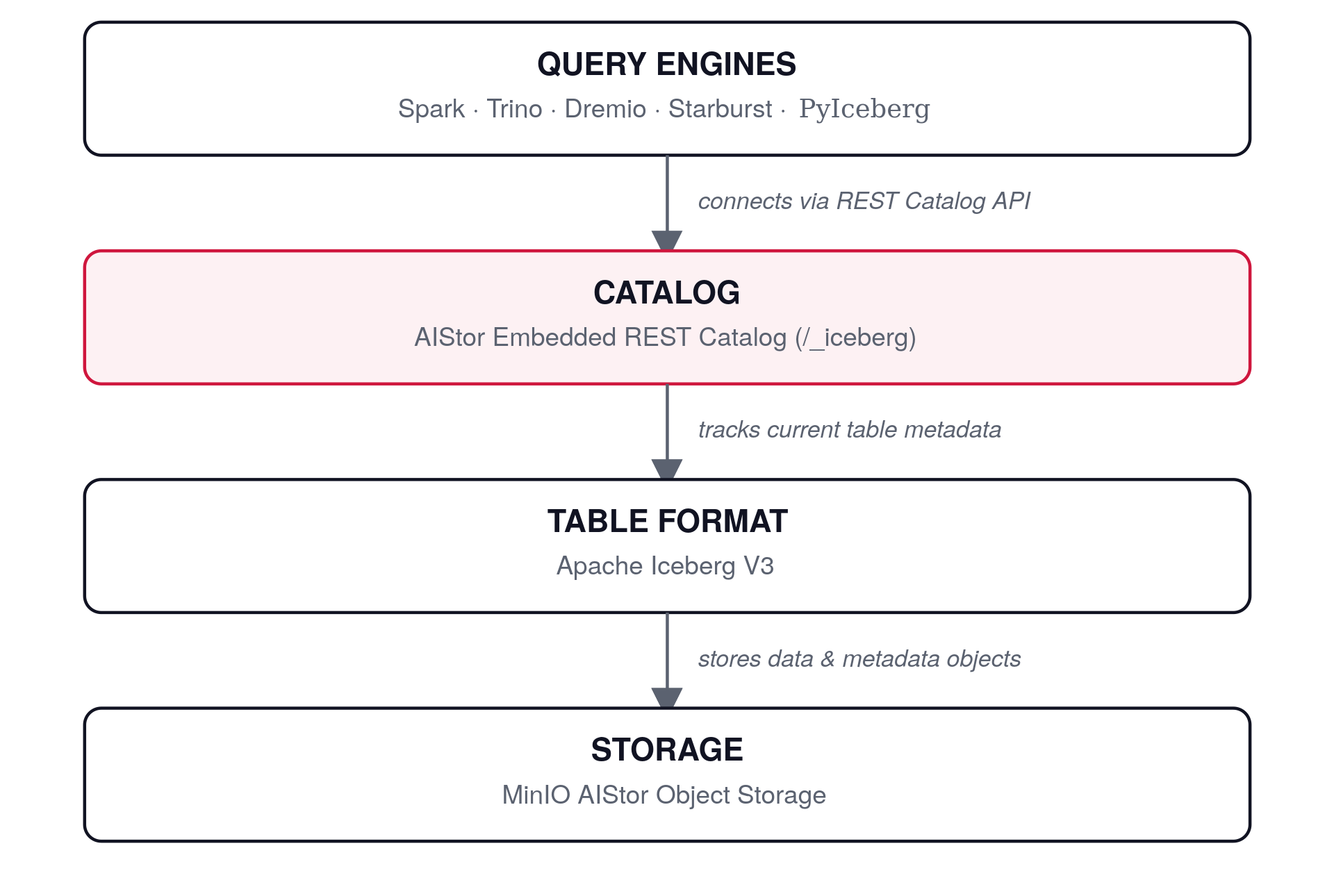
The key architectural fact: in most lakehouse stacks, the catalog layer is a separate service you deploy and operate. In AIStor Tables, the catalog and storage layers are one system.
How Data Moves Through the Lakehouse Stack
Let's walk the data path from ingestion to query. There are two API paths, not one: a catalog path for table operations and an S3 path for data and metadata objects.
Source systems such as pipelines, streaming jobs, and batch ETL use Iceberg writer libraries. The writer sends namespace and table operations, including metadata commits, to the embedded REST Catalog. It writes Parquet data files and Iceberg metadata files to the AIStor S3 endpoint.
On the read side, query engines send signed requests to the catalog to discover tables and resolve current metadata, then read the underlying files directly through the S3 API. Requests to the catalog are signed with SigV4 using the service name s3tables, so the same credential mechanism serves both paths.
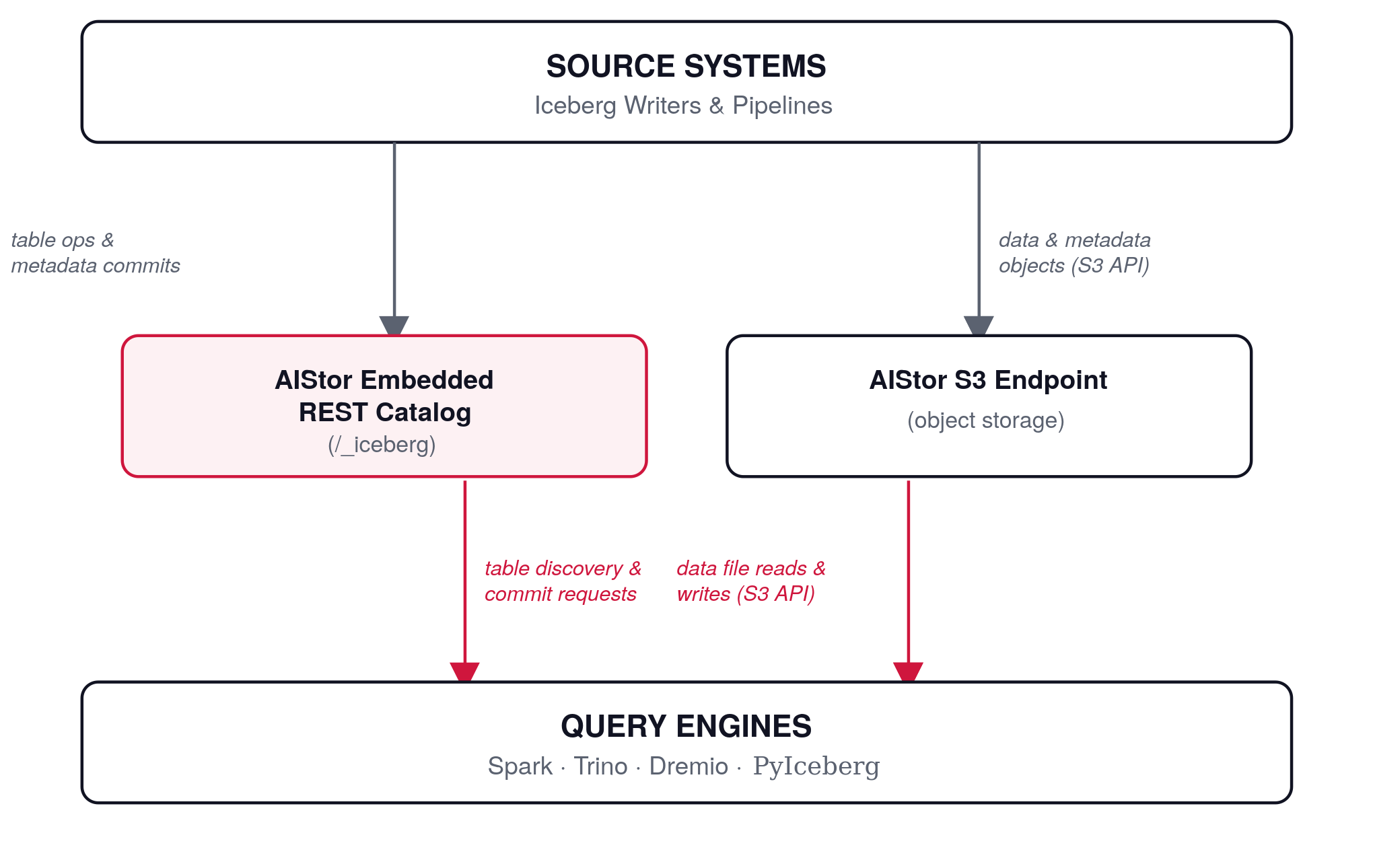
Both paths terminate at the same AIStor deployment. Because the native catalog does not require a separate external metadata database, there is no additional catalog service to keep synchronized with the storage layer it describes.
Data Lakehouse vs. Data Lake vs. Data Warehouse
Why the Lakehouse Model Emerged
A data lakehouse is an architecture that combines a data lake's open, low-cost object storage with the transactional guarantees, schema controls, and query performance traditionally associated with a data warehouse. Data lakes gave organizations cheap, open storage but, on their own, weak consistency and governance. Warehouses gave strong guarantees but often at higher cost and with less format openness. The lakehouse, built on a table format like Apache Iceberg over object storage, aims to deliver both properties from one copy of the data.
The table below compares the three architectures across nine dimensions, with a fifth column showing what AIStor Tables specifically contributes to each one.
The table's structure makes the distinction clear: the Data Lakehouse column describes what the architecture is generally capable of, while the MinIO AIStor Advantage column shows how AIStor delivers that capability from the storage system itself, rather than through an additional catalog deployment.
Why AIStor Tables' Embedded Iceberg REST Catalog Is Architecturally Different
Native Apache Iceberg V3 Capabilities
AIStor Tables supports the full Apache Iceberg V3 REST Catalog API, which brings deletion vectors, row lineage, the Variant type for semi-structured data, and native geometry, geography, and nanosecond-precision timestamp types into a catalog embedded in the object store itself. Each addresses a specific pain point, from delete-file accumulation and row-level change tracking to JSON-in-a-column overhead and full-table-scan geospatial queries. None of them is a checkbox feature. For the mechanics of each, including how deletion vectors use Roaring Bitmaps in Puffin files and how row IDs persist across compaction, see AIStor Tables: Native Iceberg V3 for On-Premises Object Storage, which covers the spec changes in depth.
AIStor Tables also supports Iceberg Views at the catalog level, letting engines share reusable query definitions instead of re-implementing them per engine. MinIO describes AIStor's embedded Iceberg REST Catalog as the first on-premises and hybrid-enabled catalog to implement Iceberg REST Catalog views. Amazon S3 Tables offers a useful comparison point: at launch it was accessed through the Hive-metastore-compatible Glue Data Catalog rather than a native Iceberg REST Catalog, and AWS didn't add REST Catalog APIs until March 2025. We haven't found documentation showing views support in that implementation today. See Iceberg Views in AIStor Tables for the REST endpoints and example payloads.
MinIO positions AIStor Tables as the first data store to embed the full Iceberg V3 Catalog REST API directly into the object store. Whichever way you weigh that framing, the underlying architectural point holds: the catalog isn't a companion service here, it's part of the storage engine.
Embedded Catalog vs. External Catalog Services
The conventional lakehouse catalog is an external system. Hive Metastore, AWS Glue, and Nessie all sit outside the object store, each adding a separate service boundary and its own security and operational integration. The responsibilities differ: a self-hosted Hive Metastore or Nessie deployment is infrastructure you run, patch, and back up, while a managed service such as Glue shifts those tasks to the provider but still remains a separate system to configure, secure, and keep aligned with your storage.
AIStor Tables collapses that layer. The Iceberg REST Catalog runs embedded inside AIStor. AIStor organizes this catalog into a warehouse → namespace → table hierarchy with policy-based access control at each level; see AIStor Tables: Technical Deep Dive for the full model and example IAM policies.
MinIO's administration documentation states this native implementation removes the dependency on Hive, Glue, Nessie, and proprietary catalogs, and lists PyIceberg, Apache Spark, Trino, Starburst, Dremio, and PuppyGraph as the engines it explicitly supports through SigV4 authentication — noting that engines which authenticate to the catalog only with OAuth bearer tokens aren't supported today. MinIO's product pages separately describe broader compatibility with any standard Iceberg REST Catalog client, including Flink.
The operational consequence is simple to state. Fewer systems means fewer failure domains and fewer credentials to rotate, and embedding the catalog removes a separate external metadata service and its associated synchronization boundary. The trade-off is equally honest: you are choosing storage-native catalog management rather than a standalone catalog you operate independently. For teams whose goal is Iceberg tables on object storage, that is the point.
Configuring Spark to Query AIStor Tables via the REST Catalog
Connecting Spark to AIStor Tables requires only standard Iceberg catalog configuration. You point Spark's Iceberg REST catalog at the AIStor endpoint plus /_iceberg, point data I/O at the same S3-compatible endpoint, and set the warehouse.
The following example assumes minio is the resolvable AIStor service hostname, port 9000 serves both the S3 API and /_iceberg, and a bucket named warehouse exists. Credentials must be supplied through the deployment's supported credential mechanism.
1spark-shell \
2  --conf spark.sql.extensions=org.apache.iceberg.spark.extensions.IcebergSparkSessionExtensions \
3  --conf spark.sql.defaultCatalog=aistor \
4  --conf spark.sql.catalog.aistor=org.apache.iceberg.spark.SparkCatalog \
5  --conf spark.sql.catalog.aistor.type=rest \
6  --conf spark.sql.catalog.aistor.uri=http://minio:9000/_iceberg \
7  --conf spark.sql.catalog.aistor.warehouse=s3://warehouse/ \
8  --conf spark.sql.catalog.aistor.io-impl=org.apache.iceberg.aws.s3.S3FileIO \
9  --conf spark.sql.catalog.aistor.s3.endpoint=http://minio:9000 \
10  --conf spark.sql.catalog.aistor.s3.path-style-access=true
Three settings carry the architectural weight. The uri targets the catalog at /_iceberg on the AIStor endpoint, the same host that serves your objects. The s3.endpoint points data I/O at that identical host, because table data and table metadata live in one system. And s3.path-style-access ensures S3FileIO addresses buckets correctly on an S3-compatible endpoint.
Once the session starts, the AIStor catalog is queryable with ordinary Spark SQL. There is no metastore URI, no JDBC connection string, and no separate catalog service to stand up first.
Multi-Engine Access: Databricks, Trino, and the Broader Ecosystem
Multi-engine access is where an embedded catalog pays off across the stack rather than in a single tool. There are two distinct integration paths to understand.
The first path is the REST Catalog with SigV4. Trino connects through its Iceberg connector, using the same REST catalog endpoint and SigV4 signing described above.
The second path is sharing. AIStor Table Sharing natively implements the Delta Sharing protocol, now evolving into OpenSharing for the agentic AI era, letting AIStor share Delta and Iceberg-formatted tables directly with Databricks and other OpenSharing-compatible clients. This is a separate sharing protocol, not a direct connection to the /_iceberg REST Catalog. The MinIO–Databricks partnership announcement provides the context: one copy of the data stays on-premises in object storage, and Databricks queries it live without export pipelines.
More broadly, MinIO's documentation states the catalog can be used by most Apache Iceberg client libraries and query engines through the REST endpoint. Clients compatible with AIStor's REST Catalog implementation and its SigV4 requirements can connect; check the supported-engine matrix in the documentation before committing to a specific tool.
The operational picture is one endpoint, one credential mechanism, and multiple supported engines reading and writing the same governed tables. No engine owns the data, and no single engine is required to reach it.
Frequently Asked Questions
What Object Storage Works Best for Apache Iceberg?
Our recommendation is S3-compatible object storage with tight Iceberg catalog integration. Iceberg was designed with object storage semantics in mind, and S3 is broadly supported across major Iceberg engines and client libraries.
When evaluating options, weigh three criteria: how the catalog is deployed and operated, which engines the implementation documents as supported, and how catalog and data access are authenticated. MinIO AIStor Tables serves the Iceberg REST Catalog from the storage system itself, at /_iceberg on the S3 endpoint, so there is no external catalog service to deploy or keep consistent with the data.
Full Iceberg V3 REST Catalog API support, from deletion vectors, row lineage, and the Variant type, plus Iceberg Views and documented multi-engine access from Spark, Trino, Dremio, PyIceberg, and others rounds out the evaluation. One storage system provides the data plane, the metadata plane, and SigV4-based access for both.
Can I Run a Data Lakehouse On-Premises?
Yes. An on-premises lakehouse can be built with S3-compatible object storage, a compatible Iceberg catalog, and supported compute engines, along with the networking and identity infrastructure to connect them. The pattern depends on open formats and APIs, not on a specific cloud provider.
AIStor Tables was announced specifically as native Iceberg V3 for on-premises object storage. The embedded REST Catalog means an on-prem deployment does not need a managed cloud catalog service to function; the catalog ships inside the object store.
Multi-engine access applies equally on-prem. Supported engines such as Spark, Trino, Dremio, and PyIceberg connect to the same /_iceberg endpoint with SigV4 credentials whether the cluster sits in a colocation facility or a private cloud.
How Do AIStor Tables Compare to External Iceberg Catalogs?
The distinction is structural: AIStor Tables embeds the Iceberg REST Catalog inside the storage system, while external catalogs run as separate systems outside the object store. Both approaches implement the open REST Catalog API, so engines connect in a similar way.
The difference shows up in operations.
MinIO's documentation states that AIStor Tables' native implementation removes the dependency on Hive, Glue, Nessie, and proprietary catalog services. Table metadata and table data share one system and one endpoint, with SigV4 credentials governing both. The trade-off to weigh: storage-native catalog management versus a catalog you operate or consume, independently of your storage vendor.
Getting Started with AIStor Tables
An Iceberg lakehouse needs three things: durable object storage, an open table format, and a catalog every supported engine can reach. AIStor Tables addresses all three in one system, with the Iceberg V3 REST Catalog embedded in the object store rather than deployed beside it.
The fastest way to evaluate it is to read the AIStor Tables announcement, then point a Spark or Trino catalog at your AIStor endpoint using the configuration shown above and run a query.
Whether you're exploring AI-native object storage or planning your next lakehouse deployment, we'd love to help. Let's start a conversation, or jump right in and try AIStor yourself.
.svg)