.svg)


Introduction
Semantic search has become a core component of modern AI applications, powering use cases such as Retrieval-Augmented Generation (RAG), recommendation systems, and enterprise knowledge search. These systems rely on vector embeddings and efficient similarity search to retrieve relevant information from unstructured data.
While vector databases are commonly used for this purpose, they are not always necessary, especially for smaller datasets that can fit entirely in memory. In these cases, NVIDIA cuVS provides a fast and lightweight alternative by enabling GPU-accelerated vector indexing and search directly within your application.
In this architecture, MinIO AIStor serves as the persistent storage layer for the semantic search pipeline, storing documents in their original format, processed text, embeddings, and vector indexes. cuVS then loads these indexes into GPU memory to power a high-performance, in-memory semantic search service.
In this post, we will build a simple semantic search pipeline using AIStor for durable storage and NVIDIA cuVS for GPU-accelerated vector search. The first step is to set up our laboratory environment.
Setting up the Environment
cuVS requires a machine with an NVIDIA GPU and CUDA installed. We also need an instance of AIStor - the Free tier will suffice for our lab - to hold the artifacts created by the various stages of the semantic search pipeline. The easiest way to set up AIStor is to follow the instructions in my post Building a RAG Lab with AIStor and Milvus. This post shows how to create a Docker Compose file that creates containers for both Milvus and AIStor. We will not use Milvus for our current exercise, but it is nice to have it in your lab environment in case you want to play with a full-featured vector database.
Next, we need to install the Python libraries required to generate embeddings, build vector indices, and access object storage. We will use:
- The NVIDIA cuVS library for GPU vector indexing and search
- MinIO Python SDK for accessing AIStor
- SentenceTransformers for generating embeddings
- Depending on your CUDA version, you may need to install the appropriate CuPy build (for example cupy-cuda11x or cupy-cuda12x).
To install these libraries, run the following commands:
- pip install minio
- pip install sentence-transformers
- pip install cupy-cuda12x
- pip install cuvs
It is also recommended that you run Python 3.9 or higher.
Before writing any code, let’s get a high-level understanding of the semantic search pipeline and the artifacts that it generates.
Overview of the Semantic Search Pipeline
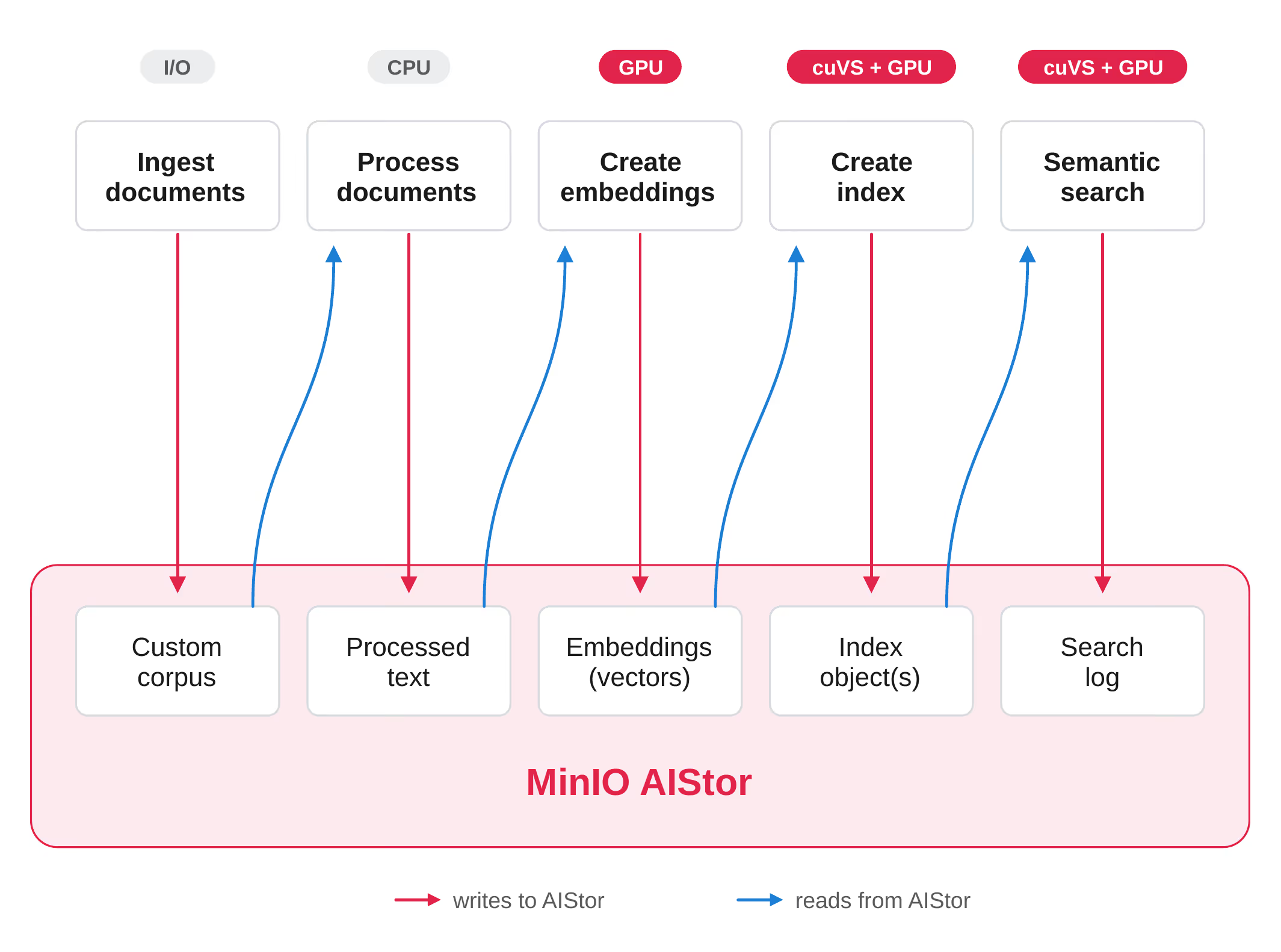
The semantic search pipeline is illustrated below. The process starts by ingesting documents into AIStor and concludes with the ability to run semantic searches against them. Note that the output of each phase becomes the input to the next, and that all outputs are saved in AIStor. Additional details and best practices for all the phases are described below.
Ingesting Documents
It is always a good idea to save the documents you wish to use for semantic search in their original format in a central repository. AIStor is perfect for this phase as there are a variety of ways to transmit data to AIStor, and AIStor can hold unstructured data in any format. For this post, we will use the Simple English Wikipedia dataset.
Processing Documents
Typically, a corpus will contain documents in different formats, such as Microsoft Word and PDFs, that need to be converted to text and then broken down into smaller chunks before creating embeddings. The Simple English Wikipedia dataset is already in text format, so we only need to focus on chunking. The chunking strategy we will use here is to parse by paragraph. In other words, each chunk will be a paragraph from an entry in the Simple English Wikipedia dataset. This workload needs to run on a CPU since it requires text processing. For our dataset, this runs quickly; however, for larger datasets with a variety of non-text formats, it may take longer. That is why it is a good idea to save the results of this phase to AIStor so they can be quickly loaded for future experiments that do not require rerunning this phase.
Creating Embeddings
Embedding models that transform unstructured data into meaning-bearing vectors are the unsung heroes of generative AI and agentic AI. We will use the “nq-distilbert-base-v1” sentence transformer, which the sentence-transformer library will download from Hugging Face. We will use it to turn each text chunk into a 768-dimensional vector. This can run on a CPU, but it will take forever. Even on a GPU, expect this to take around 10 minutes for an RTX 3070 - faster GPUs will be quicker. As with the document processing phase, we will save these vectors to AIStor for future experiments that do not require rerunning this phase.
Creating Indices
To create an index, you will need the embeddings created in the previous phase. An index for a collection of vectors serves a purpose similar to that of indices for tables in a relational database. They organize vectors in such a way that a brute force search (comparing a query vector to each document chunk vector) does not need to be performed. This allows searches to run much faster. However, they “approximate,” meaning that they will sacrifice accuracy for performance. (This is very different from a relational database index.) What is nice about cuVS is that it provides a way to do “brute force” searches. You should only use a brute force search in production when you have a small collection of vectors. The most common use of brute force searches is to calculate “recall” when you are using an indexing algorithm that approximates. Recall is a metric that compares the results of the approximating algorithm to those of the brute-force search, allowing accuracy to be calculated.
cuVS provides a variety of algorithms for creating indices. A detailed description of all the indexing algorithms provided by cuVS is beyond the scope of this post. However, if you want to understand the parameters available for configuring the index algorithm you are using, then you will need to understand how that algorithm works. This is important when you are experimenting and fine-tuning your index for maximum accuracy.
Once an index file is created from the embeddings created in the previous phase, it should be saved to object storage.
Semantic Search
Once you have an index file, you are ready to search your vectorized corpus. A semantic search starts by running your query or question through the same embedding model used to vectorize the corpus. After the query vector has been calculated, it is passed to the appropriate cuVS function, which also takes the index created in the previous phase as a parameter. You also need to tell cuVS how many matches you wish it to find, since vector searches are not an equality check returning all chink vectors that are equal to your query vector - rather, you want the closest matches to your query vector.
Finally, it is a good idea to keep a log of all your semantic search results. AIStor is used in this phase as a search log.
Now that we understand the general flow of our pipeline, we are ready to write code.
Building the Semantic Search Pipeline
In this section, we will actually build what we discussed in the previous section. We will use the CAGRA (CUDA Approximate Nearest Neighbor Graph-based) indexing algorithm. CAGRA was built by NVIDIA from the ground up to leverage GPU capabilities and is particularly efficient for small-batch (sending a few queries at the same time) or single-query scenarios. This makes it perfect for the problem we are solving in this post: building a lightweight semantic search engine for interactive use. To learn more about CAGRA and the other algorithms available for semantic search, check out Accelerating Vector Search: Using GPU-Powered Indexes with NVIDIA cuVS and Accelerating Vector Search: Fine-Tuning GPU Index Algorithms.
The code snippets shown in the following sections are available in the code download for this post. These snippets can be found in the cuvs_cagra.ipynb notebook. Other notebooks in the code download demonstrate other indexing algorithms available in cuVS. Also, many of the snippets below use utility functions whose source code is not shown here, so I can focus on cuVS features. These utilities are plain old Python that use the MinIO Python SDK to move data to and from AIStor. They can be found in the vector_utilities.py module. While they are plain old Python, I hope they save you time, as I have figured out all the subtle details of streaming large compressed datasets, PyTorch tensor embeddings, cuVS vector indices, and JSON log files. (Basically, these utilities implement the data movement arrows in the pipeline diagram above.)
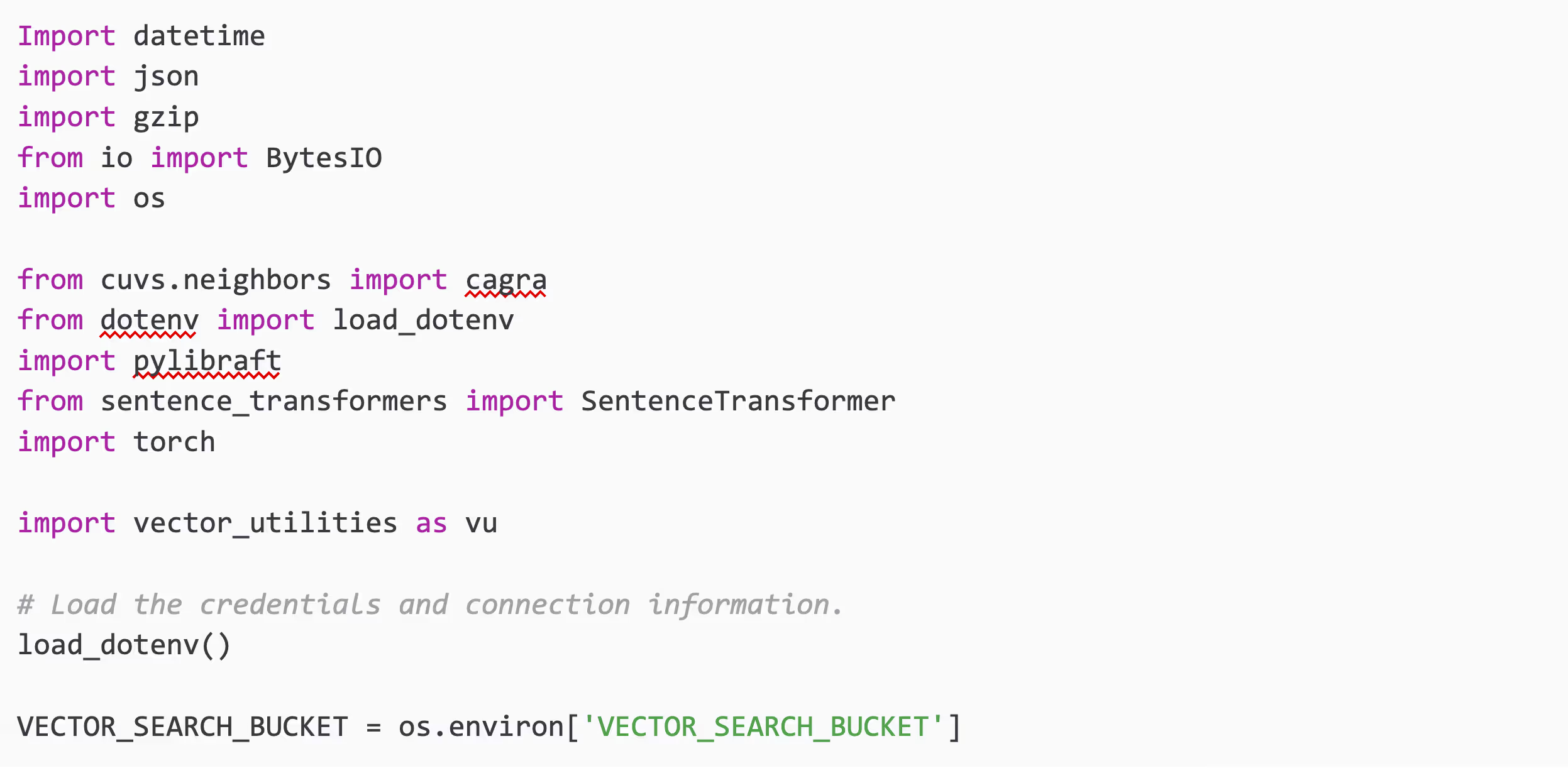
All the imports used to build our semantic search pipeline are shown below.
Storing Raw Data
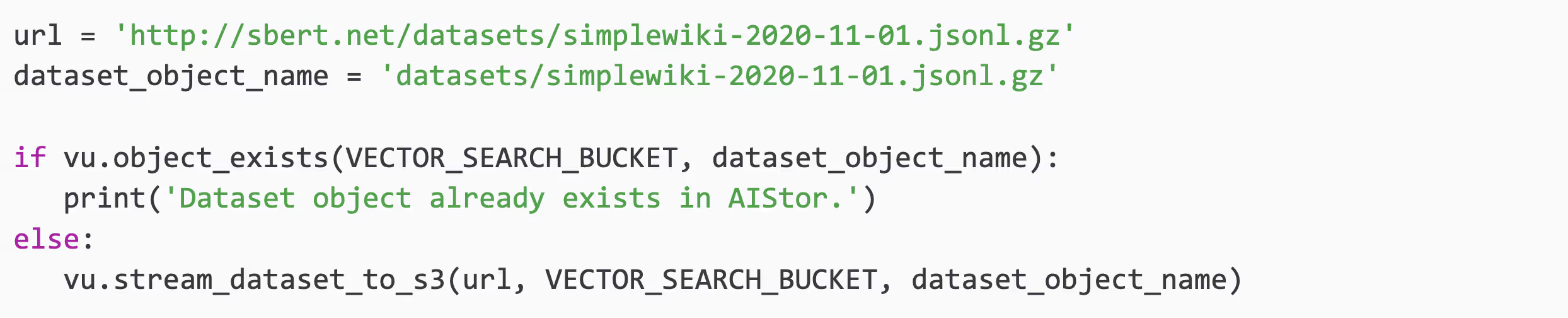
Before downloading data from an HTTP endpoint, this snippet first checks whether the data exists in AIStor. If your raw dataset is not in AIStor, the code will retrieve it and save it to the specified bucket under the specified object name. This snippet assumes you have access to your raw data via HTTP and that it is a single compressed object.
Processing Documents
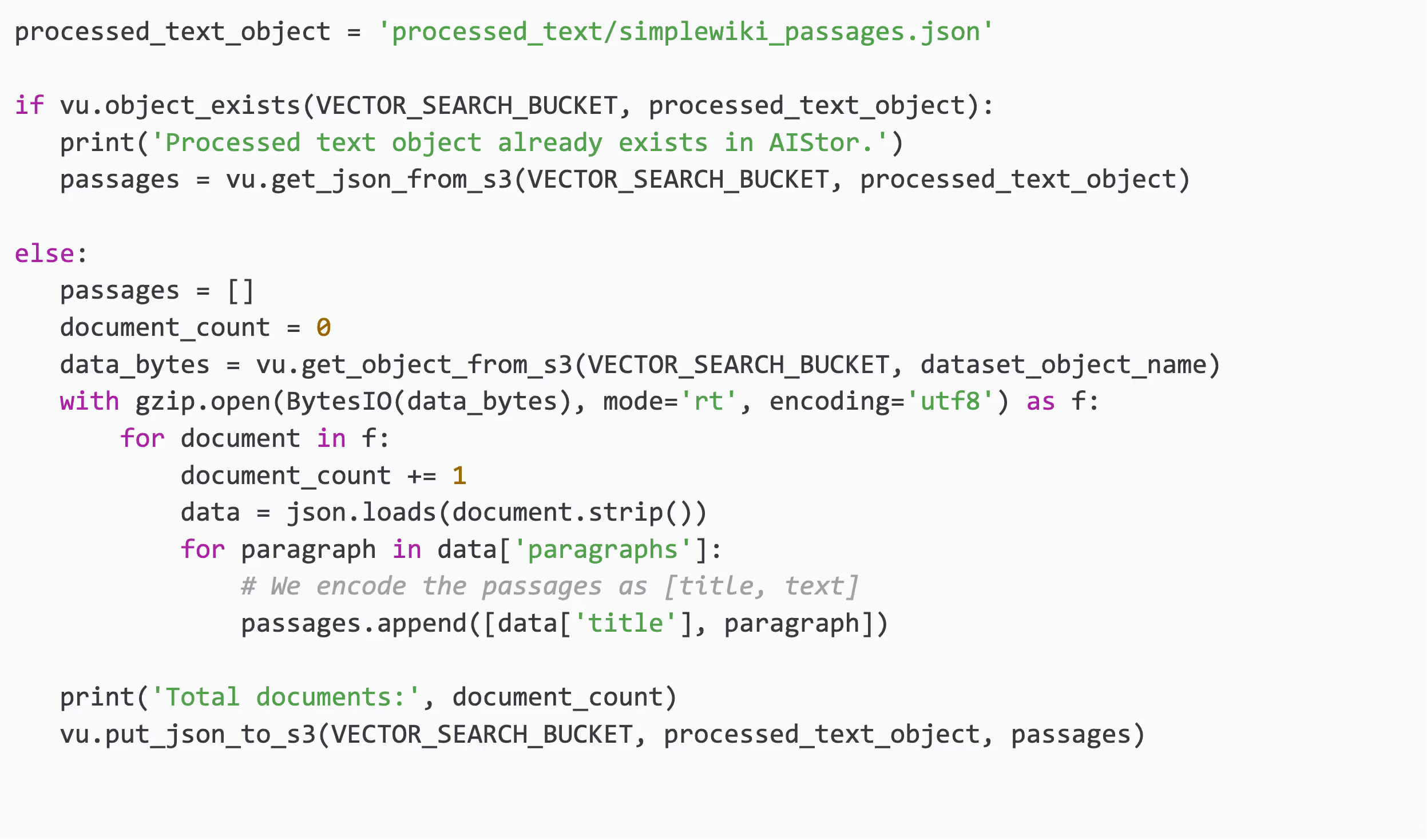
Our dataset is fairly clean, so processing it merely involves parsing each document by paragraph. Each paragraph will be converted into a vector in the next phase. A more complex dataset will require conversion to text and a strategy for dealing with diagrams and tables embedded in the documents. Most importantly, domain-specific documents rich in knowledge may require a more complex chunking strategy than parsing paragraphs, so that important ideas are not split by the chunking strategy. Overlapping text between chunks can help when parsing complex documents. The snippet below first looks for the chunks in AIStor. If they already exist, then they are retrieved from AIStor. If they do not, then the raw dataset is loaded and processed to produce the chunked text. Finally, the chunks are saved to AIStor as a JSON object.
Creating Embeddings
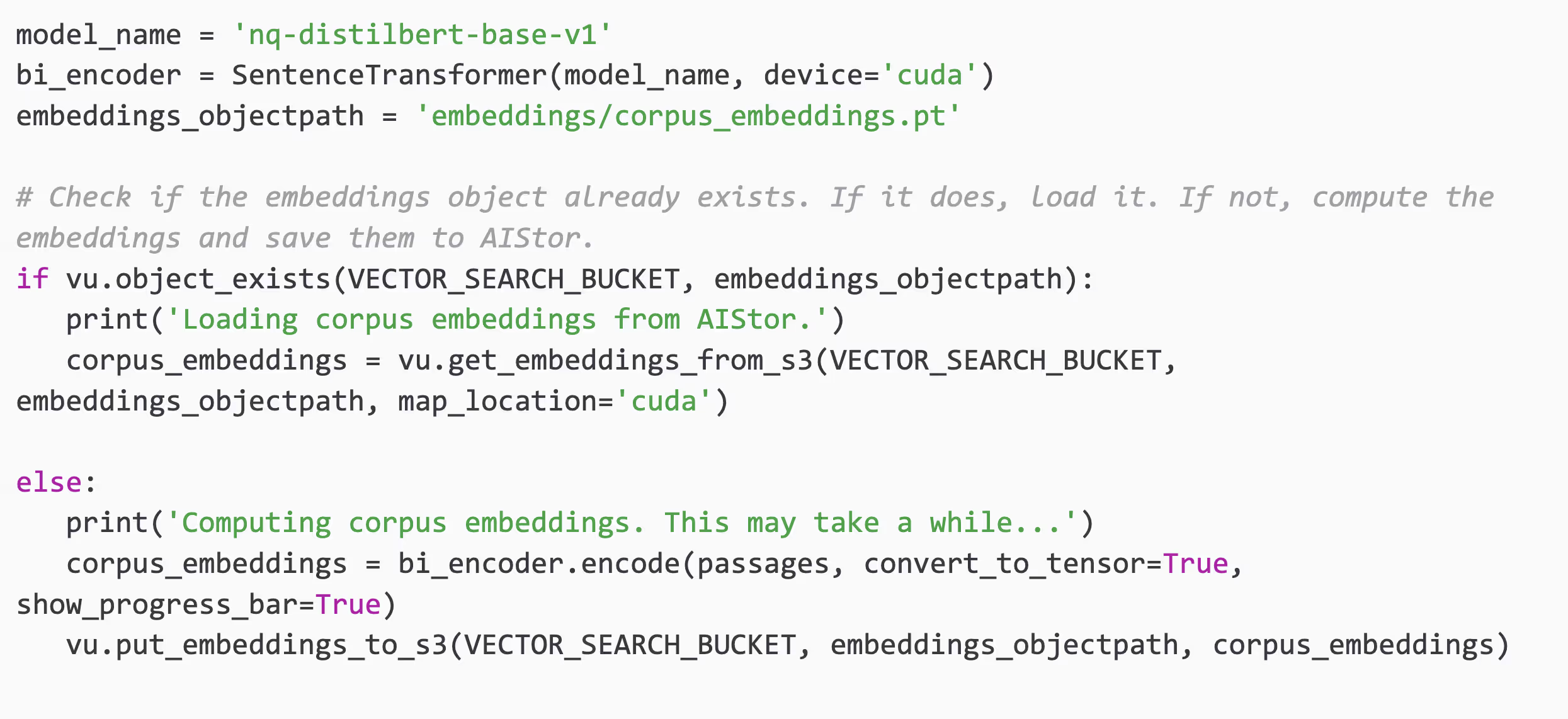
As stated above, this is the most time-consuming task for this pipeline. The code below creates the nq-distilbert-base-v1 embedding model and passes each text chunk through it. Notice that the model has been moved to the GPU. When the model is on the GPU, the embedding it creates will also reside on the GPU. Saving the results of this phase to AIstor can save valuable time in experiments involving the optimization of index and search parameters (described next). Loading the serialized embeddings into memory is much faster than recalculating them. The snippet below calculates the embeddings and saves them to AIStor if they do not already exist.
Building Vector Indices
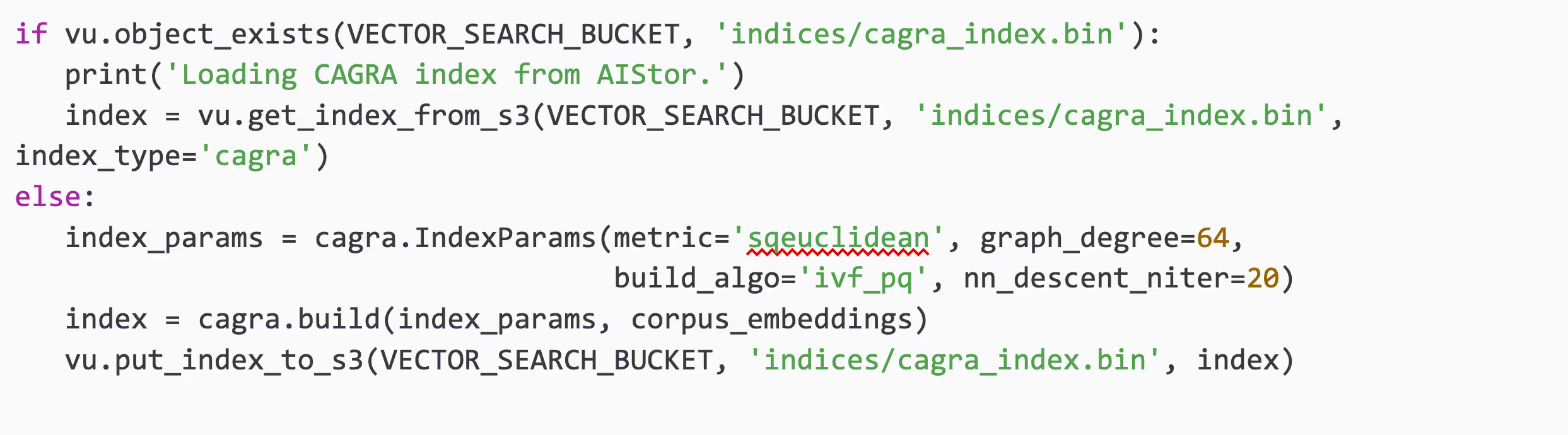
The code below shows how to build a CAGRA index. Regardless of the index you choose, the parameter signature is the same. You will need to create an IndexParams object and pass it and your embeddings to a build function. The code below shows default values of index parameters that will make the biggest difference in results if you tweak them. Check the documentation for a full list of index parameters. This phase runs on the GPU. For the dataset used here, the index-building phase took about 14 seconds.
GPU Accelerated Vector Search
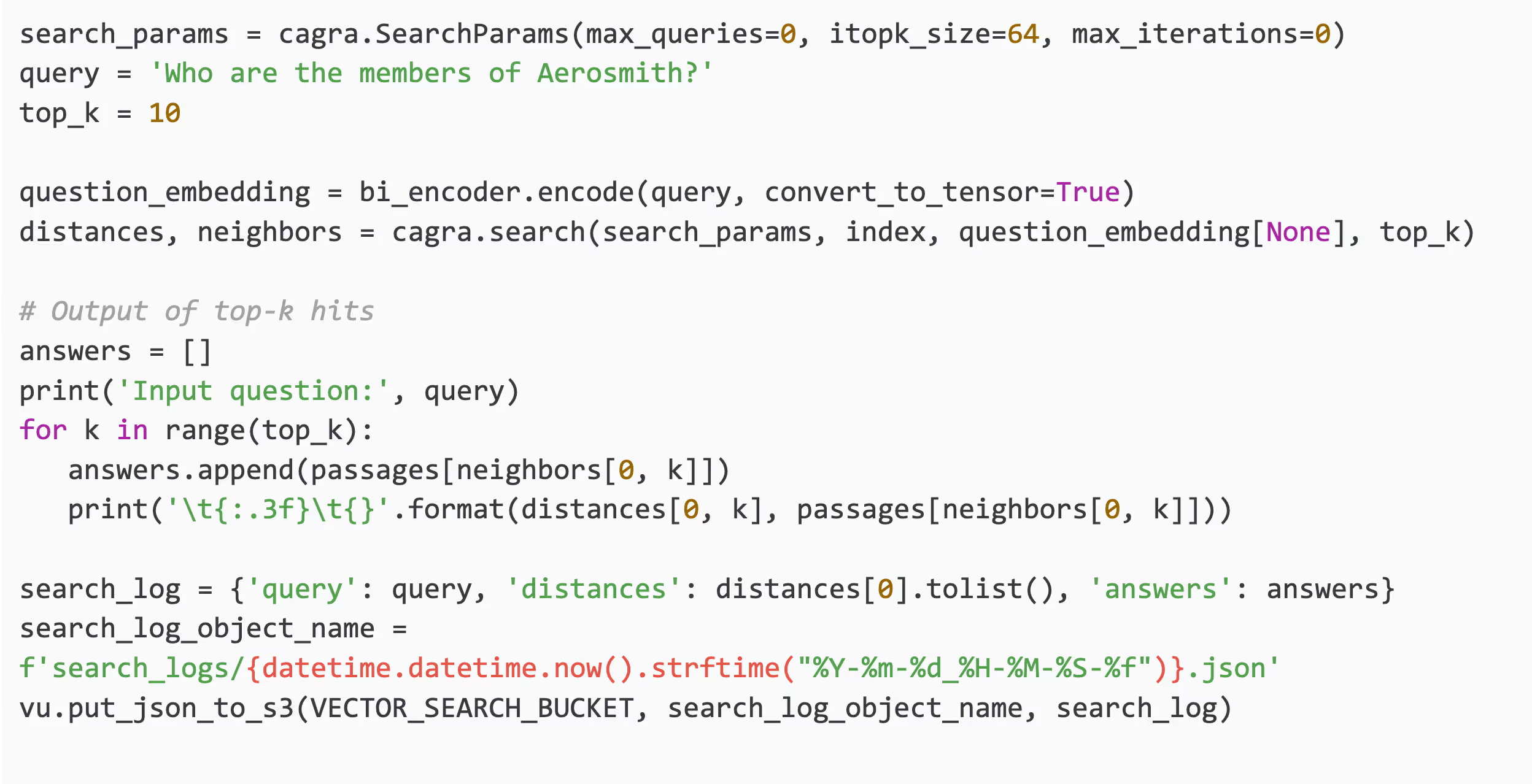
We are now ready to perform a semantic search using our index. Setting up search is similar to creating an index. You will create a SearchParams object and you will call the appropriate search function for the index algorithm you chose. The search parameters are unique to your index algorithm - you will need to understand your algorithm to optimize your search results. The code below runs a search and logs the results to AIStor.
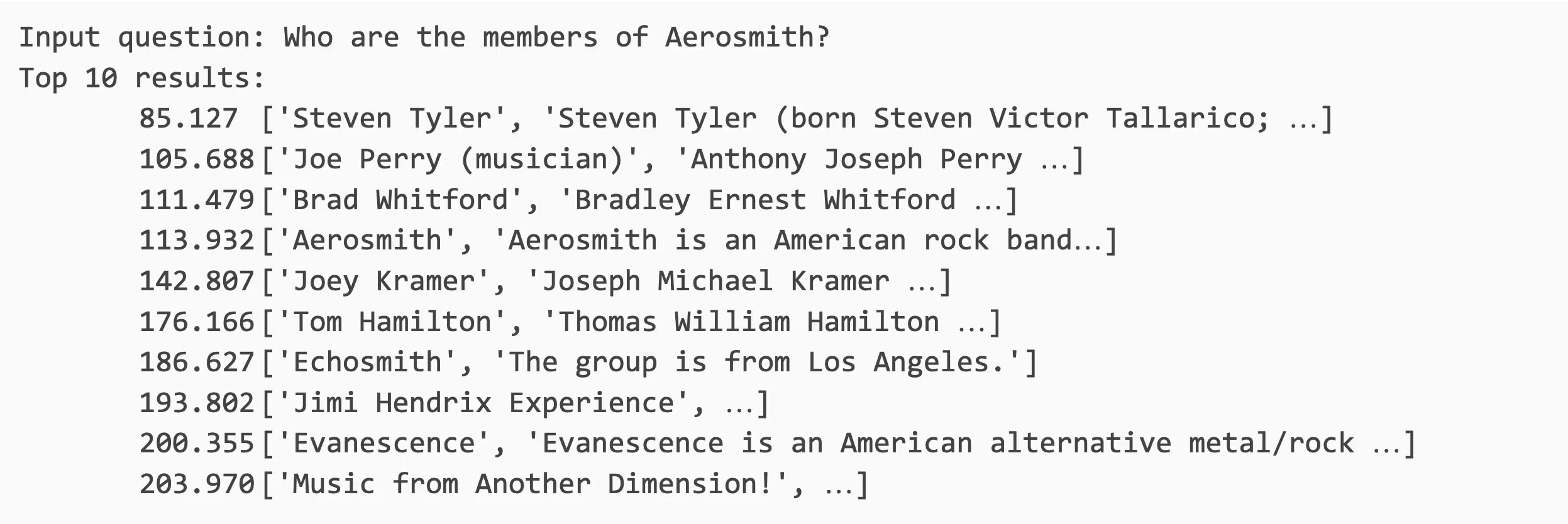
The output of the search above is shown below. You do not need to calculate recall to know that we got pretty good results. When asked who are the members of the rock band Aerosmith, our search found the band's entry as well as entries for each band member. Dream On.
Next Steps
The code in this post presented a straightforward and simple approach to using cuVS with AIStor. If you intend to use these techniques for your organization, then consider the following next steps:
- Implement recall calculations. The brute-force algorithm within cuVS will help here. It does not approximate, and it returns the ground truth for a search request. This ground truth can be used to determine the accuracy of an algorithm that approximates.
- Experiment with the other algorithms within cuVS. Your code will mostly be the same as the code shown here, which uses CAGRA. You will just need to import and use the module for your algorithm and figure out the index and search parameters.
- Experiment with other embedding models. This post used nq-distilbert-base-v1, but there are many other embedding models that may produce better results.
- Experiment with different chunking strategies. The size of the chunk and the amount of overlap with adjacent chunks can make a big difference in accuracy.
- The code in this post keeps the dataset’s text in memory, which consumes valuable system memory. If this is prohibitive for your dataset, then store each text chunk in AIStor and retrieve the relevant objects when search results are returned.
- Add real-time capabilities to the pipeline. cuVS provides the capability to extend an index when new data needs to be added.
- Consider a versioning strategy if you intend to run many experiments and your organization requires experiment tracking. This could be as simple as adding a version prefix to each saved object path. A more complex versioning strategy would allow each object to be versioned independently.
Conclusion
Semantic search pipelines generate data at every phase: raw documents, processed text, embeddings, vector indexes, and, finally, search logs. Using AIStor to manage this data is the best way to fine-tune indices and search parameters for optimal accuracy.
The approach outlined in this post enables lightweight vector search services that are easy to deploy, fast to query, and simple to scale. For smaller to medium-sized corpora, it avoids the operational complexity of a full vector database while still delivering excellent performance.
By combining MinIO AIStor with NVIDIA cuVS, you can build simple and powerful semantic search capabilities. AIStor provides a durable, scalable storage layer, while cuVS delivers high-performance GPU indexing and similarity search that can run directly in memory.
.svg)