.svg)



Why This Exists
Enterprises running Databricks routinely find that their most valuable data is the data Databricks cannot reach. It sits on-premises, and it stays there for one of three reasons.
Some of it cannot move for legal or compliance reasons such as financial records, patient data, anything subject to data residency requirements. Some of it is too large to move economically: replicating petabytes to the cloud drives storage and egress costs that scale in the wrong direction. And some of it is time-sensitive enough that by the time a sync job completes, the moment the analysis was meant to capture has already passed.
Historically, closing that gap has meant copying data, maintaining it in two places, or settling for a partial view. Each is an acceptable compromise until the volume or the stakes grow too large. AIStor Table Sharing narrows that tradeoff: Databricks reads current on-premises Iceberg and Delta tables without first creating and synchronizing a second persistent copy, and without a separate sharing service to deploy and operate. What follows is how that works, starting with the protocol underneath it.
The Protocol Underneath It
OpenSharing's origins explain some of its design. Databricks launched it in 2021 as Delta Sharing, an open, non-proprietary REST protocol, which is a significant part of why it saw broad adoption. As its scope grew beyond tables to cover assets like AI models, agent skills, and unstructured data, it evolved into OpenSharing. Delta Sharing is now the table-sharing subset of that larger protocol.
The mechanics are deliberately plain: GET to discover what is available, POST to query a table, a bearer token in the header, and a response that streams back as NDJSON. That last detail is easy to overlook, but it is what makes proxy behavior worth checking before a large table goes into production.
The protocol is open, so servers and clients from different vendors interoperate. A provider creates a share and determines what is shareable before anything is exposed. On the other side, a recipient like Databricks authenticates and consumes.
The design decision that matters most: the server does not serve the table data. Its responsibility ends at authorization and metadata resolution, after which the client reads the data files itself. The protocol defines more than one way to hand that access over. This post follows the URL-based path, where the server returns a short-lived presigned URL for each file.
The Endpoint: The Decision That Must Be Right the First Time
Standing up AIStor Table Sharing involves one setting that is technically optional and easy to skip but incredibly important to get right:
mc admin config set aistor delta_sharing \
  endpoint="https://aistor.company.com:9000"
It reads like a throwaway line, but of everything involved in standing up Table Sharing, this is the setting most likely to cause a production incident later. Whatever value goes here is not simply stored in configuration. From the moment it is set, AIStor embeds it into every presigned URL it generates and into every profile.share file a consumer uses to connect. The OpenSharing API path is appended automatically.
If the endpoint is never set explicitly, AIStor uses an available API endpoint, falling back to the request host during profile creation when no API endpoint is available. Neither is guaranteed to be an address an external consumer can reach.
Three separate things have to agree for a connection to succeed: the endpoint value itself, the hostname on the certificate the proxy in front of AIStor presents, and the address the client is actually configured to connect to. A mismatch shows up either as a flat connection failure or as a TLS certificate verification failure. The two failures look unrelated, which is why this costs an afternoon the first time rather than five minutes.
What makes this setting worth this much attention is that a wrong value here, or no value at all, does not stay a configuration problem. Because the endpoint is embedded in every profile.share already issued, correcting the server setting does not update the profiles already in circulation. Those still point at the wrong address. They can be repaired without reissuing anything. A profile is a JSON file, so endpoint can be edited in place, along with tokenEndpoint on a version 2 OAuth profile. But that repair has to reach every copy that went out, not only the consumer who happened to notice. A new token is needed only when the original bearer token or client secret is unavailable, expired, or revoked. AIStor does not retain the raw credential, so it cannot regenerate the profile for you. Setting this correctly before the first token is issued is the difference between a configuration step and a coordination exercise across every consumer.
Native Embedding: Presigned URLs and What Changes When There Is No Separate Server
The OpenSharing protocol can be implemented in two architecturally distinct ways, and the choice determines how much infrastructure a deployment carries.
The conventional pattern places a standalone OpenSharing server in front of an existing object store. That server issues the presigned URLs, and clients then read files directly from the object store, but it is a separate sharing control plane to deploy, patch, monitor, and secure, with its own configuration living apart from the storage it fronts.
AIStor embeds OpenSharing directly in the storage layer, eliminating the separate system entirely. A client connects to AIStor directly, and because AIStor is simultaneously the sharing server and the storage layer, the presigned URLs it generates point back at itself.
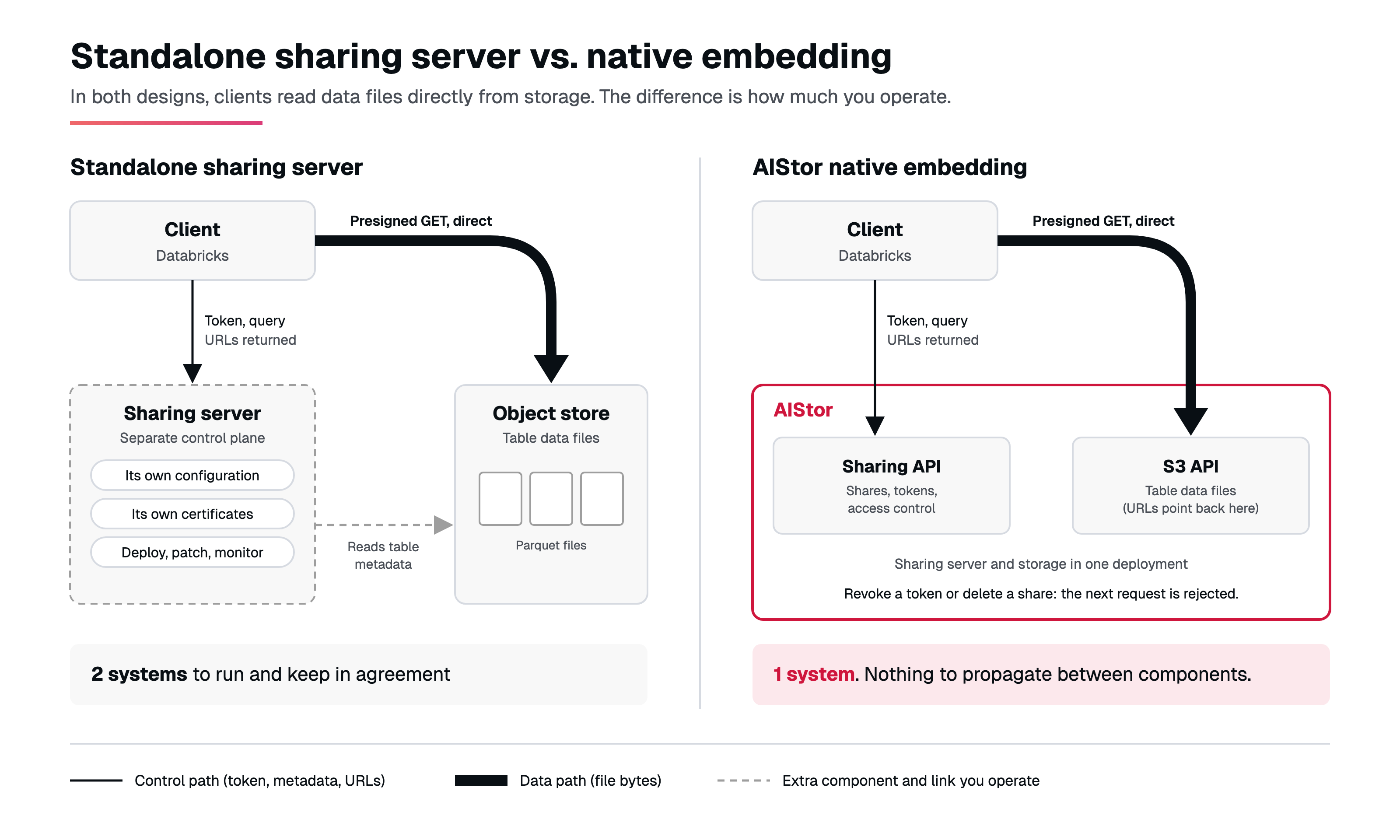
A presigned URL is an ordinary HTTPS link to a single data file, with a cryptographic signature built into the URL itself. The signature is the permission. A client that holds the link does not authenticate again against storage; it just makes the request. The links are time-limited. The credential signing each one is narrower than the token that got the client here. It covers only the table being queried, so anyone who obtains one of those URLs can read that table and nothing else.
What native embedding changes is how much you operate, not where the bytes come from. A standalone deployment adds a separate sharing control plane, with its own configuration and certificates to keep in agreement with the storage behind it. AIStor embeds that control plane in the storage deployment while clients still read table files directly from the source storage. Share definitions, tokens, and access control are held in AIStor as well. Nothing has to propagate before a change takes effect. Revoking a token or deleting a share causes the sharing API to reject subsequent requests for that credential or share, without waiting for the token to expire. Presigned URLs already issued are self-contained and stay usable until their own expiry, so revocation closes the door on new requests rather than on transfers already authorized.
Building the Share
With the endpoint configured, the structure beneath it is straightforward: a share is the access boundary, containing one or more schemas, each containing one or more Delta or Iceberg tables.
Share (one token grants access to the entire share)
  └─ Schema
      ├─ Table
      ├─ Table
      └─ Table
That embeds access control directly in the share, which keeps the decision in one place. Once a token is handed over, the recipient has every table inside it, so if that exceeds the intended access scope, the data belongs in a separate share.
What the consumer receives is a profile.share file, a connection string and a bearer token bundled into a single JSON object:
{
  "shareCredentialsVersion": 1,
  "endpoint": "https://aistor.company.com:9000/_delta-sharing/v1",
  "bearerToken": "<token>",
  "expirationTime": "2027-06-25T17:40:19Z"
}
The endpoint value is captured when the token is created, not read live, so a later change to the server setting leaves existing profiles pointing at the old address.
The share itself is not static once created. Tables can be added or removed at any time, and the change applies to subsequent queries from anyone already holding a token. No new token, no updated profile.share, nothing is required on the consumer's side. Removing a table stops new queries against it, though presigned URLs already issued for its files remain valid until they expire.
On the client side, this works with Databricks and the open-source Spark and Python path. Clients use standard HTTP APIs, but consuming a table still requires an OpenSharing-compatible connector or an implementation of the protocol and its table-reading semantics: discovery, the NDJSON action stream, pagination, credential and signed-URL handling, and Parquet reading. See opensharing.io for the wider OpenSharing ecosystem.
Tracing a Query End to End
Once a share exists and a consumer holds a profile.share, a query proceeds as follows:
- Databricks authenticates, presenting the bearer token from its profile.share. Where OAuth is enabled, it presents an OAuth2 token instead.
- AIStor validates the token, resolves which physical files answer the query, and generates a presigned URL for each.
- AIStor returns an NDJSON action sequence containing protocol and metadata records, the selected file records with their presigned URLs, and any applicable end-stream information. Where the response is paginated, the client submits the continuation token to retrieve each further page.
- Databricks fetches the files directly from AIStor's S3 API using the URLs, bypassing the sharing endpoint.
- Databricks returns query results.
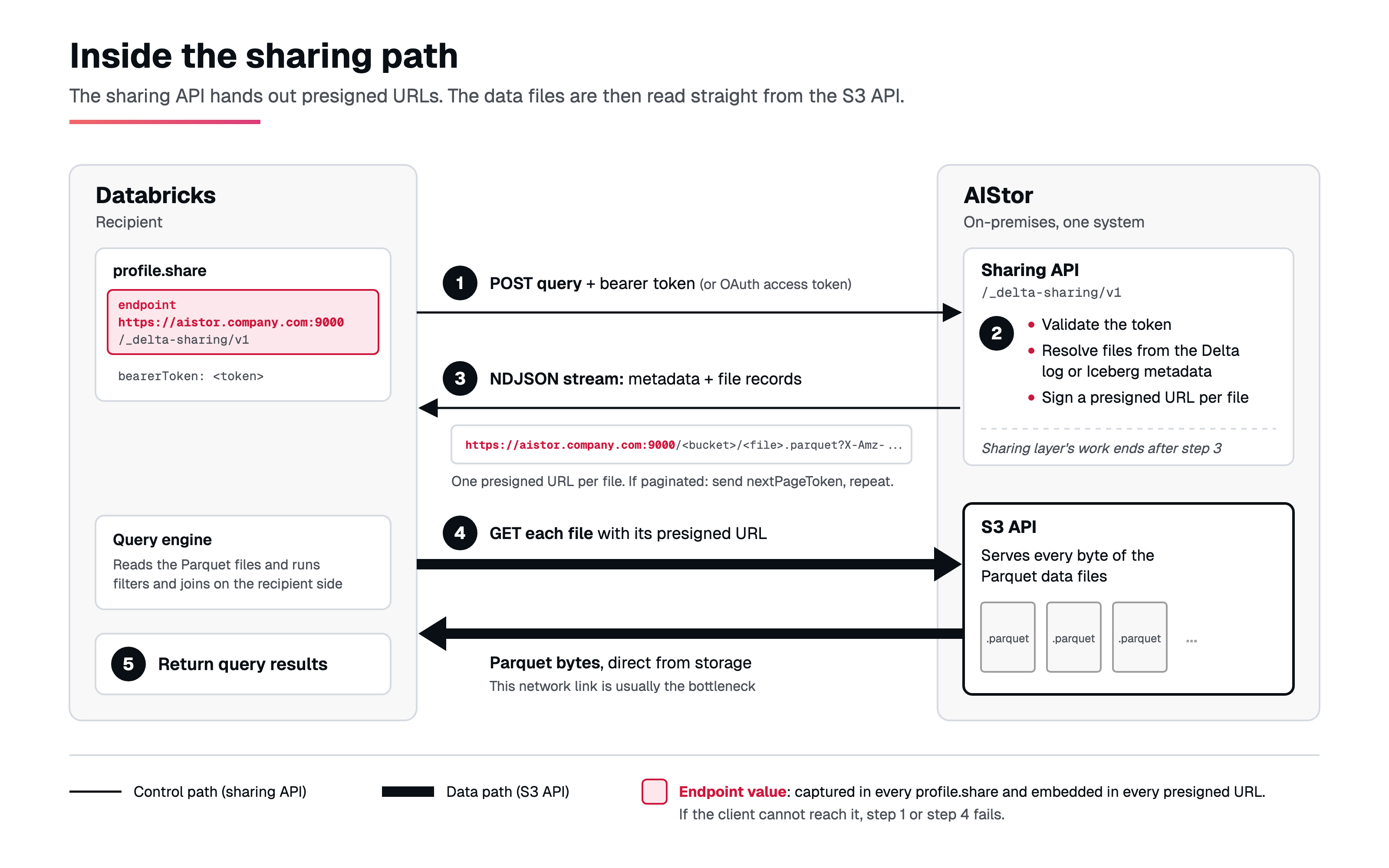
The sharing endpoint's work ends once it has returned the URLs. After that, the client reads the files from AIStor's S3 API rather than through the sharing API handler. AIStor is still serving every byte; what drops out of the path is the sharing layer, not the storage. Two consequences follow.
Network bandwidth is usually the bottleneck. Once the URL exists, transfer speed depends on the link between AIStor and wherever the client runs, which is the first place to look when queries feel slow. AIStor also does real work on either side of that: reading Delta logs or Iceberg manifests, pruning files, and signing access before the URLs exist, then serving every byte after. File count and layout, cluster throughput, and the recipient engine's own capacity all show up in end-to-end latency. For sizing AIStor's own network interfaces, see the network requirements.
The presigned URL is the data path. If it contains a hostname the client cannot reach, the query fails there. It is the same failure family as the endpoint mismatch described above, surfacing later in the flow rather than at import time.
How AIStor Shares Each Format
Delta and Iceberg tables reach AIStor by different paths, and a share has to reference each one according to where it actually lives.
A Delta table is ordinary Parquet data plus a _delta_log/ directory, sitting in a regular bucket, typically written there by an external tool writing through the S3 API. Adding it to a share means pointing at that bucket and table directly. AIStor reads the transaction log itself and generates presigned URLs from whatever state the log describes at query time.
An Iceberg table lives differently. It sits inside a warehouse that AIStor manages, built through mc table commands or the Iceberg REST Catalog API, with the catalog, metadata, and snapshot history kept by AIStor itself rather than left in a log a client would have to parse. A share references an Iceberg table by warehouse, namespace, and table name rather than by bucket and object path, because AIStor's own catalog is what resolves it. AIStor reads that native Iceberg metadata and translates the schema, snapshots, and file references into Delta Sharing responses Databricks can consume.
The two paths converge at a common sharing API. A consumer queries the live table in both cases and receives the same shape of presigned URL, while AIStor translates the differing metadata, version, access-mode, and change semantics internally.
Both formats support time travel, so a consumer can query a table as it existed at a prior version rather than rereading the current one. Delta tables can expose Delta CDF when enabled. For Iceberg, AIStor exposes a file-level comparison between two snapshots rather than row-level change records.
Access is Read-Only
A consumer can query, join, and filter the data in its own engine. AIStor Table Sharing provides read-only access through OpenSharing, and the share is the access boundary. Those are two pieces of a larger model that also covers authentication, credential lifetime, and rate limits.
Three Considerations Before Production
None of these surface in a small proof of concept. All three surface in production when unaccounted for.
Proxy handling of large metadata responses needs checking. Responses are framed as NDJSON, and a large table produces a response big enough to hit read timeouts, buffer limits, or temporary-disk capacity on the proxy. Validate all three. Disabling response buffering can reduce latency and temporary-disk use, but it is a deployment choice rather than a protocol requirement. AIStor resolves each response page before it begins encoding, so the proxy receives the page as a unit.
Presigned URL expiry must outlast the client's last request, not just its first. Expiry is checked when a request begins, so a transfer already in progress finishes, but any request started after expiry fails, including retries. A query returning thousands of files can still be issuing requests long after it received the URLs. The default is one hour.
Confirm the client follows pagination tokens. When a response includes nextPageToken, the client has to submit it to retrieve the next page, and a client that reads only the first page silently returns partial results. Behavior differs by path: Iceberg snapshot queries use 1,000-file pages by default, while Delta snapshot queries return all matching files on the initial request and use 1,000-file pages once pagination starts. A connector usually handles this, though large file counts still add round trips.
Troubleshooting
Why cannot Databricks import the profile.share (the first query fails)?
The endpoint was not set or set to an unreachable address before the token was created. Set the endpoint to the externally reachable address, then edit the endpoint in the profiles already distributed. Issue new tokens only if the bearer token itself is lost, expired, or revoked.
Why does a TLS certificate verification error appear on connection?
The endpoint hostname does not match the certificate the proxy presents. Confirm that the endpoint, the certificate hostname, and the address the client connects to all agree.
Why does a request fail with HTTP 429 or RESOURCE_EXHAUSTED?
A consumer has exceeded rate_limit_per_token, or all consumers together have exceeded rate_limit_global. Re-tune the limits to match actual concurrent load.
Why are retries or later file requests failing during a large download?
presigned_url_expiry is too short to cover the full set of requests. Extend the expiry so it outlasts the client's last request.
Anything harder to pin down is usually visible in the metrics. Table Sharing publishes them under /minio/metrics/v3/delta-sharing, with audit entries that name the share token behind each call. See Tables and Delta Sharing observability.
What's Next
This post covers the protocol and query mechanics. Token governance, how Delta and Iceberg tables each handle recovery, and monitoring a live deployment each get their own post in the coming weeks.
.svg)