.svg)



Ransomware attacks are nothing new. The first ransomware attack occurred 36 years ago in 1989, and it is known as the AIDS Trojan PC Cyborg Virus. Floppy disks infected with a Trojan virus were mailed to attendees of the World Health Organization’s AIDS conference and other individuals. The virus waited until the computer had been booted 90 times. Then it encrypted the file names on the hard drive (not the contents). A message appeared demanding a payment of $189 to be sent to a P.O. box in Panama to receive a "software lease" renewal key. Checks had to be made out to PC Cyborg Corporation.
Today, attacks have become more sophisticated and frequent - attackers use more advanced encryption algorithms, the contents of files are encrypted, and ransoms are on the order of millions of dollars. Also, the internet has created a situation where everything is connected; consequently, a ransomware virus can spread before it encrypts data. But viruses do not need to spread themselves if they can infect a software distribution package. A specific type of ransomware attack known as a supply chain attack infects a software vendor's files for distributing their software. This could be an installation kit or an image. When customers install the vendor’s software, the virus encrypts their data.
The purpose of this post is to:
- Describe a ransom attack and the damage it is capable of inflicting.
- Call out the features of an enterprise class object storage solution that are relevant to the prevention and mitigation of attacks.
- Discuss the procedures that can be put in place to prevent ransomware attacks and mitigate attacks in the event of a breach.
- For financial organizations operating within the European Union, this post will conclude by mapping these procedures to two of the articles within the Digital Operational Resilience Act (DORA).
The first step is to understand exactly what a ransomware attack is and how an attacker infects a computer or datacenter.
What is a Ransomware Attack?
A ransomware attack is a cyberattack where malicious software (ransomware) encrypts data on the system to which it has gained access. The attacker then demands a ransom payment from the victim to decrypt the data files. How Does a Ransomware Attack Occur? Ransomware attacks follow a familiar pattern:
- The ransomware virus can be delivered through phishing emails, infected websites, or by exploiting vulnerabilities in software.
- The ransomware virus is installed on the target computer. Some ransomware can spread across networks, infecting other computers automatically.
- Once installed, the ransomware virus encrypts data, making it unusable without the attacker’s secret encryption key.
- A ransom note appears, demanding payment (often in cryptocurrencies like Bitcoin) in exchange for a decryption key.
It is important to note that the attacker is in total control during this process. Even if the ransom is paid, there’s no guarantee the attacker will actually provide the decryption key.
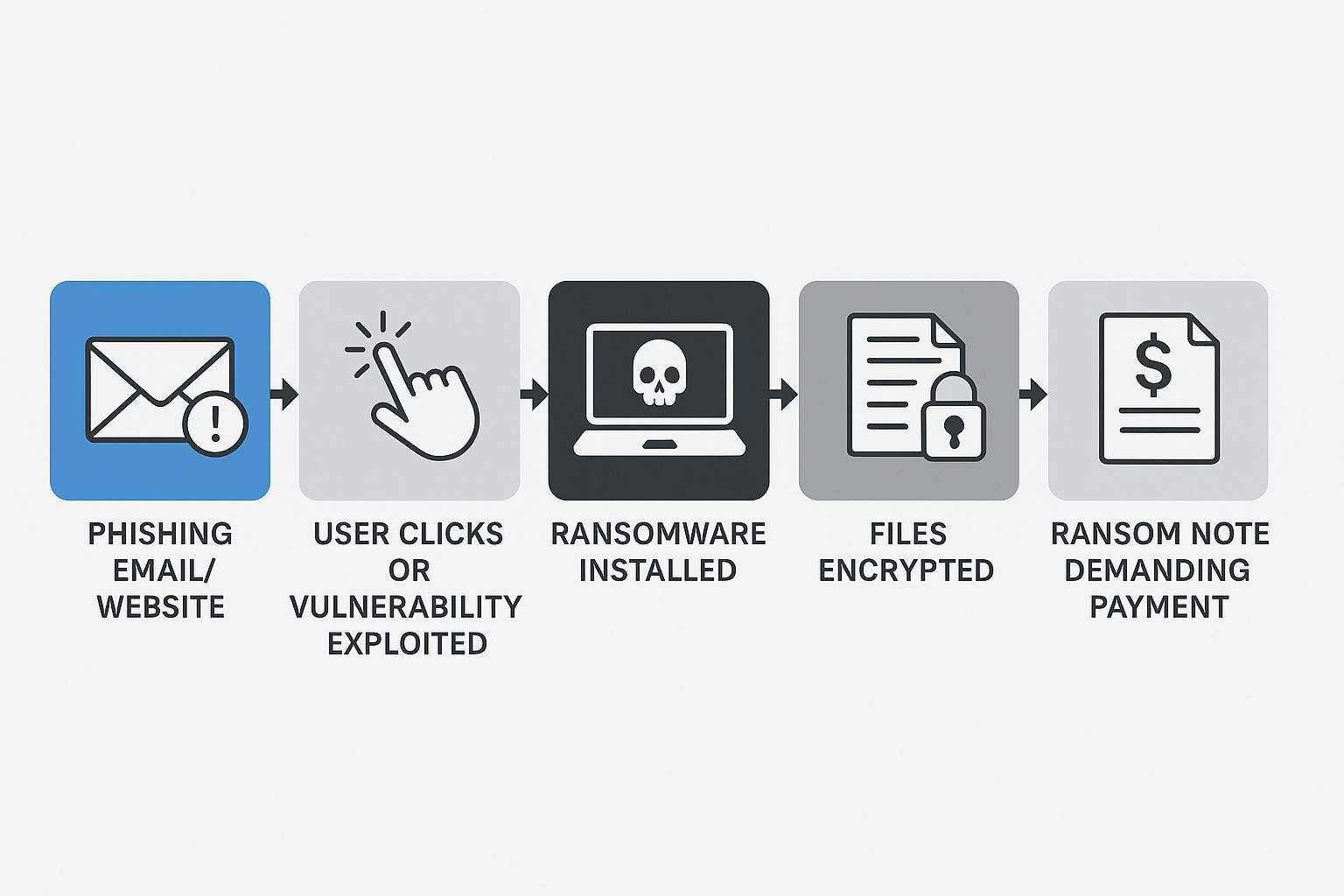
An intuitive approach to blocking the attack described above is to focus on securing your perimeter to prevent bad actors from gaining access. In other words, preventing steps #1 and #2, from the previous section. This is a great first step and should always be pursued, but it is not the only step that can be taken. An approach to security that applies the principles of “security in depth” will always produce better results. Security in depth means that you apply multiple layers of security to your infrastructure, and as you go deeper into your infrastructure, you assume the layers above have failed. At the lowest level of your infrastructure is your data, which is what the attacker is ultimately after. This post will discuss how object storage can be used to prevent data from being encrypted even if an attacker gains access to the object store. This represents a way to prevent step #3.
Next, let’s look at features of an object store that can be used to thwart an attacker who has gained access to an organization’s data center.
Features of an Object Storage for Mitigating Attacks
Object storage, particularly when configured for immutability and versioning, can be a powerful tool in mitigating ransomware attacks and recovering from them. Below are a handful of features that can be brought to bear when defending against ransomware attacks:
Immutability: Write Once, Read Many (WORM): Object storage can be configured to make data immutable, meaning it cannot be modified or deleted once written. This prevents ransomware from encrypting your data, as it can't overwrite the original data. Immutable backups provide a clean, uninfected version of your data that can be used to restore your systems. In other words, a guaranteed recovery point.
Object Locking: Object Locking is a retention policy that allows setting retention periods on objects, preventing modification or deletion until the retention period expires. This ensures that attackers cannot delete backups within the retention period, even if attackers gain access. Object Lock can help meet regulatory requirements that mandate organizations save data for a certain amount of time.
Versioning: Object storage versioning keeps multiple versions of the same object, creating a historical record of changes. In case of a ransomware infection, you can revert to a previous, unencrypted version of your data. Versioning also helps recover from accidental or malicious deletions.
Replication: An enterprise-class object storage system should provide built-in data replication for geographically distributed data. Data replicated across multiple geographic locations provides added resilience and is a backup measure in the event of a complete data center failure. Replicating your data also provides faster recovery, as data can be quickly retrieved from multiple sources stored in different locations, minimizing downtime.
Access Control: Object storage systems provide granular access controls, allowing you to specify who can access and manage data. Ideally, the credentials used to access backups contained within your object store should be different from those used to access higher layers of your infrastructure. An attacker will need multiple credentials to access your object store, decreasing the likelihood of a successful attack.
Encryption: Data can be encrypted at rest and in transit to protect against unauthorized access. Should an attacker intercept an object in transit or steal it at rest, they cannot make sense of it without the decryption key.
Protecting Your Data Using Object Storage
Applications and workloads that use object storage directly, like machine learning training pipelines and data science teams, should turn on versioning, enable encryption, and use object locking when appropriate. Access control should also be enabled, and unique credentials should be created for these workloads. As an added measure for durability, replication can be set up with a geographically distinct site.
Not all applications can use object storage directly to hold their data. For example, applications built using OLTP relational databases, OLAP data warehouses, and file systems. However, these applications should regularly back up their data and save these backups to object storage with versioning, encryption, and access control setup. Many applications can do incremental backups, which could allow these backups to be run daily. Additionally, many backup best practices call for multiple copies of backups to be created. This can be easily accomplished using replication. An enterprise-class object store can replicate to more than two sites for additional durability and protection.
Practice recovery procedures regularly. Many organizations perform quarterly failover and stay exercises, where failures are emulated, and DevOps teams ensure that recovery procedures actually work. If recovering from a backup is not a part of these exercises, consider adding it. Don’t wait until your first attack to run your first recovery—things always go wrong the first few times you run these procedures, and the only way to get them right is to practice.
Ransomware and the Digital Operational Resilience Act (DORA)
DORA is an EU regulation that aims to strengthen the digital resilience of financial entities. While DORA is not solely focused on preventing ransomware attacks, it provides a comprehensive framework that reduces the risk and impact of such cyber threats. Its regulations are broken up into 12 articles. Following the best practices outlined in this post can help financial institutions in the EU comply with articles 9 and 11.
Article 9 Protection and Prevention emphasizes continuous monitoring, implementing security measures, and establishing policies to protect ICT systems and data integrity. Setting up perimeter defences is a big part of complying with this article, but using object storage as described above is also a preventative measure as it provides an additional layer of security for all data and, most importantly, prevents data from being encrypted even if an attacker gets through the access controls of an object store.
Article 11 Response and Recovery outlines processes for responding to and recovering from ICT-related incidents, ensuring continuity of mission-critical applications. Using properly configured object storage for all backups and ensuring that DevOps teams are well-rehearsed in recovery procedures is a big part of compliance with this article.
Conclusion
Ransomware attacks are on the rise; however, a handful of basic best practices can provide comprehensive security and ensure that an organization is ready to quickly recover in the event of an attack. The six best practices below summarize the recommendations described in this post.
- Implement a Security-in-Depth Strategy: Endpoint protection, virus scans, and employee education can prevent steps #1 and #2 from occurring. However, object storage should be part of a broader security strategy in the event that an attacker does gain access to any mission-critical application.
- Configure all object stores to use versioning, access control, and encryption.
- For applications and workloads that use object storage directly, use unique credentials and object locking when appropriate.
- For applications that do not use object storage directly, run backups of data regularly and send the backups to object storage. Whenever possible, use incremental backups on a daily basis. Object storage replication can be used to create multiple copies of your backups that are geographically separated.
- Isolate Backups: Consider isolating your object storage backups from the main network or using a separate, secure account to access them.
- Practice your recovery procedures. Regularly test your ability to recover from your object storage backups. Consider making these procedures a part of existing failover and stay exercises.
By leveraging these object storage features and security best practices, organizations can both prevent ransomware attacks and ensure business continuity in the event of an attack.
.svg)