.svg)



Apache Iceberg has taken the data world by a (snow) storm. Initially incubated at Netflix by Ryan Blue (later co-founder and CEO of Tabular, and now of Databricks fame) and Daniel Weeks, it was eventually transmitted to the Apache Software Foundation where it currently resides. At its core, it is an open table format for at-scale data sets (think hundreds of TBs to hundreds of PBs). With AI gobbling up vast amounts of data for model creation, tuning, and real-time inference, the need for this technology has only increased since its initial development.
There has never been a better time to begin building or expanding with an Iceberg data lakehouse. With the ability to serve up data at near line-rate speed, you can be assured that AIStor will not hold back your query speed. And investments into Iceberg have extended to the storage layer with the invention of embedded Iceberg REST catalogs. It’s no longer necessary to deploy and maintain your catalog as a separate service: Data teams can start extracting value immediately.
Below, we'll walk through the concepts that make Iceberg worth adopting, explain how AIStor fits into that picture, and provide a tutorial to try it firsthand
Related: Data Lakehouse Solutions by MinIO
Goals for a Modern Open Table Format
The promise of a lakehouse lies in its ability to unify the best of data lakes and warehouses. Data lakes stored on object storage were designed to store massive amounts of raw data in its native format, offering scalability, ease of use, and cost-effectiveness. However, data lakes on their own struggled with issues like data governance, and the ability to efficiently query the data stored in them. Warehouses, on the other hand, were optimized for structured data and SQL analytics but fell short in handling semi-structured or unstructured data at scale.
Iceberg and other open table formats like Apache Hudi and Delta Lake represent a leap forward. These formats make data lakes behave like warehouses all while retaining the initial flexibility and scalability of object storage. This new stack of open table formats and open storage can support diverse workloads such as AI, machine learning, advanced analytics, and real-time visualization.

Here is a look at how this infrastructure could function. The query engines can sit directly on top of the object storage in your stack and query the data inside it without migration. The old paradigm of migrating data into a database’s storage is no longer relevant. Instead, you can and should be able to query your Iceberg tables from any common engine.
Analytics, BI, and AI tools can often connect directly to your storage where your Iceberg tables are stored, but more typically interface with your query engine for a more streamlined user experience.
Finally, AI/ML has the same design principle as the query engines. AI/ML tools will use Iceberg tables directly in object storage without migration. While not all AI/ML tools directly integrate with Iceberg at this time, there is a deepening interest in using Iceberg for AI/ML workloads, particularly for their capability of maintaining multiple versions of models and datasets without difficulty.
What’s Special About The Open Table Formats
All of the open table formats have a combination of features and design principles that have inspired industry wide adoption of the lakehouse model.
Schema Evolution: allows users to add, drop, update, or rename columns without necessitating a complete rewrite of existing data. This flexibility ensures that changes to the data model can be implemented seamlessly, maintaining operational continuity.
Partition Evolution: enablings modifications to partitioning schemes over time without requiring data rewrites. This capability allows for dynamic optimization of data layout as access patterns change.
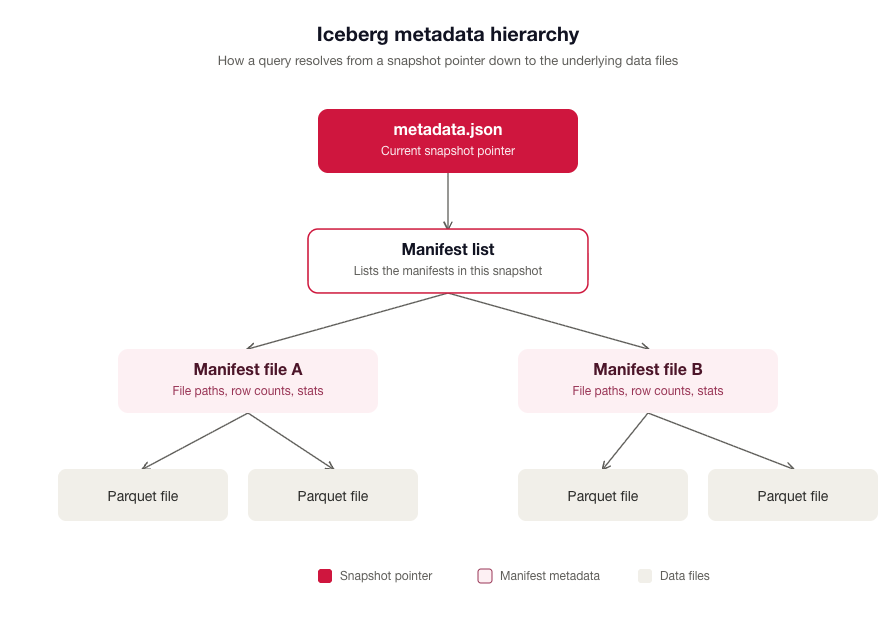
Metadata Management: hierarchical metadata structure, including manifest files, manifest lists, and metadata files. This design enhances query planning and optimization by providing detailed information about data files, facilitating efficient data access and management. In Apache Iceberg, that metadta hierachy looks like the below.
Object Storage and Iceberg
Object storage forms the foundation of modern lakehouse architectures, providing the scalability, durability, and cost-efficiency required to manage vast datasets across many environments. AIStor is particularly well-suited for these requirements.
AIStor unifies structured Iceberg tables and unstructured data in a single platform, with an Iceberg REST catalog built in, so you don't need a separate catalog service or database. Other Iceberg catalogs require a transactional database to store the catalog metadata. That's a minor inconvenience in the cloud, where spinning up a new container takes moments. The maintenance needs for this layer has less of an impact on dev ops and data teams in the cloud. But on-premises, these operational issues increase in significance. Embedding the Iceberg catalog REST API simplifies the entire lakehouse stack for sleaker and smoother deployment and maintenance.
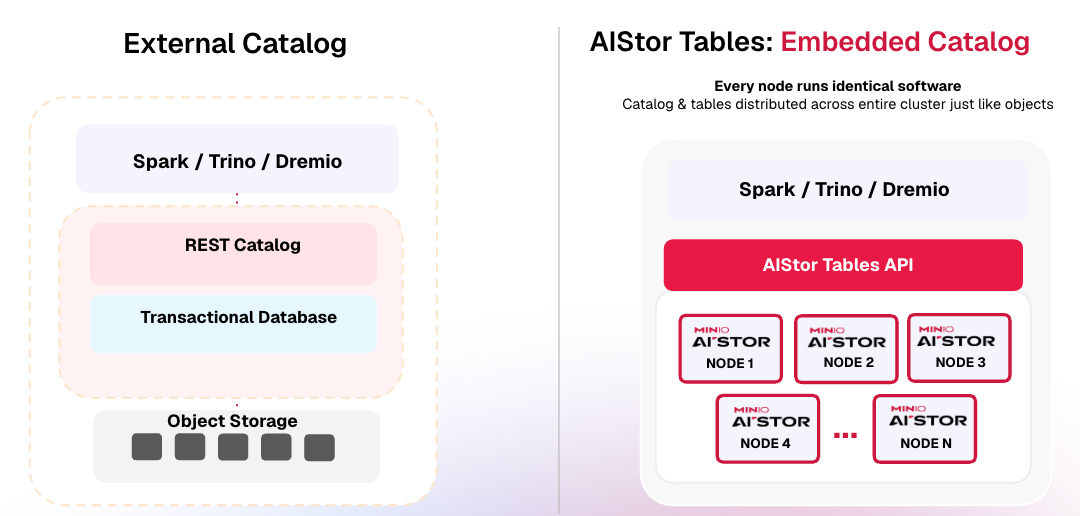
AIStor calls this emedded catalog AIStor Tables and it is shipped standared with the binary at no extra cost.
Try it out Yourself: Prerequisites
You’ll need to install Docker and Docker Compose. When both are required, it’s often easier to install Docker Desktop. Download and install Docker Desktop from the official Docker website. Follow the installation instructions provided in the installer for your operating system. Open Docker Desktop to ensure it’s running.
If you would prefer, you can also verify the installation of Docker and Docker Compose by opening a terminal and running:
docker --version
docker-compose --version
You will also need an AIStor license. You can request a license here.
Tutorial: Build a Lakehouse with Spark, Iceberg and AIStor Tables
In this tutorial you'll connect Apache Spark to AIStor Tables, create a table, and then try out the key Iceberg features described above: schema evolution, partition evolution, time travel and rollback, expressive SQL, and metadata tables.
Time to complete: about 25 minutes
Spark uses the Iceberg REST catalog for metadata operations like creating and listing tables, and it reads and writes data files directly in AIStor over the S3 API. Both run in the same AIStor server.
AIStor Tables organizes data in three levels:
- Warehouse: the top-level container, similar to a database server. You might have one for production, one for staging, and one for analytic.
- Namespace: a group of related tables, like a schema in PostgreSQL or a database in MySQL.
- Table: your data, stored as Parquet files, plus Iceberg metadata that tracks the schema, partitions, and snapshots.
Step 1: Start AIStor and Jupyter
Create a new directory for the tutorial. In it, create a file named docker-compose.yml that runs a single AIStor node and a Jupyter server with PySpark:
yaml
services:
  aistor:
    image: quay.io/minio/aistor/minio:RELEASE.2026-09-19T17-05-25Z
    hostname: aistor
    command: server --console-address ":9001" /data
    ports:
      - "9000:9000"
      - "9001:9001"
    environment:
      MINIO_LICENSE: ${MINIO_LICENSE}
      MINIO_ROOT_USER: minioadmin
      MINIO_ROOT_PASSWORD: minioadmin
    healthcheck:
      test: ["CMD", "curl", "-f", "http://localhost:9000/minio/health/live"]
      interval: 5s
      retries: 10
    volumes:
      - aistor_data:/data

  jupyter:
    image: quay.io/jupyter/pyspark-notebook:2024-10-14
    command: start-notebook.sh --NotebookApp.token=''
    ports:
      - "8888:8888"
    environment:
      MINIO_HOST: http://aistor:9000
    depends_on:
      aistor:
        condition: service_healthy

volumes:
  aistor_data:
This tutorial was tested with AIStor RELEASE.2026-09-19T17-05-25Z. You can find newer releases on Quay.
In the same directory, create a .env file with your license key. Docker Compose reads it automatically:
MINIO_LICENSE=your-license-key-here
Start the containers:
docker compose up -d
When the containers are running, you can open:
- Jupyter: http://localhost:8888
- AIStor Console: http://localhost:9001 (`minioadmin` / `minioadmin`)
In Jupyter, create a new Python 3 notebook. Run each code block below in its own cell, in order.
Step 2: Create a Warehouse
Before Spark can create tables, you need a warehouse. You create it through the AIStor Tables REST API. AIStor Tables authenticates requests with AWS Signature Version 4 (SigV4), the same method AWS S3 uses for S3 Tables., so the code below signs the request with botocore, the library that powers the AWS SDK for Python.
When this code runs, it:
1. Builds a JSON payload with the warehouse name.
2. Signs the request with SigV4.
3. Sends the request to AIStor's Iceberg endpoint, /_iceberg.
AIStor then creates the warehouse and the storage behind it.
python
!pip install -q pyspark==3.5.5 boto3
python
import os, json, hashlib, requests
from botocore.auth import SigV4Auth
from botocore.awsrequest import AWSRequest
from botocore.credentials import Credentials
from pyspark.sql import SparkSession
MINIO_HOST = os.getenv("MINIO_HOST", "http://aistor:9000")
CATALOG_URL = f"{MINIO_HOST}/_iceberg"
WAREHOUSE = "lakehouse"
ACCESS_KEY, SECRET_KEY = "minioadmin", "minioadmin"
ICEBERG_VERSION = "1.10.0" # must match the Iceberg version AIStor supports
# Build and sign the request with SigV4 (service name "s3tables")
url = f"{CATALOG_URL}/v1/warehouses"
payload = json.dumps({"name": WAREHOUSE})
request = AWSRequest(method="POST", url=url, data=payload, headers={
"Content-Type": "application/json",
"x-amz-content-sha256": hashlib.sha256(payload.encode()).hexdigest(),
})
SigV4Auth(Credentials(ACCESS_KEY, SECRET_KEY), "s3tables", "us-east-1").add_auth(request)
response = requests.post(url, data=payload, headers=dict(request.headers))
print(response.status_code) # 200 = created, 409 = already existsStep 3: Connect Spark to AIStor Tables
Now create a Spark session that uses AIStor Tables as an Iceberg catalog named aistor. Here's what the key settings do:
- spark.jars.packages downloads the Iceberg runtime and AWS bundle JARs.
- spark.sql.extensions enables Iceberg-specific SQL, such as ALTER TABLE ... ADD PARTITION FIELD and CALL procedures.
- type = rest and uri point the catalog at AIStor's built-in REST catalog.
- rest.sigv4-enabled and rest.signing-name = s3tables turn on SigV4 authentication for catalog requests.
- s3.path-style-access makes Spark use path-style URLs when it reads and writes data files, which AIStor requires.
python
cat = "spark.sql.catalog.aistor"

spark = (
    SparkSession.builder
    .appName("AIStor Lakehouse")
    .config("spark.jars.packages",
            f"org.apache.iceberg:iceberg-spark-runtime-3.5_2.12:{ICEBERG_VERSION},"
            f"org.apache.iceberg:iceberg-aws-bundle:{ICEBERG_VERSION}")
    .config("spark.sql.extensions",
            "org.apache.iceberg.spark.extensions.IcebergSparkSessionExtensions")
    # Iceberg REST catalog
    .config(cat, "org.apache.iceberg.spark.SparkCatalog")
    .config(f"{cat}.type", "rest")
    .config(f"{cat}.uri", CATALOG_URL)
    .config(f"{cat}.warehouse", WAREHOUSE)
    # SigV4 authentication for the catalog
    .config(f"{cat}.rest.sigv4-enabled", "true")
    .config(f"{cat}.rest.signing-name", "s3tables")
    .config(f"{cat}.rest.signing-region", "us-east-1")
    .config(f"{cat}.rest.endpoint", MINIO_HOST)
    .config(f"{cat}.rest.access-key-id", ACCESS_KEY)
    .config(f"{cat}.rest.secret-access-key", SECRET_KEY)
    # S3 access to data files
    .config(f"{cat}.s3.endpoint", MINIO_HOST)
    .config(f"{cat}.s3.access-key-id", ACCESS_KEY)
    .config(f"{cat}.s3.secret-access-key", SECRET_KEY)
    .config(f"{cat}.s3.path-style-access", "true")
    .getOrCreate()
)
The first run takes a minute or two while Spark downloads the JARs.
Step 4: Create a Table
Create a namespace, set it as the default so you don't have to type aistor.tutorial. before every table name, and create a customers table:
python
spark.sql("CREATE NAMESPACE IF NOT EXISTS aistor.tutorial")
spark.sql("USE aistor.tutorial")

spark.sql("""
    CREATE TABLE customers (
        customer_id     BIGINT,
        name            STRING,
        country         STRING,
        total_purchases DOUBLE
    ) USING iceberg
""")

spark.sql("DESCRIBE customers").show()
Open the AIStor Console at http://localhost:9001 (`minioadmin` / `minioadmin`) and browse the lakehouse bucket. That's your warehouse. Each table gets its own folder, named with the table's UUID. Inside the new table's folder is a metadata/ directory holding a single .metadata.json file. There are no data files yet, only metadata that defines the table's schema and partitioning.
Step 5: Insert Data
Insert some mock data:
python
spark.sql("""
    INSERT INTO customers VALUES
    (1, 'Alice Johnson', 'USA',       1250.00),
    (2, 'Bob Smith',     'Canada',     850.50),
    (3, 'Carol White',   'UK',        2100.75),
    (4, 'David Brown',   'Australia',  500.25),
    (5, 'Emma Davis',    'USA',       1875.00)
""")
This writes Parquet data files for the table and updates its metadata. Every write creates a new snapshot of the table, which is what makes time travel possible later on. Add a second batch to create a second snapshot:
python
spark.sql("""
    INSERT INTO customers VALUES
    (6, 'Frank Wilson', 'Germany', 625.00),
    (7, 'Grace Lee',    'Japan',  1450.25),
    (8, 'Henry Chen',   'China',   990.00)
""")
If you look in the AIStor Console again, the table's folder now has a data/ directory with Parquet files. The metadata/ directory has a new .metadata.json file for each commit, plus the manifest list (snap-*.avro) and manifest (*-m0.avro) files that describe each snapshot.
Step 6: Query the Data
Run a basic query to check the data:
python
spark.sql("""
    SELECT country, COUNT(*) AS customers, ROUND(SUM(total_purchases), 2) AS revenue
    FROM customers
    GROUP BY country
    ORDER BY revenue DESC
""").show()
You should see seven countries. The USA is at the top with two customers and 3,125.00 in revenue.
Testing Key Iceberg Features
Schema Evolution
Schema evolution is one of Apache Iceberg's most powerful features, and it solves a major pain point of traditional warehouse systems. You can change a table's schema without expensive, time-consuming data rewrites, which matters most for large datasets. Organizations can adapt their data models as business needs change without disrupting ongoing queries or operations.
In Iceberg, schema changes happen purely at the metadata level. Each column in a table has a unique ID, so changes to the schema don't affect the underlying data files. For example, when you add a column, Iceberg gives it a new ID without reinterpreting or rewriting existing data. This avoids errors and keeps the table compatible with historical data.
Here's an example of how schema evolution works in practice. Suppose you need to add a new column, loyalty_tier, to store more information about each customer. You can run the following SQL command:
python
spark.sql("ALTER TABLE customers ADD COLUMN loyalty_tier STRING")
spark.sql("DESCRIBE customers").show()
This updates the table's metadata so that new data files can include the `loyalty_tier` column. Older data files stay untouched, and queries can handle old and new data together. Existing rows return `NULL` for the new column until you fill it in:
python
spark.sql("""
    UPDATE customers SET loyalty_tier =
        CASE WHEN total_purchases >= 2000 THEN 'Platinum'
             WHEN total_purchases >= 1000 THEN 'Gold'
             ELSE 'Silver' END
""")

spark.sql("SELECT name, total_purchases, loyalty_tier FROM customers ORDER BY total_purchases DESC").show()
Iceberg's schema evolution also supports renaming columns, widening column types, and reordering columns, all as metadata-only operations. Because the data files don't change, schema changes happen instantly and cost almost nothing, even on petabyte-scale tables:
python
spark.sql("ALTER TABLE customers RENAME COLUMN total_purchases TO lifetime_value")
spark.sql("ALTER TABLE customers ALTER COLUMN loyalty_tier FIRST")
spark.sql("DESCRIBE customers").show()
Similarly, if you no longer need a column, you can remove it without touching the stored data. This command removes `loyalty_tier` from the schema, and historical snapshots that still include the column stay intact:
python
spark.sql("ALTER TABLE customers DROP COLUMN loyalty_tier")
This approach is especially useful where schemas change often, for example in AI/ML experiments, fast-changing business logic, or evolving regulatory requirements.
Partition Evolution
Iceberg handles the tedious and error-prone work of producing partition values for each row in a table. You focus on writing query filters that solve business problems, not on how the table is partitioned. Iceberg automatically skips reading partitions that can't contain matching rows.
Iceberg also handles the details of changing a table's partitioning scheme. You can define partitioning yourself or let Iceberg take care of it, and partitioning on a date or timestamp, such as event time, is a common choice. Snapshots track partitions in manifest files, so queries don't depend on a table's physical layout. Because the physical layout is separate from the logical table, Iceberg tables can change their partitioning over time as more data comes in.
Create an orders table partitioned by order date:
python
spark.sql("""
    CREATE TABLE orders (
        order_id    BIGINT,
        customer_id BIGINT,
        product     STRING,
        amount      DOUBLE,
        order_date  STRING
    ) USING iceberg
    PARTITIONED BY (order_date)
""")

spark.sql("""
    INSERT INTO orders VALUES
    (1001, 1, 'Laptop',     1200.00, '2024-01-15'),
    (1002, 2, 'Mouse',        50.00, '2024-01-15'),
    (1003, 1, 'Keyboard',     75.00, '2024-01-16'),
    (1004, 3, 'Monitor',     350.00, '2024-01-16'),
    (1005, 5, 'Headphones',  150.00, '2024-01-17')
""")
In the AIStor Console, the orders table's data/ directory has a separate order_date=... folder for each date. Now suppose the business starts running most of its reports by region. Add a region column and make it a partition field too:
python
spark.sql("ALTER TABLE orders ADD COLUMN region STRING")
spark.sql("ALTER TABLE orders ADD PARTITION FIELD region")

spark.sql("""
    INSERT INTO orders VALUES
    (1006, 2, 'USB Hub', 30.00, '2024-01-18', 'AMER'),
    (1007, 7, 'Webcam',  80.00, '2024-01-18', 'APAC')
""")
The table now has two partitioning schemes. From now on, Spark splits each query plan: it reads the old data using the old partition scheme and the new data using the new one. Iceberg handles this for you, so people querying the table don't need to know that the data is stored in two layouts. It does this with behind-the-scenes filters on the partition values, which skip data files that can't contain matching rows:
pythonspark.sql("SELECT * FROM orders WHERE order_date >= '2024-01-16' ORDER BY order_id").show()Expressive SQL
Iceberg supports expressive SQL commands such as row-level DELETE, UPDATE, and MERGE. One important point: Iceberg supports both eager and lazy strategies for these changes. For example, you can record all the rows you need to delete for GDPR or CCPA without rewriting every data file right away, and clean up later as needed. That makes row-level changes efficient even on very large tables.
Update a single customer's record:
python
spark.sql("UPDATE customers SET lifetime_value = lifetime_value + 500 WHERE name = 'Alice Johnson'")
Before deleting anything, save the current snapshot ID. You'll use it in the next section to roll back the delete:
python;
before_delete = spark
  .sql(
    'SELECT snapshot_id FROM aistor.tutorial.customers.snapshots ORDER BY committed_at DESC LIMIT 1',
  )
  .collect()[0][0];
Now delete all rows that match a predicate. This removes every customer in Australia:
python
spark.sql("DELETE FROM customers WHERE country = 'Australia'")
You can also use CREATE TABLE AS SELECT or REPLACE TABLE AS SELECT to build a new table from a query:
python
spark.sql("CREATE TABLE usa_customers AS SELECT * FROM customers WHERE country = 'USA'")
You might see a `RESTException: ... Table does not exist: tutorial.usa_customers` message in the logs. It's harmless: Spark tries to report scan metrics for the new table before the table has been committed. The table is created as expected.
And you can merge one set of rows into a table. This MERGE updates Bob's total and adds a new customer in one atomic operation:
python
spark.sql("""
    MERGE INTO customers t
    USING (SELECT * FROM VALUES
             (2, 'Bob Smith', 'Canada', 1100.00),
             (9, 'Ivy Park',  'Korea',   300.00)
           AS s(customer_id, name, country, lifetime_value)) s
    ON t.customer_id = s.customer_id
    WHEN MATCHED THEN UPDATE SET t.lifetime_value = s.lifetime_value
    WHEN NOT MATCHED THEN INSERT *
""")

spark.sql("SELECT * FROM customers ORDER BY customer_id").show()
Time Travel and Rollback
Every write to an Iceberg table creates a new snapshot. Snapshots work like versions: you can use them to time travel and roll back, much like AIStor's object versioning. To keep metadata from growing without limit, you expire old snapshots with the expire_snapshots procedure. Time travel lets you run reproducible queries against exactly the same snapshot, or easily see what changed. Rollback lets you quickly fix problems by resetting a table to a known good state.
As a table changes, Iceberg records each version as a snapshot, and you can time travel to any snapshot when you query the table. This is useful for running historical queries or reproducing the results of earlier queries, for example for reporting. Time travel also helps when you test code changes, because you can run the new code against a query whose results you already know.
To see the snapshots saved for a table, run the following query:
python
spark.sql("""
    SELECT committed_at, snapshot_id, operation
    FROM aistor.tutorial.customers.snapshots
    ORDER BY committed_at
""").show(truncate=False)
You should see one snapshot for each change you've made: two appends from the inserts, followed by snapshots for the update, delete, and merge.
Query the table as it was at the first snapshot, either by snapshot ID or by timestamp:
python
first_id, first_ts = spark.sql("""
    SELECT snapshot_id, committed_at
    FROM aistor.tutorial.customers.snapshots
    ORDER BY committed_at LIMIT 1
""").collect()[0]

# Time travel by snapshot ID
spark.sql(f"SELECT * FROM customers VERSION AS OF {first_id}").show()

# Time travel by timestamp
spark.sql(f"SELECT * FROM customers TIMESTAMP AS OF '{first_ts}'").show()
Only the first five customers are there, with their original values. The column is even called total_purchases again, because each snapshot keeps the schema it was written with. The current table hasn't changed. You're just reading an older snapshot.
You can also do incremental reads between snapshots with the DataFrame API. This returns only the rows added by the second insert:
python
second_id = spark.sql("""
    SELECT snapshot_id FROM aistor.tutorial.customers.snapshots
    ORDER BY committed_at LIMIT 1 OFFSET 1
""").collect()[0][0]

(spark.read.format("iceberg")
    .option("start-snapshot-id", first_id)
    .option("end-snapshot-id", second_id)
    .load("aistor.tutorial.customers")
    .show())
Finally, you can roll a table back to a specific snapshot or a point in time. Roll back to the snapshot you saved before the delete:
python
spark.sql(f"CALL aistor.system.rollback_to_snapshot('tutorial.customers', {before_delete})")
spark.sql("SELECT * FROM customers ORDER BY customer_id").show()
David Brown is back. Because the rollback resets the table to the state before the delete, it also undoes the MERGE that came after it.
To roll back to a point in time instead, use rollback_to_timestamp. It resets the table to the most recent snapshot committed before the timestamp you give it, so pick a time after the table was created:
sql
CALL aistor.system.rollback_to_timestamp('tutorial.customers', TIMESTAMP '2026-09-22 14:30:00');
Metadata Tables
Iceberg applies data warehouse fundamentals to the data lake. With declarative data engineering, you configure tables once rather than adapting each engine to fit your data, which opens the door to automatic optimization. Safe, atomic commits mean data services can run without someone babysitting every workload.
To inspect a table's history, snapshots, and other metadata, you can query Iceberg's metadata tables. You name a metadata table by adding its name, such as history, after the table name in your query.
To display a table's data files:
python
spark.sql("SELECT file_path, record_count, file_size_in_bytes FROM aistor.tutorial.customers.files").show(truncate=False)
To display manifests:
python
spark.sql("SELECT * FROM aistor.tutorial.customers.manifests").show()
To display table history:
python
spark.sql("SELECT * FROM aistor.tutorial.customers.history").show()
To display partitions:
python
spark.sql("SELECT * FROM aistor.tutorial.orders.partitions").show(truncate=False)
You can also join snapshots and table history to see which application wrote each snapshot:
python
spark.sql("""
    SELECT h.made_current_at,
           s.operation,
           h.snapshot_id,
           h.is_current_ancestor,
           s.summary['spark.app.id']
    FROM aistor.tutorial.customers.history h
    JOIN aistor.tutorial.customers.snapshots s
      ON h.snapshot_id = s.snapshot_id
    ORDER BY h.made_current_at
""").show(truncate=False)
The is_current_ancestor column shows the rollback: the snapshots from the delete and merge are false because they're no longer part of the table's current history.
Clean Up
To remove the tutorial data:
python
for t in ["orders", "usa_customers", "customers"]:
    spark.sql(f"DROP TABLE IF EXISTS {t}")
spark.sql("DROP NAMESPACE IF EXISTS aistor.tutorial")
Add -v to also delete the AIStor data volume.
What's Next
Now that you've learned the basics, load some of your own data into Iceberg on AIStor Tables. Because AIStor Tables implements the standard Iceberg REST catalog API, any engine that speaks it, such as Trino, Dremio, or PyIceberg, can work with the same tables you created here.
You can find more about Iceberg in the Apache Iceberg documentation.
.svg)