.svg)



When our enterprise customers describe their data pipeline challenges, a common theme emerges: They need real-time data processing that works without compromise across cloud and on-premises environments. That's why flexibility is so foundational to MinIO’s AIStor.
In this technical deep-dive, I'll demonstrate how AIStor creates a unified foundation for data engineers who need to support everything from traditional analytics to cutting-edge AI/ML workloads. Instead of theoretical examples, we'll examine a real implementation of a Kafka-based streaming pipeline that handles two critical functions simultaneously: preserving raw events for data scientists while generating aggregated insights for business dashboards. The best part? The same code runs seamlessly whether you're operating in AWS, Azure, or your own data centers - no more sacrificing features for data sovereignty requirements.
This implementation demonstrates how AIStor enables a Java-based data pipeline that handles 10s of millions of Kafka events without complex infrastructure. We've included the complete source code showing how this was built as an enterprise-grade solution that simultaneously preserves raw events for compliance and data science while generating pre-aggregated datasets for KPIs and dashboards. This architecture scales linearly from development laptops to production clusters, eliminating the traditional tradeoffs between flexibility, performance, and deployment location.
The Power and Flexibility of Data Pipelines
Data pipelines can be designed in numerous ways depending on your specific requirements. Whether you need stream processing, batch processing, or a hybrid approach, your chosen architecture should align with your business needs. The example we'll examine today demonstrates a straightforward yet powerful approach to handling event data from Kafka, but is also relevant to other similar streaming technologies.
Understanding this Sample Pipeline
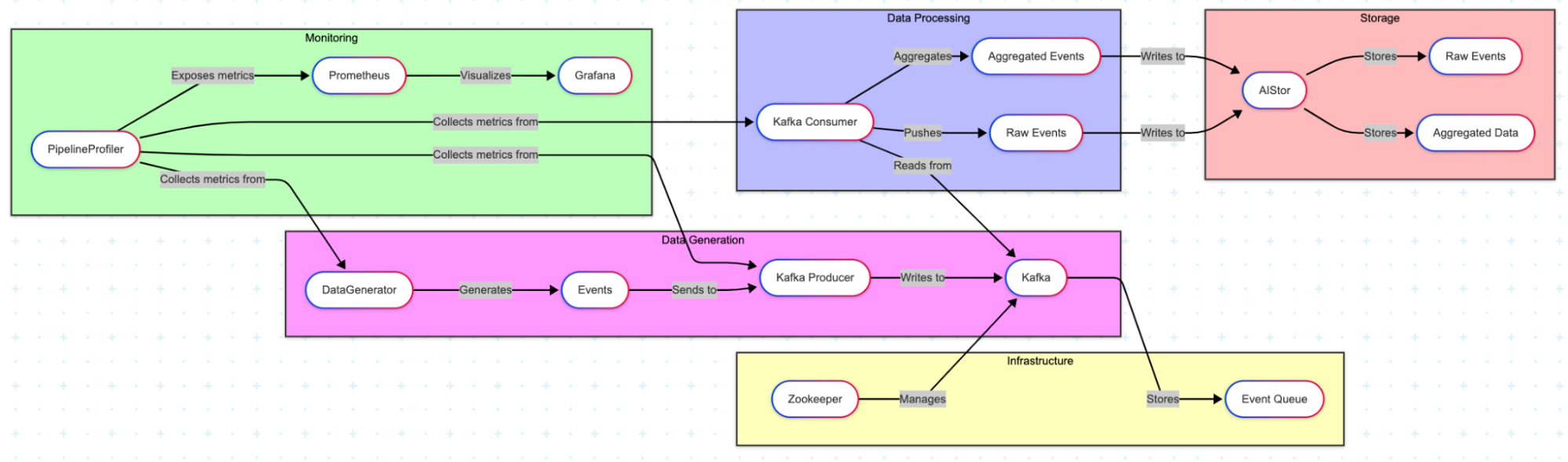
This pipeline demonstrates a common pattern in data processing: consuming events from a messaging system (Kafka), storing them in their raw form for future reference, and simultaneously performing aggregations to extract immediate insights.
Let's visualize the overall architecture:
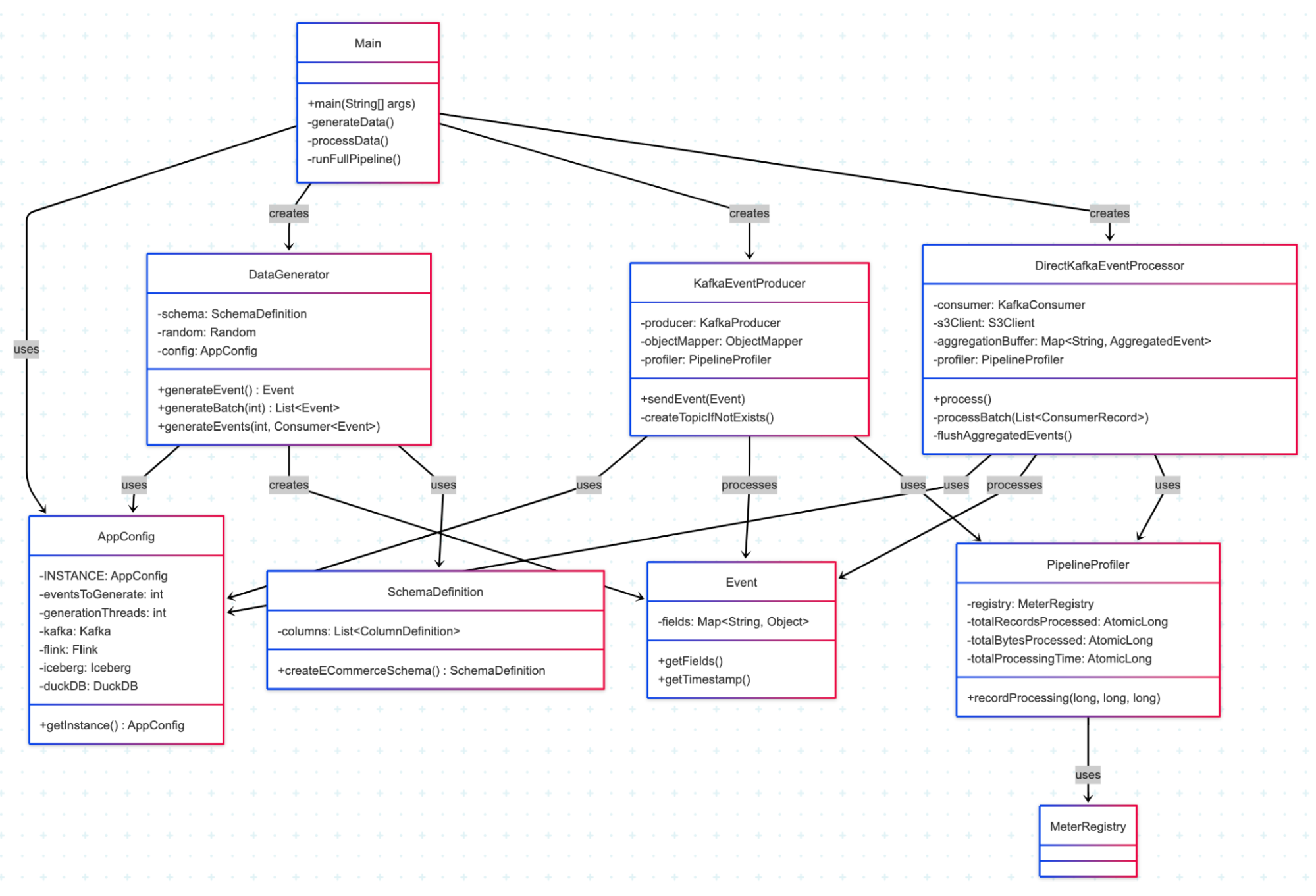
And the main components of this codebase:
Prerequisites
- x86 Linux-based OS/mac OS
- Running Docker engine ( colima )
- docker cli
- docker-compose cli
- JDK 17+
- maven
- git
- curl
Configuration Parameters
The configuration parameters are in the following files:
- src/main/java/com/minio/training/labs/pipeline/config/AppConfig.java:
- eventsToGenerate: Number of synthetic events to generate
- maxPollRecords: Maximum number of records to poll from Kafka at once, and write to MinIO Raw and Aggregate Dataset
- src/main/java/com/minio/training/labs/pipeline/processor/DirectKafkaEventProcessor.java:
- POLL_TIMEOUT_MS: Timeout for Kafka consumer polling in milliseconds
- FLUSH_THRESHOLD: Minimum Number of data grains produced by the Aggregator before writing to MinIO Aggregate Dataset
Details are in the README.md in the Code link in Containerized Deployment section.
Key Components Explained
Data Generation
This pipeline begins with the data generator, which creates synthetic events based on a predefined schema. We're using an e-commerce schema for demonstration purposes that includes fields like user_id, country, action, and value.
Example of an Event is below where 10s of millions of such events with the cardinality expressed in SchemaDefinition are generated.
    {
        "eventGuid": "67f4dfdd-c4db-4f8d-aa90-24da30f760ac",
        "timestamp": 1742199657865,
        "country": "country_20",
        "is_returning": true,
        "user_id": "user_id_694",
        "action": "action_3",
        "device_type": "device_type_1",
        "page": "page_9",
        "category": "category_13",
        "value": 39.259011259415466,
        "session_duration": 243
    }
This is how the Event is generated.
public Event generateEvent() {
    Map<String, Object> fields = new HashMap<>();

    // Generate values for each column in the schema
    for (SchemaDefinition.ColumnDefinition column : schema.getColumns()) {
        fields.put(column.getName(), column.generateValue(random));
    }

    return new Event(fields);
}
Kafka Integration
Events are sent to Kafka, which serves as the central messaging system. The KafkaEventProducer handles this.
public void sendEvent(Event event) {
    try {
        String json = objectMapper.writeValueAsString(event);
        ProducerRecord<String, String> record = new ProducerRecord<>(
            config.getKafka().getTopic(),
            event.getEventGuid(),
            json
        );

        producer.send(record, (metadata, exception) -> {
            if (exception != null) {
                log.error("Error sending event to Kafka", exception);
            } else {
                profiler.recordProducerEvent();
            }
        });
    } catch (Exception e) {
        log.error("Error serializing event", e);
    }
}
Event Processing and MinIO’s AIStor Integration
The heart of this pipeline is the DirectKafkaEventProcessor, which consumes events from Kafka and performs two primary operations:
- Raw Event Storage: Storing events in their original format for future reference or detailed analysis
- Real-time Aggregation: Creating aggregated views of the data to provide immediate insights
As the events are consumed, they are batched based on the batchSize and sinked into AiStor. With respect to Real-time Aggregation, the events are also processed for Aggregation, where they are checked for duplication using eventGuid within a sliding window, grouped to a single dimension or multi-dimension, and written to an aggregation buffer. When the FLUSH_THRESHOLD has been reached, the buffer is linked to AIStor and cleared for the next set of events.
The AIStor integration makes this storage process remarkably simple. Here's how we write raw events:
private void writeRawEventsToJson(List<Event> events, String timestamp) {
    if (events.isEmpty()) {
        return;
    }

    try {
        // Include UUID in filename to ensure uniqueness
        String filename = String.format("events_%s_%s.json",
            timestamp, UUID.randomUUID().toString().substring(0, 8));

        // Partition by year/month/day/hour for efficient querying
        String s3Key = String.format("raw-json/%s/%s/%s/%s/%s",
            "year=" + timestamp.substring(0, 4),
            "month=" + timestamp.substring(5, 7),
            "day=" + timestamp.substring(8, 10),
            "hour=" + timestamp.substring(11, 13),
            filename);

        String jsonContent = objectMapper.writeValueAsString(events);
        byte[] content = jsonContent.getBytes(StandardCharsets.UTF_8);

        // Simple AIStor/S3 PUT operation
        s3Client.putObject(PutObjectRequest.builder()
            .bucket(config.getS3().getS3Bucket())
            .key(s3Key)
            .contentType("application/json")
            .build(),
            RequestBody.fromBytes(content));

        log.debug("Wrote {} raw events to MinIO: {}", events.size(), s3Key);
    } catch (Exception e) {
        log.error("Failed to write raw events to MinIO", e);
    }
}
And for aggregated events:
private void writeAggregatedEventsToJson(List<AggregatedEvent> aggregatedEvents, String timestamp) {
    // Similar to raw events, but with processed aggregated data
    // ...
    s3Client.putObject(PutObjectRequest.builder()
        .bucket(config.getS3().getS3Bucket())
        .key(s3Key)
        .contentType("application/json")
        .build(),
            RequestBody.fromBytes(content));
    // ...
}
Simplifying Storage with MinIO’s AIStor
One of the standout features of this pipeline is the simplicity of data storage through AIStor. This property means this pipeline can handle increasing data volumes without requiring code changes.
The configuration for connecting to AIStor is straightforward:
AwsBasicCredentials credentials = AwsBasicCredentials.create(
        config.getS3().getS3AccessKey(),
        config.getS3().getS3SecretKey());

s3Client = S3Client.builder()
        .endpointOverride(URI.create(config.getS3().getS3Endpoint()))
        .credentialsProvider(StaticCredentialsProvider.create(credentials))
        .region(Region.US_EAST_1)
        .httpClient(UrlConnectionHttpClient.builder().build())
        .forcePathStyle(true)
        .build();
Real-time Aggregation
This pipeline demonstrates a simple but powerful real-time aggregation pattern. As events flow through the system, they're aggregated by various dimensions such as time window, country, action, and category.
private void processEventForAggregation(Event event) {
    // Skip if event was already processed within our deduplication window
    if (!processedEventGuids.add(event.getEventGuid())) {
        return;
    }

    LocalDateTime eventTime = LocalDateTime.ofInstant(
        Instant.ofEpochMilli(event.getTimestamp()),
        ZoneOffset.UTC
    );

    LocalDateTime windowStart = eventTime.truncatedTo(ChronoUnit.HOURS);

    String userId = event.getFields().getOrDefault(
        "user_id", "unknown").toString();

    for (Map.Entry<String, Object> field : event.getFields().entrySet()) {
        String fieldName = field.getKey();

        if (!fieldName.equals("country") && !fieldName.equals("device_type") &&
            !fieldName.equals("action") && !fieldName.equals("page") &&
            !fieldName.equals("category")) {
            continue;
        }

        Object fieldValue = field.getValue();
        if (fieldValue == null) {
            continue;
        }
        // single dimension
        String key = String.format("%s::%s:%s",
            windowStart.format(pathFormatter),
            fieldName, fieldValue
        );

        // multi dimension
        // String key = String.format("%s::%s:%s::%s:%s::%s:%s::%s:%s::%s:%s",
        //         windowStart.format(pathFormatter),
        //         "country", event.getFields().get("country"),
        //         "device_type", event.getFields().get("device_type"),
        //         "action", event.getFields().get("action"),
        //         "page", event.getFields().get("page"),
        //         "category", event.getFields().get("category")
        // );

        // Update aggregations...
    }
}
How This Approach Works
- Dual Storage Strategy: By storing both raw and aggregated data, you get the best of both worlds, detailed records for auditing or deep analysis, and fast access to insights through aggregations.
- Flexibility: The code can be extended to support different aggregation dimensions or additional processing steps without changing the core architecture.
- Scalability: As data volumes grow, the system can scale horizontally by adding more Kafka partitions or increasing the processing capacity.
Adapting to Different Workloads
While this example shows a specific implementation, the same architecture can be adapted for various workloads
- High-velocity trading data: By adjusting the aggregation windows and buffering strategy
- IoT sensor data: By modifying the schema and adding time-series specific aggregations
- User behavior analytics: By implementing more complex session-based aggregations
- Payment processing: By adding transaction validation rules and real-time aggregations for fraud detection, while maintaining both raw transaction records for compliance and summary data for financial reporting.
- Log data processing: By implementing parsers for various log formats and adding real-time aggregations for error rates, performance metrics, and security events, with time-based partitioning to support both immediate alerting and historical analysis.
Running the Pipeline in Production
This data pipeline is designed for flexible deployment across various environments, with containerization making it easy to move from development to production.
Java Runtime Environment
The core pipeline is implemented in Java, providing several advantages
- Cross-platform compatibility: Runs consistently across different operating systems
- Rich ecosystem: Leverages mature libraries for Kafka, AIStor integration
- Enterprise readiness: Supports monitoring, metrics collection, and logging integration
Containerized Deployment
The entire pipeline [Code] is containerized using Docker, simplifying deployment and ensuring consistency.
./run_pipeline.sh
This script
- Builds the Java application
- Starts the infrastructure containers (Kafka, AIStor/MinIO, Prometheus, Grafana)
- Deploys the data processing container
- Sets up monitoring services
- The Docker Compose configuration handles
- Container networking
- Volume management for persistent storage
- Environment variable injection for configuration
- Service dependencies and startup order
With consistent behavior and performance characteristics, the pipeline can be deployed in various environments, from a local development machine to a production Kubernetes cluster.
Conclusion
Building a data pipeline doesn't have to be complicated. With AIStor and Kafka, you can quickly implement a solution that handles both raw data storage and real-time aggregation. This example demonstrates just one approach to processing Kafka events, but the same principles can be applied to various data processing needs.
The combination of Kafka for messaging and AIStor for storage provides a powerful foundation for building scalable, resilient data pipelines that grow with your business needs. By separating the concerns of data ingestion, processing, and storage, you create a system that's easier to maintain and evolve. Whether you're just starting with data pipelines or looking to optimize an existing solution, consider this architecture as a template that can be customized to your specific requirements. If you have any questions, please feel free to contact us at hello@min.io or Slack.
.svg)